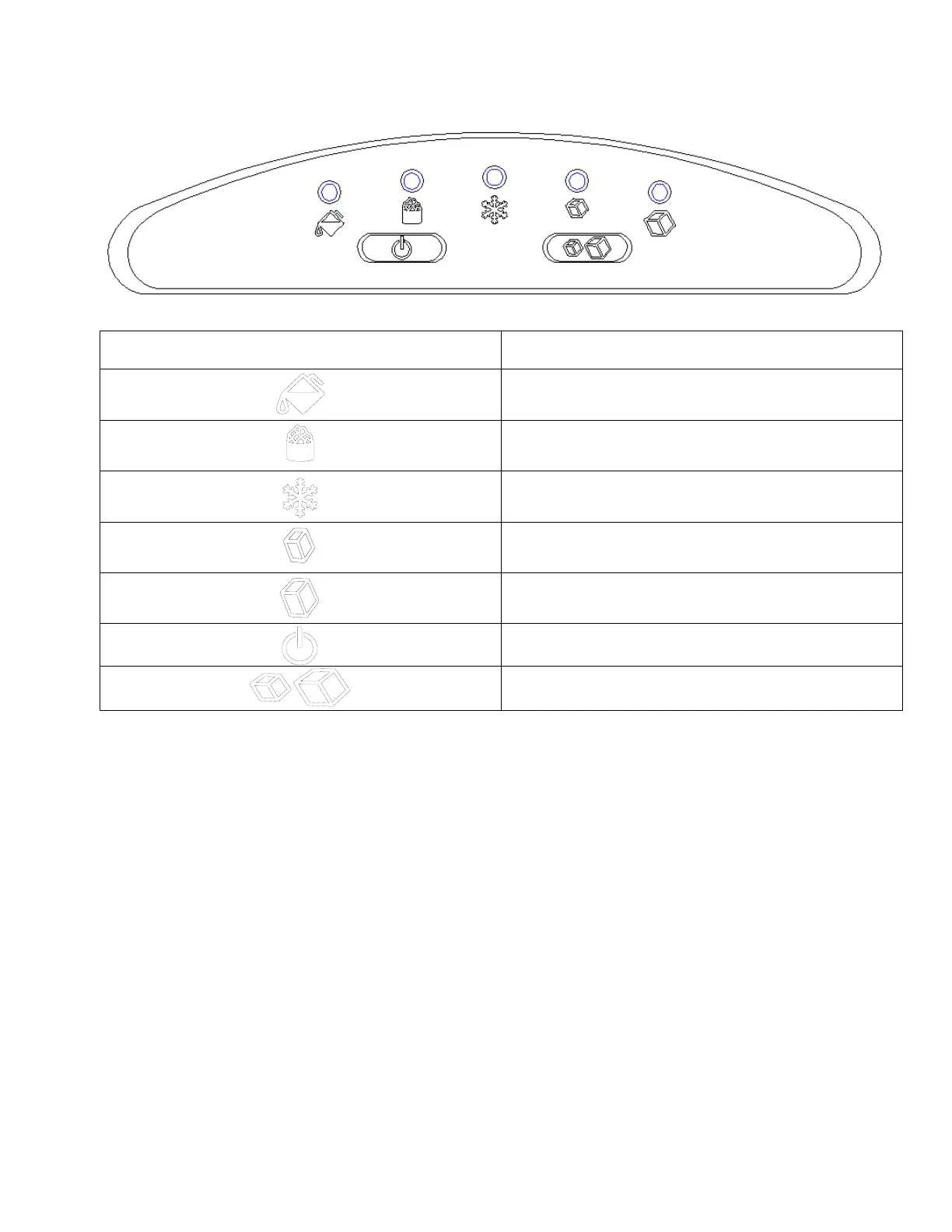
CONTROL PANEL
The indicator lights in red when the water
reservoir is lack of water.
The indicator lights in red when the ice
basket is full.
The indicator lights in green when making
ice.
The indicator lights in green when select
small ice.
The indicator lights in green when select
large ice.
Start or stop the appliance
BEFORE FIRST USE
1. Unpack the appliance, check and make sure that all the accessories including the
ice basket and ice scoop etc. are complete. Please contact with the client service
department if some accessories are missed.
2. Please ensure that the ice maker is level and on a stable table or platform to avoid
malfunction.
3. The incline angle of the ice maker cabinet should not exceed 45°during
transportation or use. Do not turn the ice maker upside down. Doing so could cause
the compressor or refrigerating system to operate incorrectly. Please allow time for
the fluids in the compressor to settle after the ice maker is moved or transported.
Before using the ice maker for the first time, please wait for 2 hours after the unit has


 To Next Page