EasyManua.ls Logo

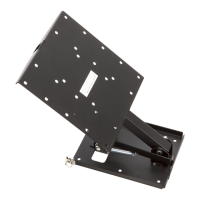
MORryde TV1-080H - User Manual

MORryde TV1-080H
2 pages
Print Icon
To Next Page IconTo Next Page
Loading...
MORryde International, Inc. | 1966 Sterling Ave | PO Box 579 | Elkhart, IN 46516
Customer Service: 574.293.1581 | www.MORryde.com
Hardware for mounting television: Refer to your television’s owners manual or select the appropriate bolt from the hardware provided.
M4x12mm Bolt (4)
M4 Lock Washer (6)
M4x30mm Bolt (4)
M5x12mm Bolt (4)
M5 Lock Washer (6)
M5x30mm Bolt (4)
M4 M5
Hardware for securing bracket: Select the appropriate length based on the thickness of your mounting surface.
< best for wood applications >
#10 Flat Washer (4)
Question and Answer IconNeed help?

Do you have a question about the MORryde TV1-080H and is the answer not in the manual?

Summary

Supplied Parts and Hardware

Hardware for Mounting Television

Details hardware for attaching the television to the mount, advising use of the TV's manual or provided bolts.

Hardware for Securing Bracket

Guides selection of appropriate length hardware for the mounting surface, noting wood applications.

Step 1: Secure Mount to Reinforced Ceiling or Mounting Surface

Pre-drill Holes and Secure Mount

Pre-drill holes with a 1/8" bit and use lag bolts or appropriate hardware to secure the mount to the surface.

Step 2: Secure Television or Monitor to the Mount

Attach Television to Mounting Plate

Align the TV's hole pattern with the mounting plate and secure using appropriate hardware and washers.

Adjust TV Position (Flip Down;Up)

Instructions on releasing a lever to guide the TV to a vertical position or lift it to lock.

Summary

Supplied Parts and Hardware

Hardware for Mounting Television

Details hardware for attaching the television to the mount, advising use of the TV's manual or provided bolts.

Hardware for Securing Bracket

Guides selection of appropriate length hardware for the mounting surface, noting wood applications.

Step 1: Secure Mount to Reinforced Ceiling or Mounting Surface

Pre-drill Holes and Secure Mount

Pre-drill holes with a 1/8" bit and use lag bolts or appropriate hardware to secure the mount to the surface.

Step 2: Secure Television or Monitor to the Mount

Attach Television to Mounting Plate

Align the TV's hole pattern with the mounting plate and secure using appropriate hardware and washers.

Adjust TV Position (Flip Down;Up)

Instructions on releasing a lever to guide the TV to a vertical position or lift it to lock.

MORryde TV1-080H Specifications

General IconGeneral
ModelTV1-080H
CategoryRacks & Stands
BrandMORryde
MaterialSteel
MotionFull Motion
ColorBlack
TypeTV Wall Mount

Related product manuals