7
7.3
7.1
7.2
7.4
8
MOTION CM-35 ELECTRONIC CURTAIN MOTOR
MOTION CM-35 ELECTRONIC CURTAIN MOTOR
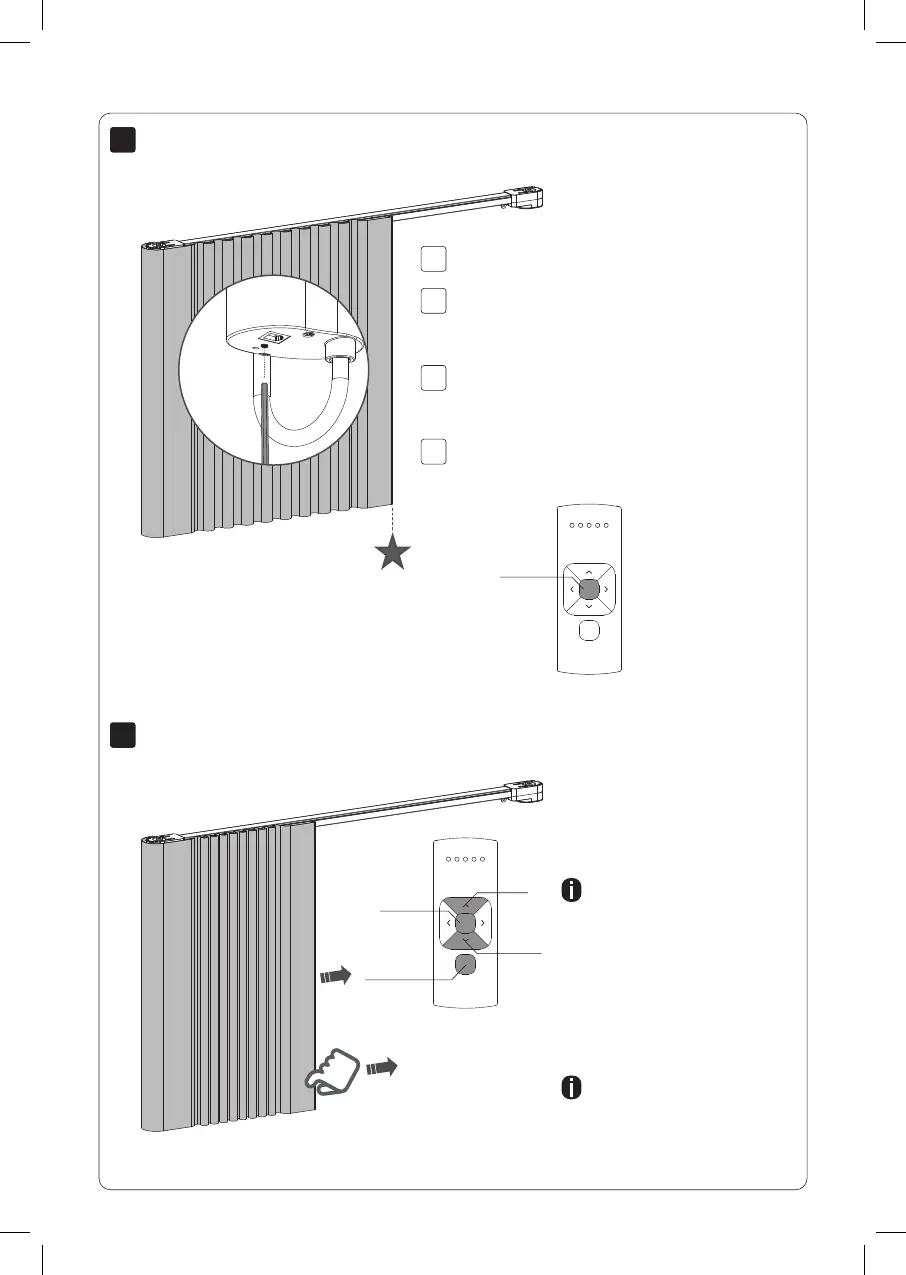
Move the blind to a desired favourite position.
Set favourite position (optional)
Activate program mode by shortly pressing the
program button. The curtain will start stepping and
the favorite position can be set.
Shortly press the program button to deactivate
program mode. The blind stops stepping and can
be operated.
Hold the centre button to save this favourite
position. The blind shortly stops stepping indicating
the favourite position has been saved.
Center
Operate the blind
Remote control: Choose the
channel to which the blind
has been paired using the
channel button.
Press the up or down button
to operate the blind. Press
the center button to stop the
blind. Use the left and right
button to move the blind in
small steps.
Pull control: Pull once to
move the blind to the end
positions.
Up
Down
Center
Channel
Selection
18
CM35AC Curtain motor.indd 18 31-07-2020 13:53



 To Next Page