Need help?
Do you have a question about the Motorola AM24 and is the answer not in the manual?
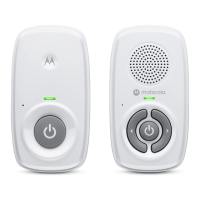
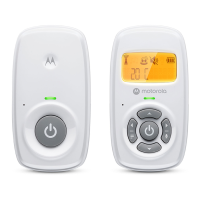
Detailed descriptions of the LCD display, buttons, indicators, speaker, battery cover, and power jack.
Detailed descriptions of the microphone, power button, speaker, power indicator, power jack, and temperature sensor.
Warning about cord strangulation hazard for children; keep cords out of reach and use only provided AC adapters.
Instructions on determining baby unit location, securing placement, and general warnings for safe operation.
Use only provided adapters, battery replacement risks, and proper disposal of batteries.
Instructions for connecting the DC plug of the power adapter to the baby unit and mains power.
Steps to open the battery door, insert the battery pack, and secure the door on the parent unit.
Instructions for connecting the power adapter to the parent unit and mains power for operation.
How to power on/off the baby and parent units and adjust the speaker volume on the parent unit.
How to select the display language and turn sound alerts on or off for the parent unit.
Instructions to reset settings to default and use the two-way talk feature to communicate with the baby.
Instructions for proper recycling of electronic equipment and battery disposal according to local regulations.
Guidelines for cleaning the baby monitor using a damp or anti-static cloth and avoiding chemicals.
Solutions for when the parent unit's Power/Link indicator does not come on or flashes.
Troubleshooting steps for parent unit beeps, lost connection, and low battery indicators.
How to address issues with not hearing sound, or the system producing high-pitched noise.
Tips for improving battery life by adjusting volume levels on the parent unit.
Details on what the Motorola product warranty covers for consumers, including legal rights.
Explains MZGW's repair/replacement policy and limitations on implied warranties and consequential damages.
Specific coverage periods for consumer products, accessories, and replaced items, along with exclusions.
Steps and required documentation to obtain warranty service or other product information.
States compliance with RE Directive 2014/53/EU and where to find the full declaration.
FCC caution regarding modifications and compliance with part 15 rules for interference.
ISEDC warning regarding interference and compliance with RSS standards.
Information on FCC/ISEDC radiation exposure limits for baby and parent units.
Technical details for the baby unit including frequency, channels, operating temperature, and power adapter rating.
Technical details for the parent unit including frequency, channels, operating temperature, and power adapter rating.
 General
| Type | DECT babyphone |
|---|---|
| Night mode | - |
| Maximum range | 300 m |
| Built-in camera | No |
| Channels quantity | - channels |
| Temperature sensor | Yes |
| Product color | White |
| Backlight color | Amber |
| Receiver power source | Battery |

 To Next Page