Need help?
Do you have a question about the Motorola AM21 and is the answer not in the manual?
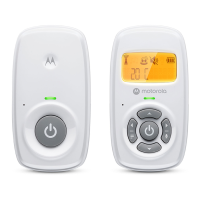
Details how to connect the power adapter to the baby unit and the power indicator.
Explains connecting the power adapter to the parent unit for operation.
Guides on how to install alkaline batteries into the parent unit for optional power.
Instructions for powering the baby unit on and off using the power button.
Instructions for powering the parent unit on and off using the power button.
Addresses problems with the parent unit's power/link indicator not coming on or flashing.
 General
| Type | DECT babyphone |
|---|---|
| Night mode | - |
| Maximum range | 300 m |
| Built-in camera | No |
| Channels quantity | - channels |
| Product color | White |
| Volume control | Yes |
| Receiver power source | Battery |

 To Next Page