EasyManua.ls Logo

Motorola C123 - Page 2

Motorola C123
61 pages
Print Icon
To Next Page IconTo Next Page
To Previous Page IconTo Previous Page
Loading...
1
HELLOMOTO
HELLOMOTO
Welcome to the world of Motorola digital wireless
communications! We are pleased that you have chosen the
Motorola C123 wireless phone.
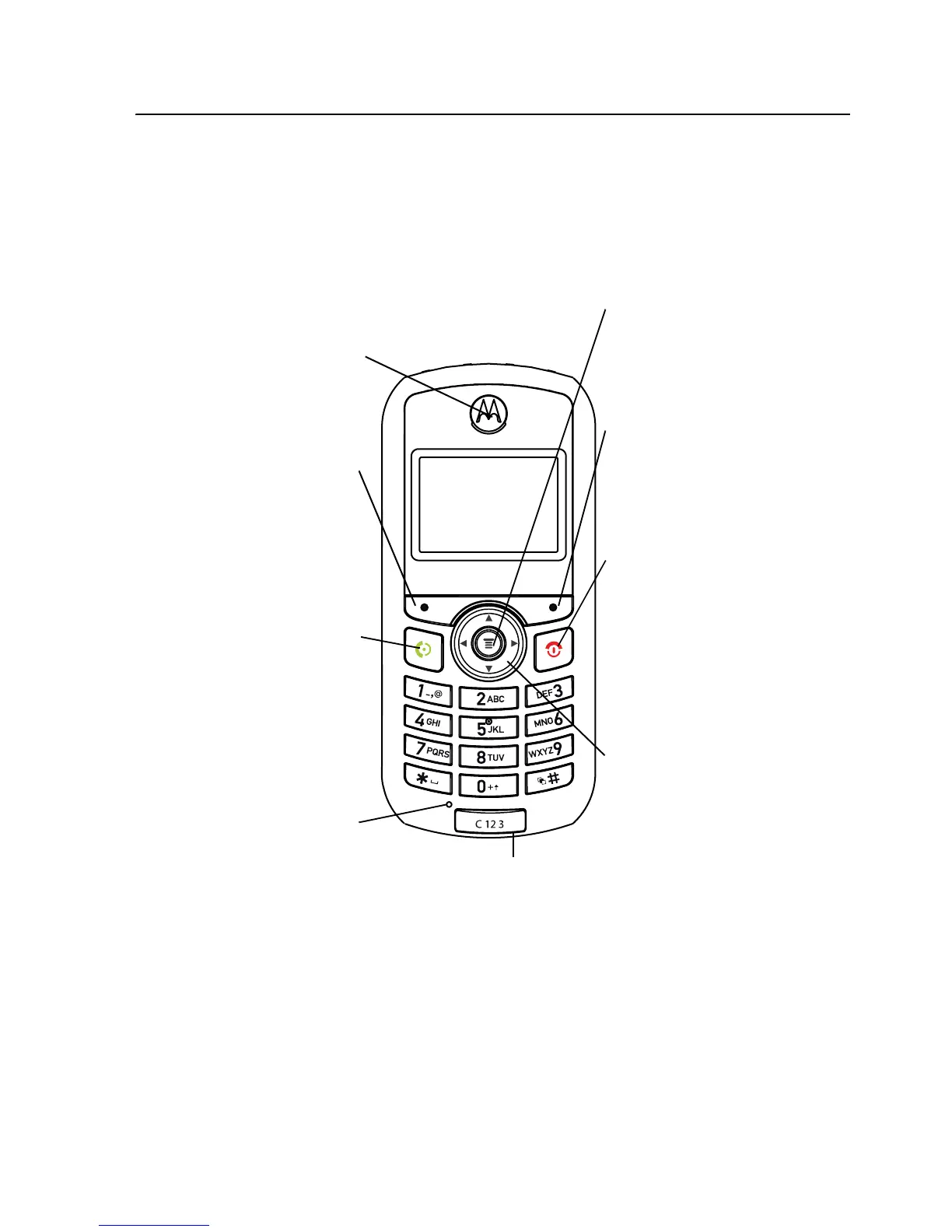
Earpiece
Listen to your voice
calls & messages.
Left Soft Key
Performs functions
identified by left
display prompt.
Send/Answer Key
Make and answer
calls. Press when
idle to see the list of
recently dialed calls.
Menu Key
Open a menu when
you see
å
in the
display.
Right Soft Key
Performs functions
identified by right
display prompt.
Power/End Key
Press and hold to turn
the phone on/off.
Press and release to
end phone calls, exit
menu system.
Power Connector Port
Port to insert the charger.
Navigation Key
Press
S
up and down
to scroll through lists,
left and right to adjust
volume.
Microphone

Related product manuals