EasyManua.ls Logo

Motorola CT100 - User Manual

Motorola CT100
15 pages
Print Icon
To Next Page IconTo Next Page
Loading...
Important
Do not place your CT100 in the bathroom or other humid areas.
Location
You need to place your CT100 base within reach of the telephone wall socket
so that the cable will reach. The socket-outlet should be installed near the
equipment and should be easily accessible.
If you are wall mounting your phone please refer to the wall mount template
over the page.
Connecting the handset and base
1. Plug one end of the handset curly cord into the socket marked
on the
underside of the base and the other end into the socket at the bottom of
the handset.
2. Plug the telephone line cord into the socket marked
.
Overview of your handset
A Earpiece
To listen to your caller.
B Microphone
To speak to your caller.
C Curly cord socket
Where you plug in your curly cord.
Box Contents Getting started
Getting started
Help
General information
Overview of the base
A Hook switch
Hangs up a call when pressed or when you replace the handset.
B Mute
Speak to someone nearby without your caller hearing the conversation.
C R
Recall used with switchboards / PABX.
When on an external call, press to access a Call Waiting Line when a call
waiting prompt signal is heard. Press again to toggle between the two
calls.
D Redial
Press to redial the last number called.
E Pause
Press to enter a pause (P) when dialling numbers.
F Ringer switch
Change the ringer volume.
Using the phone
Getting started
A
B
C
F
A
B
C
D
E
3.1 Calls
3.1.1 Make a call
Lift the handset, when you hear the dial tone, dial the number.
3.1.2 End a call
Place the handset back on the base.
3.1.3 Receive a call
Lift the handset to answer the call.
3.2 Mute
You can mute your handset so that you can talk to someone nearby without
your caller hearing.
1. During a call, press and hold
.
2. Release
again to resume your call.
3.3 Redial
The last entry dialled is stored in the phone; the number can be up to 31 digits
long.
To redial the last entry called, pick up the handset and press
.
3.4 Ringer volume control
Switch the ringer volume between high (left) normal (middle) and low (right).
3.5 Recall
Recall is useful to access certain network services and PABX /switchboard
services.
For more information about network services contact your network operator.
The recall mode preset in the CT100 is suitable for your country network.
No dial tone
Use only the telephone line cord supplied.
Check that the telephone line cord is connected properly.
Important
This product is intended for connection to analogue public switched
telephone networks and private switchboards in Singapore.
Important safety instructions
Follow these safety precautions when using your phone to reduce the risk of
fire, electric shock, and injury to persons or property:
Do not set the phone on a heating register or over a radiator. Ensure that
proper ventilation is provided at the installation site.
Do not use while wet or while standing in water.
Do not use this product near water (for example, near a bath tub, kitchen
sink, or swimming pool).
Do not disassemble this product. If service or repair work is required,
contact the customer service helpline found in this User Guide.
Avoid using during an electrical storm. Use a surge protector to protect
the equipment.
Installation Guidelines
Read and understand all instructions and save them for future reference.
Follow all warnings and instructions marked on the product.
Do not install this product near a bath tub, sink, or shower.
Do not place this product on an unstable cart, stand, or table. This
product may fall, causing serious damage to the product.
Adjust only those controls that are covered by the operating instructions.
Improper adjustment of other controls may result in damage and will
often require extensive work to restore the product to normal operation.
Corded base
Corded handset
Quick start
guide
Telephone line
cord
Curly cord
Quick Start Guide
This Quick Start Guide provides all the information you
need to get you started.
Alternatively, contact Customer Services on:
6278 8274
Email: service@alcos.com.sg
Motorola CT100
Corded Telephone

Question and Answer IconNeed help?

Do you have a question about the Motorola CT100 and is the answer not in the manual?

Overview

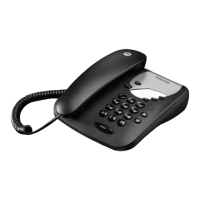
The Motorola CT100 is a corded telephone designed for connection to analogue public switched telephone networks and private switchboards in Singapore. This Quick Start Guide provides essential information for setting up and using the device, along with important safety and general information.

Function Description

The Motorola CT100 is a basic corded telephone that allows users to make and receive calls. It features a handset, a base unit with a keypad, and a ringer. The phone is designed for simple, straightforward communication.

Important Technical Specifications

  • Model: Motorola CT100
  • Type: Corded Telephone
  • Compliance:
    • Low Voltage Directive (2014/35/EU)
    • EMC Directive (2014/30/EU)
    • Safety Standard: EN60950-1:2006+A11:2009+A1:2010+A12:2011+A2:2013
    • EMC Standard: EN55022:2010/AC:2011 and EN55024:2010
  • Maximum Dialled Digits: Up to 31 digits for redial.
  • Connection: Intended for connection as a single terminal to the telephone network.
  • Country of Use: Singapore (for public telephone network and PABX connections).

Usage Features

Getting Started:

  1. Location: Place the CT100 base within reach of the telephone wall socket. Ensure the socket-outlet is near the equipment and easily accessible. Avoid placing in bathrooms or humid areas.
  2. Handset Connection: Plug one end of the curly cord into the socket marked on the underside of the base and the other end into the socket at the bottom of the handset.
  3. Telephone Line Connection: Plug the telephone line cord into the socket marked on the base.

Overview of the Handset:

  • A - Earpiece: Used to listen to the caller.
  • B - Microphone: Used to speak to the caller.
  • C - Curly cord socket: Where the curly cord plugs in.

Overview of the Base:

  • A - Hook switch: Hangs up a call when pressed or when the handset is replaced.
  • B - Mute: Allows speaking to someone nearby without the caller hearing the conversation.
  • C - R (Recall): Used with switchboards/PABX. When on an external call, press to access a Call Waiting Line if a call waiting prompt is heard. Press again to toggle between calls.
  • D - Redial: Press to redial the last number called.
  • E - Pause: Press to enter a pause (P) when dialling numbers.
  • F - Ringer switch: Changes the ringer volume.

Using the Phone:

  • Making a Call: Lift the handset, wait for the dial tone, then dial the number.
  • Ending a Call: Place the handset back on the base.
  • Receiving a Call: Lift the handset to answer.
  • Mute Function:
    1. During a call, press and hold the Mute button.
    2. Release the Mute button to resume the call.
  • Redial Function: The last dialled number (up to 31 digits) is stored. To redial, pick up the handset and press the Redial button.
  • Ringer Volume Control: Switch the ringer volume between high (left), normal (middle), and low (right) using the ringer switch on the base.
  • Recall Function: Useful for accessing certain network services and PABX/switchboard services. The CT100's recall mode is preset for the country's network. Contact your network operator for more information on network services or your PABX supplier for switchboard-related information.

Wall Mounting:

  1. Pre-drilling Check: Before wall-mounting, ensure no hidden wiring or pipes are in the drilling area. Verify the telephone line cable will reach the socket.
  2. Drilling: Drill two holes in the wall, 10cm apart vertically, using an 8mm drill bit.

Maintenance Features

Cleaning:

  • Clean the handset and base with a damp (not wet) cloth, or an anti-static wipe.
  • Do not use household polish as this may damage the product or cause static shock.

Troubleshooting (Help):

  • No dial tone:
    • Use only the telephone line cord supplied.
    • Check that the telephone line cord is connected properly.

General Information and Safety:

  • Environmental:
    • Do not expose to direct sunlight.
    • Do not place on carpets or other surfaces that generate fibres, or in locations preventing free air flow.
    • Do not submerge any part of the product in water or use in damp/humid conditions (e.g., bathrooms).
    • Do not expose to fire, explosives, or other hazardous conditions.
    • During an electrical storm, unplug the telephone line cord and use a surge protector to protect the equipment.
  • Installation Guidelines:
    • Read and understand all instructions.
    • Follow all warnings and instructions marked on the product.
    • Do not install near a bath tub, sink, or shower.
    • Do not place on an unstable cart, stand, or table to prevent damage from falling.
    • Adjust only controls covered by operating instructions; improper adjustment can cause damage.
  • Product Disposal: Dispose of the product responsibly. Contact local authority or retailer for information on recycling processes.
  • Warranty:
    • Consumer Products: One (1) year from the date of original purchase.
    • Consumer Accessories (line cord): Ninety (90) days from the date of original purchase.
    • Repaired/Replaced Products/Accessories: Balance of original warranty or ninety (90) days from return date, whichever is longer.
    • Exclusions: Normal wear and tear, abuse/misuse (improper operation, storage, physical damage, contact with liquids, extreme heat, commercial use, abnormal usage), use of non-Motorola branded products/accessories, unauthorized service/modification, and altered products (removed/altered serial numbers, broken seals, mismatched parts).
    • Warranty Service: Contact Customer Services at 6278 8274 or service@alcos.com.sg. Provide the product/accessory, original proof of purchase, completed warranty card (if applicable), written problem description, and contact information.

Motorola CT100 Specifications

General IconGeneral
BrandMotorola
ModelCT100
CategoryTelephone
LanguageEnglish

Related product manuals