Need help?
Do you have a question about the Motorola CT310 and is the answer not in the manual?
Provides guidance on the optimal placement of the telephone base for best performance.
Step-by-step instructions for physically connecting the handset and line cord to the base unit.
Identifies and explains the key components of the telephone handset, including earpiece and microphone.
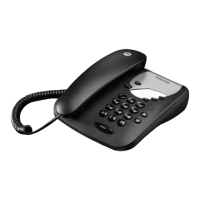
Details the buttons, hook switch, and layout of the main phone base unit.
Explains the meaning of various icons and indicators shown on the phone's LCD screen.
Instructions on how to make, pre-dial, end, and answer incoming calls.
Guidance on placing a caller on hold and resuming the conversation.
Procedures for redialing the last number and accessing saved redial entries.
Instructions for changing dialling mode and using recall for network services.
How to enable or disable the anti-dialling function for PABX systems.
Step-by-step instructions for saving telephone numbers into the phone's memory.
How to retrieve and dial stored numbers, including hands-free options.
How to choose from available ringtones and play samples for selection.
Guide to setting the ringer volume level or choosing a crescendo effect.
Procedure for manually setting the phone's current date and time.
How to input the local area code for call display and dialing purposes.
Process for saving an access code required for switchboard connections.
How to save an IP code to enable cheaper long-distance call charges.
Steps to change the contrast level of the LCD screen for better readability.
Instructions for setting a timed alarm on the telephone.
How to access and view the list of incoming calls and their details.
How to view and dial numbers from the phone's redial list.
Steps to take if the phone does not produce a dial tone when expected.
Important safety precautions and recommendations for proper installation.
Instructions for cleaning the phone and handling it in various environmental conditions.
Details on what the warranty covers, who is covered, and its limitations.
Lists specific conditions and circumstances not covered by the product warranty.
How to contact support and initiate service or warranty claims.
Information on connecting to switchboards and related recall functions.
Lists directives and standards the product complies with for market entry.
 General
| Type | Corded Telephone |
|---|---|
| Speakerphone | Yes |
| Caller ID | Yes |
| Call Waiting | Yes |
| Phonebook | Yes |
| Redial | Yes |
| Display | LCD |
| Power Source | AC adapter |
| Phonebook Capacity | 30 Entries |


 To Next Page