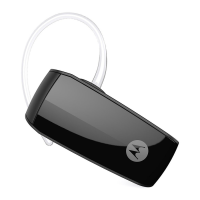
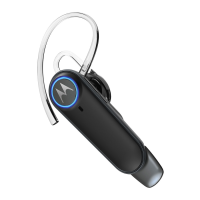
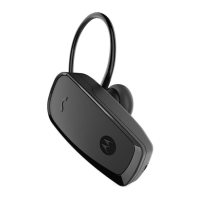
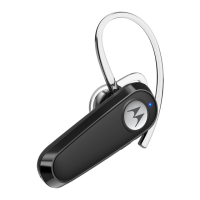
Quick Start Guide
MODELS:
HK255-S
Product ID: HK255-S
FCC ID: 2ARRB-HK255
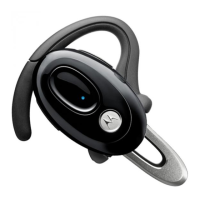
1. At a glance
Volume
Press in to
adjust
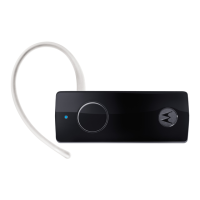
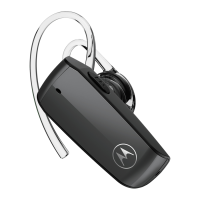
Wear
Ear
Cushion
Earpiece
Earhook
OFF
ON
Power
Switch
Charge
(Micro USB)
Call
Button
Status
Light
Note: Fully charge before use. Any attempt to remove or
replace your battery will damage your headset.
2. Connect & go
1
2
4
3
On
Status Light - Blue flash twice
Voice prompt: “Ready to pair.”
Status Light - Blue flash rapidly
Turn headset on (charge before use).Turn Bluetooth on.
On
Enter passcode.
Enter “0000”
if prompted.
Complete.
Voice prompt:
“pairing complete”
3. Buttons operation
To…
answer a call Press
.
reject a call
Press and hold
until you hear a
tone.
make a voice dial call Press
and you hear a tone.
redial last call
Press and hold
until you hear a
tone.
mute or unmute Press and hold the Volume button .
end a call Press
.
Note: Some features are phone/network dependent.
Note: Using a mobile device or accessory while driving may
cause distraction and may be illegal. Always obey the laws
and drive safely.
4. Connect to second device
Connect your headset with two devices at the same time:
•
the previously paired device and restart the headset
power. Now pair your second device following “Connect
& go”
• Once paired to the second device, your headset is ready
to connect with either or both devices. Normal headset
features work with both devices.
5. Additional status light
status light headset
rapid red flashes battery low
steady red charging - low battery level
steady purple charging - mid battery level
steady blue charging - battery full
6. General information
Safety, Regulatory & Legal
If your product is not working properly, read this Quick Start Guide
or the User’s Guide of one of the models listed on page 1.
Contact Customer Service:
US and Canada 1-888-331-3383
Email: support@motorolahome.com
On the Web: www.motorolahome.com/support
Consumer Products and Accessories Limited Warranty
(“Warranty”)
Thank you for purchasing this Motorola branded product
manufactured under license by Binatone Electronics International
LTD (“BINATONE”).
What Does this Warranty Cover?
Subject to the exclusions contained below, BINATONE warrants
that this Motorola branded product (“Product”) or certified
accessory (“Accessory”) sold for use with this product that
it manufactured to be free from defects in materials and
workmanship under normal consumer usage for the period
outlined below. This Warranty is your exclusive warranty and is not
transferable.
Who is covered?
This Warranty extends only to the first consumer purchaser, and is
not transferable.
What will BINATONE do?
BINATONE or its authorized distributor at its option and within a
commercially reasonable time, will at no charge repair or replace
any Products or Accessories th
at does not c
onform to this
Warranty. We may use functionally equivalent reconditioned /
refurbished / pre-owned or new Products, Accessories or parts.
What Other Limitations Are There?
ANY IMPLIED WARRANTIES, INCLUDING WITHOUT LIMITATION
THE IMPLIED WARRANTIES OF MERCHANTABILITY AND
FITNESS FOR A PARTICULAR PURPOSE, SHALL BE LIMITED
TO THE DURATION OF THIS LIMITED WARRANTY, OTHERWISE
THE REPAIR OR REPLACEMENT PROVIDED UNDER THIS
EXPRESS LIMITED WARRANTY IS THE EXCLUSIVE REMEDY
OF THE CONSUMER, AND IS PROVIDED IN LIEU OF ALL
OTHER WARRANTIES, EXPRESS OR IMPLIED. IN NO EVENT
Nota: Algunas funciones dependen del teléfono/la red.
Nota: El uso de un dispositivo o accesorio móvil mientras
conduce puede causar alguna distracción y podría ser ilegal.
Acate siempre las leyes y maneje con cuidado.
4. Conecte a un segundo dispositivo
Conecte sus auriculares a dos dispositivos al mismo tiempo
• Antes de asociar un segundo dispositivo, desconecte el
Bluetooth del dispositivo previamente asociado y reinicie
el encendido de los auriculares. Ahora asocie su segundo
dispositivo siguiendo “Conectar y listo”
• Una vez asociado al segundo dispositivo, sus auriculares
están listos para conectarse con cualquiera de los dos
dispositivos. Las funciones normales de los auriculares
funcionan con ambos dispositivos.
5. Luz adicional de estado
luz de estado auricular
parpadea en rojo
rápidamente
batería baja
luz roja fija
cargando - nivel de carga de la batería
bajo
luz morada fija
cargando - nivel de carga de la batería
medio
luz azul fija
cargando
-
máximo nivel de carga de la
batería
Nota: Alguns recursos dependem do seu aparelho/conexão
de rede.
Nota: O uso de um aparelho celular ou acessório para celular
ao dirigir pode causar distração e pode ser ilegal. Siga
sempre as leis e dirija com segurança.
4. Conecte ao segundo dispositivo
Conecte seu fone de ouvido a dois dispositivos ao mesmo tempo:
• Antes de fazer o pareamento com o segundo dispositivo,
desligue o Bluetooth no dispositivo pareado previamente e
reinicie o comando do fone de ouvido. Agora, faça o pareamento
do segundo di
spositivo seguindo o “Conecte e pronto”
• Uma vez pareado com o segundo dispositivo, seu fone
de ouvido está pronto para se conectar com um ou com
os dois dispositivos. Características normais do fone de
ouvido funcionam com os dois dispositivos.
5. Luz de Status Adicional
luz de status headset
vermelho,
piscando rápido
bateria baixa
vermelho,
constante
carregando - nível de bateria baixo
roxo, constante carregando - nível de bateria médio
azul, constante carregando - bateria completa
Guide de démarrage rapide
MODÈLES :
HK255-S
Réf. produit : HK255-S
ID FCC : 2ARRB-HK255
1. En un coup d’oeil
Volume
Appuyez
pour régler
Portez
Coussin
auriculaire
Écouteur
Crochet
d’oreille
Éteint
Allumé
Interrupteur
d’alimentation
Charge
(Micro USB)
Touche
d’appel
Voyant
d’état
Remarque : chargez complètement avant utilisation. Toute
tentative de retirer ou de remplacer la pile endommagera
votre oreillette.
Guía rápida de inicio
MODELOS:
HK255-S
Identificación del Producto: HK255-S
Identificación de la Comisión federal de
comunicaciones (FCC): 2ARRB-HK255
1. De un vistazo
Volumen
Presione
para ajustar
Uso
Almoha-
dilla
Auricular
Gancho de
sujeción al
oído
Apagado
Encendido
Interruptor de
encendido
Carga
(Micro USB)
Botón de
llamada
Luz de
estado
Nota: Cargue la batería completamente antes de utilizar
el producto por primera vez. Cualquier intento de retirar o
remplazar su batería puede dañar su auricular.
Guia de início rápido
MODELOS:
HK255-S
ID do produto: HK255-S
ID de FCC: 2ARRB-HK255
1. Um resumo
Chave Liga/
Desliga
Uso
Volume
Almofada
auricular
Fone de
ouvido
Pressione
para
ajustar
Gancho
de encaixe
auricular
Desligado
Ligado
Botão de
Chamada
Luz de
status
Carga
(Micro USB)
Nota: Cargue la batería completamente antes de utilizar
el producto por primera vez. Cualquier intento de retirar o
remplazar su batería puede dañar su auricular.
US ES US PTUS FR
US EN
6. Généralités
Sécurité, réglementation et mentions légales
Si votre produit ne fonctionne pas correctement, lisez ce Guide de
démarrage rapide ou le Guide de l’utilisateur de l’un des modèles
indiqués en première page.
Adressez-vous à notre service clientèle : US and Canada 1-888-
331-3383
Courriel : support@motorolahome.com
Site Web : www.motorolahome.com/support
Garantie limitée pour les produits et accessoires grand public
Merci d’avoir acheté ce produit de marque Motorola fabriqué sous
licence par Binatone Electronics International LTD (« BINATONE »).
Que couvre la présente Garantie ?
Sous réserve des exclusions indiquées ci-dessous, la société
BINATONE garantit que ce produit (« Produit ») de marque
Motorola ou cet accessoire certifié et vendu pour être utilisé
avec le Produit (« Accessoire ») fabriqué par BINATONE est
exempt de défauts de matériaux et de fabrication, sous réserve
d’une utilisation normale pendant la période stipulée ci-dessous.
La présente Garantie est votre unique garantie et n’est pas
transférable.
Qui est couvert par la présente Garantie ?
La présente Garantie couvre uniquement le premier acheteur du
Produit et n’est pas transférable.
Que fera BINATONE ?
BINATONE ou son distributeur agréé réparera ou remplacera
gratuitement, à sa discrétion et pendant une période
commercialement raisonnable, tout Produit ou Accessoire qui ne
serait pas conforme à la présente Garantie. Nous pourrons utiliser des
Produits, Accessoires ou pièces remis à neuf, d’occasion ou neufs,
dont les fonctionnalités sont équivalentes.
Quelle sont les autres limites de la Garantie ?
TOUTE GARANTIE IMPLICITE, Y COMPRIS, SANS S’Y LIMITER,
LES GARANTIES IMPLICITES DE QUALITÉ MARCHANDE ET
D’ADAPTATION À UN USAGE PARTICULIER, SERA LIMITÉE À LA
DURÉE DE LA PRÉSENTE GARANTIE, SINON LA RÉPARATION
OU LE REMPLACEMENT FOURNIS EN VERTU DE LA PRÉSENTE
GARANTIE LIMITÉE CONSTITUERONT LE SEUL RECOURS DU
6. lnformación general
Seguridad, Normas y aspectos legales
Si su producto no está funcionando correctamente, lea esta Guía
rápida de inicio o la Guía de usuario de uno de los modelos que
aparecen en la página 1.
Contáctese con el Servicio de atención al cliente: 1-888-331-3383
para Estados Unidos y Canadá
Correo electrónico: support@motorolahome.com
En la Web: www.motorolahome.com/support
Garantía limitada para productos y accesorios de consume
(“Garantía”)
Gracias por comprar este producto de marca Motorola fabricado
bajo licencia otorgada por Binatone Electronics International LTD
(“BINATONE”).
¿Qué cobertura tiene esta Garantía?
Sujeto a las exclusiones que aquí se detallan, BINATONE garantiza
que este producto de marca Motorola (“Producto”) o todo
accesorio certificado (“Accesorio”) que se vende para ser utilizado
con este producto que fabrica están libres de defectos en los
materiales y mano de obra conforme a condiciones normales de
uso por parte del consumidor para el período que se detalla a
continuación. La presente Garantía es de carácter exclusivo y no
es transferible.
¿Quién está cubierto?
La presente Garantía cubre solamente al primer comprador usuario
y no es transferible.
¿Qué hará BINATONE?
BINATONE o su distribuidor autorizado según su criterio y dentro
de un período de tiempo comercialmente razonable, reparará o
remplazará sin cargo todo Producto o Accesorio que no se ajuste
a esta Garantía. Posiblemente se utilicen Productos, Accesorios
o partes funcionalmente similares reacondicionadas/reparadas/
usadas o nuevas.
¿Qué otras limitaciones existen?
CUALQUIER GARANTÍA IMPLÍCITA, INCLUSO LAS GARANTÍAS
IMPLÍCITAS DE COMERCIABILIDAD E IDONEIDAD SIN LÍMITE
PARA UN DETERMINADO
PROPÓSITO, SE DEBEN RESTRINGIR A LA DURACIÓN DE ESTA
GARANTÍA LIMITADA. DE LO CONTRARIO, LA REPARACIÓN O
6. Informações gerais
Se o seu produto não estiver funcionando adequadamente,
leia este Guia de Início Rápido ou o Guia do Usuário de um dos
modelos listados na página 1.
Entre em contato com o Atendimento a Clientes: Estados Unidos e
Canadá 1-888-331-3383
E-mail: support@motorolahome.com
Na Web: www.motorolahome.com/support
Garantia limitada de produtos e acessórios de consumo
(“Garantia”)
Obrigado por adquirir este produto da marca Moto
rola
fabricado sob licença da Binatone Electronics International LTD
(“BINATONE”).
O que esta Garantia cobre?
Sujeito às exclusões contidas abaixo, a BINATONE garante que este
produto da marca Motorola (“Produto”), ou acessório certificado
(“Acessório”) vendido para uso com este produto, é fabricado para
estar livre de defeitos de materiais e acabamento sob condi
ções
normais de uso pelo período descrito abaixo. Esta Garantia é a sua
garantia exclusiva e não é transferível.
Quem está coberto?
Esta Garantia aplica-se apenas ao primeiro comprador, e não é
transferível.
O que a BINATONE fará?
A BINATONE ou seu distribuidor autorizado, a seu critério e
em um prazo comercialmente razoável, reparará ou substituirá
gratuitamente quaisquer Produtos ou Acessórios que não estejam
em conformidade com esta Garantia. Podemos utilizar Produtos,
Acessórios ou peças recondicionados/recuperados/usados
equivalentes ou novos.
Quais são as outras limitações?
QUAISQUER GARANTIAS IMPLÍCITAS, INCLUINDO, SEM
LIMITAÇÃO, GARANTIAS IMPLÍCITAS DE COMERCIALIZAÇÃO E
ADEQUAÇÃO A UM FIM ESPECÍFICO, ESTARÃO LIMITADAS À
DURAÇÃO DESTA GARANTIA LIMITADA, CASO CONTRÁRIO O
REPARO OU SUBSTITUIÇÃO FORNECIDOS AO AMPARO DESTA
GARANTIA LIMITADA EXPRESSA É O RECURSO EXCLUSIVO
DO CONSUMIDOR, E É OFERECIDO NO LUGAR DE TODAS
AS
DEMAIS GARANTIAS, EXPRESSAS OU IMPLÍCITAS. EM NENHUMA
2. Connectez et allez-y
1
2
4
3
Allumé
Voyant d’état - bleu clignotant deux fois
Invite vocale : « Ready to pair. »
Voyant d’état - bleu clignotant rapidement
Allumez l’oreillette (chargez avant utilisation).
Activez le Bluetooth.
Activé
Entrez le mot de
passe.
Entrez
vous y êtes
invité.
Terminé.
Invite vocale :
« pairing complete »
3. Fonctionnement des touches
Pour...
répondre à un appel Appuyez sur
.
refuser un appel
Appuyez longuement sur
jusqu'à ce
que vous entendiez un bip.
appeler par
numérotation vocale
Appuyez sur
et vous entendez un bip.
rappeler le dernier
numéro appelé
Appuyez longuement sur
jusqu'à ce
que vous entendiez un bip.
sourdine
Appuyez longuement sur la touche de volume.
mettre fin à un appel Appuyez sur .
Remarque : certaines fonctions dépendent du téléphone ou
du réseau.
Remarque : l’utilisation d’un dispositif ou accessoire portable
en conduisant peut provoquer une distraction et peut être
illégal. Respectez toujours les lois et soyez prudent au volant.
4. Connexion à un deuxième appareil
• Avant de jumeler le deuxième appareil, éteignez la
fonctionnalité Bluetooth sur l’appareil précédemment jumelé
et redémarrez le casque. Il faut maintenant jumeler votre
• Une fois jumelé à l’autre appareil, votre casque est prêt à
se connecter à l’un ou l’autre des appareils, ou aux deux.
Les fonctionnalités habituelles du casque marchent avec
les deux appareils.
5. Voyant lumineux supplémentaire
voyant d’état oreillette
rouge clignotant rapidement pile faible
rouge fixe charge en cours - charge faible
violet fixe charge en cours - charge moyenne
bleu fixe charge en cours - pile chargée
2. Conectar y listo
1
2
4
3
Encendido
Luz de estado - Parpadea en azul dos veces
Mensaje de voz: “Ready to pair.” (Listo para vincular)
Luz de estado - Parpadea en azul rápidamente
Encienda el auricular (cárguelo antes de utilizarlo).
Active la función
Bluetooth.
Encendido
Ingrese la clave
de acceso.
Ingrese “0000”
si así se
lo solicitan.
Listo.
Mensaje de voz:
“pairing complete”
(vinculación completa)
3. Funcionamiento de los botones
Para...
contestar una llamada Presione
.
rechazar una llamada
Mantenga presionado
hasta escuchar
un tono.
realizar una llamada de
marcación por voz
Presione
y escuchará un tono.
volver a marcar la
última llamada
Mantenga presionado
hasta escuchar
un tono.
activar/desactivar
silencio
Mantenga presionado el botón de
Volumen.
finalizar una llamada Presione
.
2. Conecte e pronto
1
2
4
3
Ligado
Luz de status - Azul, piscando duas vezes
Aviso por voz: “Ready to pair”.
Luz de status - Azul, piscando rapidamente
Ligue o headset (carregue antes do uso).Ligue o Bluetooth.
Ligado
Insira a senha.
Digite “0000”
se solicitado.
Pronto.
Aviso de voz:
“pairing complete”
3. Operações do Botão
Para...
atender uma chamada Pressione
.
rejeitar uma chamada
Pressione e segure
até ouvir um
toque.
fazer uma chamada
com discagem por voz
Pressione
e ouça um toque.
discar para o número
da última chamada
Pressione e segure
até ouvir um
toque.
colocar ou tirar do
modo silencioso
Pressione e segure o botão Volume.
finalizar uma chamada Pressione
.

 Need help?

 To Next Page
 General