EasyManua.ls Logo

Motorola L404C - User Manual

Motorola L404C
46 pages
Print Icon
To Next Page IconTo Next Page
Loading...
Doc Title : Product Data - User Manual Revision : R.00
Model : Motorola Active Pro (L402C) Page(s) : 1 of 46
This document contains confidential and proprietary information of VTech Telecommunications Ltd
USER’S GUIDE
Motorola L402C / L403C / L404C / L405C
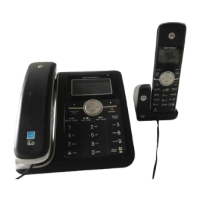
Digital Combo corded base and cordless handset
With Answering Machine
Warning
Use only the adapter and telephone line cord provided in the box.

Table of Contents

Question and Answer IconNeed help?

Do you have a question about the Motorola L404C and is the answer not in the manual?

Overview

This document describes the Motorola L402C / L403C / L404C / L405C Digital Combo corded base and cordless handset with answering machine.

Function Description

The Motorola L402C / L403C / L404C / L405C is a digital combo phone system featuring both a corded base and a cordless handset, equipped with an answering machine. It supports up to 5 registered handsets to the combo base, allowing for internal calls, external call transfers, and three-party conference calls between two internal callers and an external caller. The integrated answering machine (ITAD) offers 15 minutes of digital recording time and can store up to 59 messages, each up to 3 minutes long. It also provides Caller ID functionality, displaying caller information and details of the last 30 callers in a calls list, provided the user subscribes to their network provider's Caller ID or Call Waiting service. The phone includes a 30-name and number phonebook for both the cordless handset and the combo base.

Important Technical Specifications

  • RF frequency band: 1921.536 MHz – 1928.448 MHz
  • Channels: 5
  • Operating temperature: 5°C to 45°C
  • Telephone base voltage (AC voltage, 60Hz): 96 – 130 Vrms
  • Telephone base voltage (Adapter output): 6V DC, 600mA
  • Handset voltage: 2.4V 550mAh Ni-MH battery pack
  • Charger voltage (Adapter output): 6V AC, 300mA
  • Phonebook capacity: 30 names and numbers (up to 24 digits for numbers, 16 characters for names)
  • Calls list capacity: 30 entries
  • Redial list capacity: 5 numbers (up to 32 digits long)
  • Answering machine recording time: 15 minutes total, up to 59 messages, each up to 3 minutes. Personal outgoing messages up to 1 minute.
  • Flash time options: 90, 100, 110, 250, 300, 400, 600, 700ms (country dependent for US: 700ms as default)
  • Number of rings for answering machine: Toll Saver, 2 Rings, 4 Rings, 6 Rings
  • Remote access security code: 3 digits (default 123)

Usage Features

Calls:

  • Making a call: Pick up the corded handset or press <Speaker> on the base/handset, then dial the number.
  • Predial: Enter the number (max 32 digits) first, then pick up the corded handset or press <Speaker> to dial.
  • One-touch dialing: Press and hold keys 1-9 for stored numbers.
  • Calling from phonebook/calls list: Browse entries and press <Speaker> or pick up the handset to dial.
  • Answering a call: Pick up the corded handset or press <Speaker> when the phone rings. Auto Talk mode allows answering by lifting the handset from the base/charger.
  • Adjusting volume: Use <Up/Down> during a call to adjust earpiece or loudspeaker volume.
  • Mute: Press <Mute/Clear> during a call to mute the microphone. Press again to unmute.
  • Ending a call: Place the corded handset on the base cradle or press <Speaker> (if in handsfree mode) on the base/handset.

Intercom:

  • Internal calls: Press <Intercom> on the base/handset, select the desired handset (1-5 or All Handsets), and press <Menu> to call.
  • Call transfer: During an external call, press <Intercom>, select the desired handset, and press <Menu>. When the other handset answers, place the corded handset on the base or press <Speaker> to transfer.
  • Three-party conference: During an external call, press <Intercom>, select the desired handset, and press <Menu>. When the other handset answers, press <Speaker> or pick up the corded handset to join.

Phonebook:

  • Viewing entries: Press <Phonebook>, scroll with <Up/Down>, then <Menu> and <Up/Down> to select View.
  • Adding entries: Press <Phonebook>, then <Menu> to Add. Enter name and number, select melody, and save.
  • Editing entries: Press <Phonebook>, scroll to entry, then <Menu> and <Up/Down> to Edit. Edit number/name, select melody, and save.
  • Deleting entries: Press <Phonebook>, scroll to entry, then <Menu> and <Up/Down> to Delete.
  • Deleting all entries: Press <Phonebook>, then <Menu> and <Up/Down> to Delete All.
  • One-touch numbers: Store phonebook entries as one-touch numbers (1-9).

Caller ID and Calls List:

  • Viewing calls list: Press <Call log>, scroll with <Up/Down>. New calls are marked with <NEW icon>.
  • Saving numbers from calls list: Select an entry, press <Menu>, enter name, edit number, select melody, and save.
  • Deleting calls list entries: Select an entry, press <Back/Clear> to delete.
  • Deleting entire calls list: Press and hold <Back/Clear>, then <Menu> to confirm.

Redial:

  • Viewing redial list: Press <Down/Redial> to view the last 5 dialed numbers.
  • Copying redial numbers to phonebook: Select a redial entry, press <Menu> to Add to PB, then enter name, edit number, select melody, and save.
  • Deleting redial entries: Select a redial entry, press <Clear/Delete> to delete.
  • Deleting entire redial list: Press <Menu> and <Up/Down> to Delete All, then <Menu> to confirm.

Answering Machine:

  • Playing messages: Press <Play/Stop> on the base. Use <Up/Down> to adjust volume. Use <Play/Stop>, <Repeat/Annc>, <Skip/Memo>, <Delete> for message control.
  • Recording/Playing announcements: Access via <Menu> -> Answer Machine -> Announcement. Choose Annc & Record or Announce Only.
  • Setting answer mode: Access via <Menu> -> Answer Machine -> Answer Mode. Options: Answer Off, Annc & Record, Announce Only.
  • Message alert: Turn on/off via <Menu> -> Answer Machine -> Message Alert.
  • Number of rings: Set via <Menu> -> Answer Machine -> Number of Rings. Options: Toll Saver, 2, 4, 6 rings.
  • Recording memos: Access via <Menu> -> Answer Machine -> Record Memo.
  • Call screening: Turn on/off via <Menu> -> Answer Machine -> Call Screening.
  • Remote access: Turn on/off via <Menu> -> Answer Machine -> Remote Access. Allows remote message retrieval using a 3-digit PIN.

Personal Settings:

  • Set Date & Time: Access via <Menu> -> Date & Time. Edit time (12hr format, AM/PM toggle) and date.
  • Ringer tone/volume: Access via <Menu> -> Ringer Setup. Select from 10 melodies and 6 volume levels (including off).
  • Key tones: Turn on/off key beeps via <Menu> -> Ringer Setup -> Key Tone.
  • Base name: Personalize base name (max 14 characters) via <Menu> -> Settings -> Base Name.
  • Display language: Change language via <Menu> -> Settings -> Language.
  • LCD contrast: Adjust contrast (5 levels) via <Menu> -> Settings -> LCD Contrast.
  • Auto Talk (handset): Turn on/off via <Menu> -> SETUP HS -> AUTO TALK. When on, lifting handset answers calls.
  • Dial mode: Set to Tone or Pulse via <Menu> -> SETUP BS -> Dial Mode.
  • Flash time: Set flash time (8 options) via <Menu> -> SETUP BS -> Flash Time.
  • Area code: Enter 3-digit area code via <Menu> -> SETUP BS -> Area Code.
  • Reset all settings: Reset all personalized settings to default (except date/time) via <Menu> -> Reset Settings -> All Settings.

Registration:

  • Registering a handset: Place unregistered handset on charger, press and hold <Find> on base for 4 seconds until IN USE LED flashes.
  • De-registering all handsets: Unplug base power, press and hold <Find> for 10 seconds, plug in power, release <Find> when IN USE LED flashes rapidly, then press and release <Find> again within 2 seconds.
Maintenance Features

  • Battery charging: Handsets require at least 24 hours initial charge. Subsequent charging takes 6-8 hours. The battery icon indicates charge status.
  • Battery performance: Fully charged batteries provide about 12 hours talk time or 180 hours standby. New batteries take several days to reach full capacity. To maintain battery health, leave the handset off the base for a few hours occasionally and run batteries down at least once a week.
  • Cleaning: Use a soft, damp cloth. Do not use chemicals or cleaning agents.
  • Troubleshooting: The manual includes a "HELP" section for common issues like charging problems, no dialing tone, poor audio quality, no ring tone, Caller ID not working, phonebook full, display issues, registration problems, and answering machine malfunctions.
  • Safety instructions: Emphasizes proper placement (avoid humid areas, heat sources, dust, moisture, other cordless phones), correct power adapter and line cord usage, and caution during installation. Advises against disassembling the product and to contact Motorola for service.
  • Battery safety: Warnings against burning, disassembling, mutilating, or puncturing batteries due to toxic materials and explosion risk. Recommends using only authorized battery packs and proper disposal/recycling.
  • Wall mounting: Instructions for mounting the base on a standard wall plate.

Motorola L404C Specifications

General IconGeneral
BrandMotorola
ModelL404C
CategoryHandsets
LanguageEnglish

Related product manuals