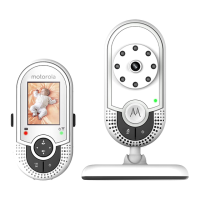
This document is a user's guide for the Motorola MBP481 series of video baby monitors, including models MBP481, MBP481-2, MBP481-3, and MBP481-4. It provides comprehensive information on the product's features, setup, usage, maintenance, and technical specifications.
The Motorola MBP481 is a video baby monitor designed to allow parents to see and hear their baby or monitor older children in another room. The system consists of at least one baby unit (camera) and a parent unit (monitor). Multi-baby unit packs include additional baby units and power adaptors.
Function Description:
The baby monitor system establishes a radio link between the baby unit(s) and the parent unit, transmitting video and audio. The parent unit features an LCD display to show the video feed and sound level indicators to visually represent detected sound levels. It also has controls for adjusting speaker volume, LCD brightness, setting alarms, monitoring temperature, and managing paired baby units. The baby unit includes a power ON/OFF switch and a Power/Link indicator.
Important Technical Specifications:
Baby Unit:
- Frequency: 2407.5 - 2475 MHz
- Channels: 21
- Operating Temperature: 5°C - 45°C
- Image Sensor: Color CMOS 0.3M Pixels
- Lens: f 2.7mm, F 2.6
- Power Adaptor (UL): Input 100-120VAC, 60Hz, 150mA; Output 6VDC, 400mA
- Power Adaptor (UK/EU): Input 100-120VAC, 50/60Hz, 150mA; Output 6VDC, 400mA
Parent Unit:
- Frequency: 2407.5 - 2475 MHz
- Channels: 21
- Operating Temperature: 5°C - 45°C
- Display: 2.4" diagonal TFT LCD
- Brightness Control: 5 steps
- Battery: 3.6V 800mAh Ni-MH battery pack (GPI GP80AAAHC3BMXZ)
- Power Adaptor (UL): Input 100-120VAC, 60Hz, 150mA; Output 6VDC, 400mA
- Power Adaptor (UK/EU): Input 100-120VAC, 50/60Hz, 150mA; Output 6VDC, 400mA
Usage Features:
Setup:
- Baby Unit Connection: Insert the DC plug of the power adaptor into the baby unit's DC jack and connect to a power outlet.
- Parent Unit Battery & Power: Install the rechargeable Ni-MH battery pack into the parent unit, then connect the power adaptor to the parent unit's DC jack and a power outlet. The battery should be fully charged before first use.
- Stand: The parent unit has a pull-out stand for upright positioning.
- Placement: Position the baby unit on a flat surface or mount it to a wall. Ensure the baby unit and adaptor cord are more than 3 feet (0.91 meters) from the crib and out of the baby's reach. Avoid placing cords within the crib.
- Range: To establish a radio link, the baby and parent units must be within range. Large metal objects, solid structures (walls), and radio/electrical equipment can reduce signal strength. If the signal is poor, reposition the units.
- High-pitched Noise: If units are too close, a high-pitched noise may occur; move them further apart (at least 3 feet).
Operation:
- Power ON/OFF:
- Baby Unit: Press and hold the power button to turn on/off. The Power/Link indicator turns on/off accordingly.
- Parent Unit: Press and hold the power button to turn on/off. The Power/Link and battery status indicators turn on/off accordingly.
- Screen ON/OFF: Press and hold the power button on the parent unit to turn the screen off without powering down the unit (audio remains active). Press any key to turn the screen back on.
- Volume Adjustment: Use the UP (+) and DOWN (-) buttons on the parent unit to adjust speaker volume (Volume 1 to 5, or off).
- LCD Brightness: Access the menu (press the menu button), then use UP (+) or DOWN (-) to adjust brightness from Level 1 to 5. Confirm with OK.
- Alarm Setting: From the menu, select the alarm option. Choose "On" and set the duration (2h, 3h, 4h, 5h, or 6h). To turn off, select "Off." Confirm with OK.
- Temperature Monitoring: The baby unit detects ambient temperature. The parent unit can display this in °F or °C. Change the format via the menu.
- Zoom: While viewing the image, press the zoom button to zoom in. Use the directional keys (UP, DOWN, LEFT, RIGHT) to move the zoomed image. Press the zoom button again to zoom out.
- Screen Off Time: Set the parent unit screen to turn off automatically after 5m, 30m, 60m, or OFF (never turn off) when idle.
- Deleting a Baby Unit: From the menu, select the option to delete a baby unit. Choose the desired unit (1, 2, 3, or 4) and confirm with YES.
- Pairing/Replacing Baby Units: The provided units are pre-paired. To add or replace a baby unit (up to four total), access the menu, select the pairing option, choose an empty or occupied slot, and press OK. Then, turn on the new baby unit and immediately press and hold its PAIR button until the Power/Link indicator turns on.
Parent Unit Status Icons:
- Connection Status: Icons indicate strong, moderate, or lost signal strength, or if the parent unit is out of range.
- Patrol Mode: Indicates if the parent unit is cycling through multiple baby units.
- Current View Status: Shows which baby unit (e.g., 1, 2, 3, or 4) is currently being viewed.
- Zoom: Displays when the image is zoomed.
- Volume Off: Indicates the microphone is muted or volume is off.
- Temperature: Shows the current temperature detected by the baby unit.
- Battery Status: Icons indicate charging, fully charged, low battery, or no battery/incorrect installation.
Safety Instructions:
- Strangulation Hazard: Keep units and adaptor cords more than 3 feet from the crib and out of baby's reach. Never place cords within the crib.
- Adaptors: Only use provided AC adaptors; never use extension cords.
- Adult Supervision: This product is an aid, not a substitute for responsible adult supervision.
- Child Safety: Not a toy; keep small parts away from children.
- Placement: Avoid damp areas, extreme cold/heat, direct sunlight, or heat sources.
- Battery: Only use the specified rechargeable Ni-MH battery pack (3.6V 800mAh). Dispose of used batteries according to instructions.
- Obstruction: Do not cover the baby monitor with a towel or blanket.
- Electrical: Connect power adaptors to easily accessible electrical outlets. Avoid touching plug contacts with sharp or metal objects.
Maintenance Features:
Cleaning:
- Clean the MBP481 with a slightly damp cloth or an anti-static cloth.
- Do not use thinners, solvents, or abrasive cleaning agents, as these can cause permanent damage and void the warranty.
- Always switch off and disconnect the power adaptor before cleaning.
Care:
- Keep the MBP481 away from hot, humid areas or strong sunlight.
- Do not allow the unit to get wet.
- Do not attempt to repair the unit yourself; contact Customer Service for assistance if issues arise.
Troubleshooting:
The guide provides solutions for common issues such as:
- Power indicator not coming on.
- Baby unit Power/Link indicator flashing.
- Parent unit light flashing green.
- Parent unit beeping.
- No sound or baby cry from the parent unit.
- High-pitched noise.
- Battery pack running low quickly.
For further assistance, users are directed to consult the user guide, visit motorola.com, or contact customer service via phone (US and Canada: 1-888-331-3383) or email (motorola@encompass.com). Replacement battery packs can be ordered through customer service.

 Need help?
 General

 To Next Page