Doc Title : Product Data – User’s Guide Revision : R.00
Model : MBP481 Page(s) : 4 of 17
This document contains confidential and proprietary information of VTech Telecommunications Ltd
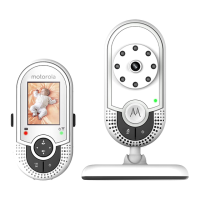
Overview of the Parent unit
1. Sound Level indicators
The sound level indicators show the sound level as detected by the baby unit.
- Sound level detected by the baby unit:
The more LEDs light on, the stronger the sound is detected.
2 LCD display
3 Control key panel
UP / VOLUME +
- Press to increase the speaker volume.
- While in the menu, press to scroll up.
- While viewing a zoomed image, press and hold
to move the image upward.
DOWN / VOLUME -
- Press to decrease the speaker volume.
- While in the menu, press to scroll down.
- While viewing a zoomed image, press and hold
to move the image downward.
LEFT
- While viewing a zoomed image, press and hold
to move the image leftward.
ZOOM / RIGHT
- While in a menu, press to choose the option on the right side.
- While viewing a zoomed image, press to zoom out; or press and hold
to move the image rightward..
4. OK
While in a menu, press to choose an item, or save a setting.



 To Next Page
 Loading...