Need help?
Do you have a question about the Motorola MT200-SB51 and is the answer not in the manual?
Safety instructions, including warnings about voltage and servicing.
Advises against high volume, leaving system plugged in, opening panels, and indoor use.
Guidelines for avoiding high temperatures, moisture, dust, and ensuring ventilation.
Instructions for adequate ventilation to prevent internal heat buildup.
Recommendations for cleaning the cabinet using a soft, slightly moistened cloth.
Lists all the items included in the product package.
Illustrates the back panel of the soundbar and satellites with mounting points.
Step-by-step visual guide for mounting the soundbar on a wall.
Explanation of button functions on the front panel for operation.
Procedures for resetting wireless connections for subwoofer and satellites.
Functions for power, volume, bass, and treble adjustments.
Controls for playback, track skipping, source selection, and EQ modes.
Buttons for muting, resetting, and managing Bluetooth connection.
Steps to connect the soundbar to Bluetooth devices.
Instructions for disconnecting Bluetooth and important usage notes.
Recommendations for optimal placement of speakers and subwoofer for sound effect.
Advice on avoiding magnetic interference with speakers.
Table listing common issues and their resolutions.
Details warranty period, service centers, and coverage exclusions.
Outlines customer obligations, liability, and company's limitations.
Conditions under which the warranty becomes void.
Information on jurisdiction, liability, and customer support contact details.
Detailed technical data for the sound system components.
Guidelines for environmentally responsible disposal of the product.
This document serves as the user manual for the Motorola MT200-SB51 200W 5.1 Soundbar, providing essential information for its safe operation, setup, and maintenance.
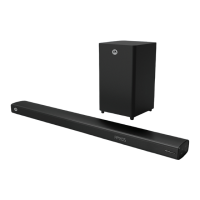
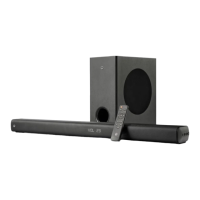
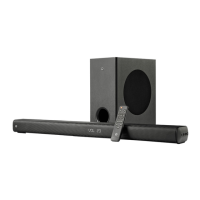
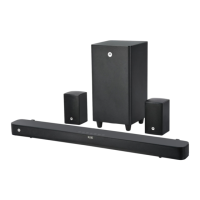
The Motorola MT200-SB51 is a 200W 5.1 soundbar system designed to enhance your audio experience. It comprises a main soundbar unit, a subwoofer with a built-in multimedia amplifier, and two satellite speakers, creating a comprehensive surround sound setup. The system supports various input modes, including Bluetooth, HDMI ARC, Optical, AUX, and USB, allowing for versatile connectivity with different audio sources such as mobile phones, DVDs, and TVs. The soundbar is capable of delivering 5.1 channel audio, localizing the center channel sound and providing immersive surround sound through its dedicated satellite speakers. It also features a remote control for convenient operation and a front panel display for mode indication.
The soundbar system offers a range of features for an optimized listening experience. Users can switch the system on or off using the power button on the front panel or the remote control. The "SRC" button on the front panel and "SOURCE" button on the remote allow for cycling through different input modes: Bluetooth ("bt"), HDMI ARC ("HD"), Optical ("OP"), Audio ("AU"), USB ("Ud"), and DVD ("dU"). The system provides controls for adjusting volume, bass, and treble levels, either through the front panel buttons or the remote. Dedicated buttons on the remote allow for fine-tuning the volume of individual channels (front, surround, central) in 5.1 mode.
For media playback, when in USB or Bluetooth mode, users can play/pause, skip to the previous or next song, and move backward or forward within a track using the corresponding buttons on the front panel or remote. The remote also includes an "EQ" button to cycle through various equalizer presets like POP, ROC, JAZ, CLA, DIR, and NOR, allowing users to tailor the sound profile to their preferences. A "MOVIE" button provides a dedicated movie mode for an enhanced cinematic experience.
Bluetooth connectivity enables wireless audio streaming from compatible devices. To pair, select Bluetooth mode, search for "Motorola 200w SB" on your device, and connect. The system indicates pairing status through a blinking dot on its display. To disconnect a Bluetooth device, press and hold the play/pause button on the remote for three seconds.
The soundbar and satellite speakers are designed to be wall-mountable, offering flexibility in placement. The manual provides instructions and dimensions for wall mounting the soundbar. The subwoofer is recommended to be placed on the floor for optimal acoustic effect. Front speakers should be positioned at equal distances from the TV and at a 45-degree angle from the listening position, while surround speakers should be at ear level, facing each other, or mounted on the wall.
A manual reset feature is available for wireless pairing issues with the subwoofer and satellite speakers. By pressing a specific key for 5 seconds and then power cycling the respective unit, wireless connection can be re-established. To prevent disturbance during the night, the LED display of the soundbar automatically turns off after 90 seconds of no operation and can be resumed by pressing any button.
To ensure the longevity and proper functioning of the Motorola MT200-SB51 soundbar system, several maintenance guidelines are provided. For general care of the cabinet, it is recommended to use a soft cloth slightly moistened with water. Harsh cleaning solutions containing alcohol, spirits, ammonia, or abrasives should be avoided as they can damage the finish.
Safety instructions emphasize avoiding exposure of the product to dripping or splashing liquids, and no liquid-filled objects like vases should be placed on it. The system should not be installed near heat sources and adequate ventilation must be maintained around the apparatus to prevent internal heat buildup. A minimum of 10cm (4 inches) of free space around the unit is advised. Users are warned that the back cover of the subwoofer can become hot at high volumes and should not be touched.
For electrical safety, users are cautioned against opening the cover or back panel of the system to avoid electric shock, as there are no user-serviceable parts inside. The system should only be used indoors and plugged into an electricity socket with the correct voltage. The MAINS plug serves as the disconnect device.
In case of troubleshooting, the manual offers solutions for common issues such as no power, no sound or distorted sound, remote control malfunction, low hum or buzz, and problems with USB* flash drive recognition or playback. It also addresses issues with Bluetooth, HDMI, and Optical connectivity. For instance, if there's no power, checking the AC power cord insertion is suggested. For sound issues, adjusting volume or selecting the correct source is recommended. Remote control problems can often be resolved by reducing distance, replacing batteries, or pointing it directly at the IR sensor. USB* drive issues might stem from incompatible formats or large file sizes, suggesting re-inserting the drive or checking its format. For wireless connection problems, the manual reset procedure is provided.
The warranty terms and conditions outline the coverage for manufacturing defects for a period of one year from the date of purchase, with specific conditions for commercial usage. It clarifies that the warranty does not cover damages from unauthorized adaptations, improper installation, mishandling, or external causes like accidents, voltage fluctuations, or natural calamities. Users are advised to contact authorized service centers for repairs and to present the original purchase invoice for warranty claims.
 General
| Brand | Motorola |
|---|---|
| Model | MT200-SB51 |
| Category | Speaker System |
| Speaker Type | Portable Bluetooth Speaker |
| Battery Life | Up to 10 hours |
| Connectivity | Bluetooth |

 To Next Page