18
4. Viewing the baby through your device
4.1 Minimum System Requirements
Android™ System
• Version 7.0 or above
iPhone®/iPad® iOS
• Version 10.0 or above
High Speed (Wi-Fi®) Internet
• At least 0.6 Mbps upload bandwidth per camera (you can test your internet
speed on this site: http://www.speedtest.net).
4.2 Connect your device
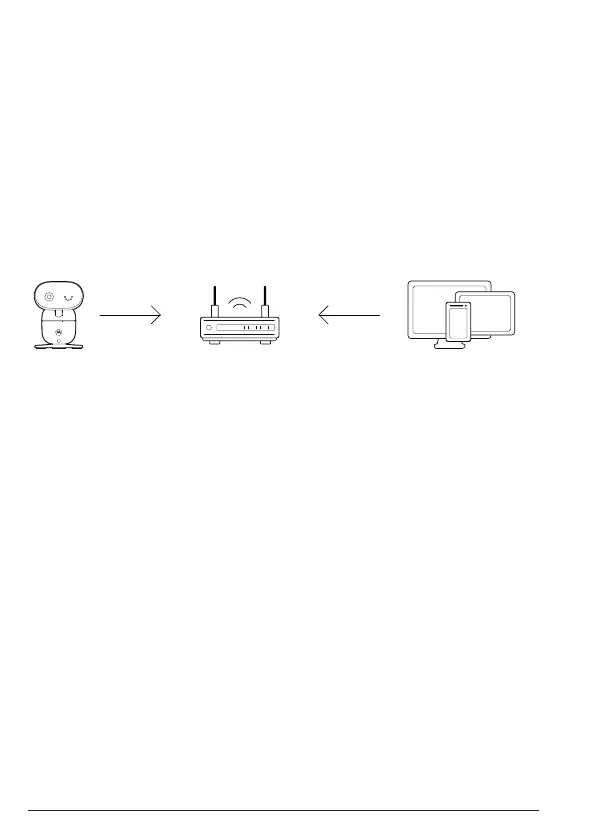
When a user tries to access the Wi-Fi® camera (baby unit), our server
authenticates the user’s identity and permits access to the Wi-Fi® camera
(baby unit).
Note
You can only set up through a compatible smartphone or tablet but not
through a PC.
4.3 Set up the camera
Connect the Wi-Fi® camera (baby unit) to the power adapter, then plug into
the wall socket. The camera must be within range of the Wi-Fi® router with
which you want to connect. Make sure the password of the router is available
for entering during the in-app setup process.
The following table shows the meanings of dierent LED connection status.
State LED indication
Pair / Setup Flashes blue and red
Connected Solid blue
Video streaming Solid blue
Viewing the baby through your device
View your camera
from any compatible
device remotely
Camera
Connect to internet
via Wi-Fi
®
router



 To Next Page
 Loading...