EasyManua.ls Logo

Motorola PMMN4148 - User Manual

Motorola PMMN4148
15 pages
Print Icon
To Next Page IconTo Next Page
Loading...
m
Foreword
RF Energy Exposure and Product Safety
Guide for Portable Two-way Radios
Attention!
Before using this accessory, read this guide
which contains important operating instructions
for safe usage and RF energy awareness and
control for compliance with applicable standards
and regulations.
The Remote Speaker Microphone (RSM), when
attached to the radio, is restricted to occupational
use only to satisfy FCC/ICNIRP RF energy
exposure requirements. Before using this
product, read the RF energy awareness
information and operating instructions in the
Product Safety and RF Exposure booklet
enclosed with your radio to ensure compliance
with RF energy exposure limits.
Acoustic Safety
Exposure to loud noises from any source for
extended periods of time may temporarily or
permanently affect your hearing. The louder the
volume of the radio, the less time is required
before your hearing can be affected.
Hearing damage from loud noise is sometimes
undetectable at first and can have a cumulative
effect.
To protect your hearing:
Use the lowest volume necessary to do your
job.
Turn up the volume only if you are in noisy
surroundings.
Turn down the volume before attaching
headset or earpiece.
Limit the amount of time you use headsets or
earpieces at high volume.
When using the radio without a headset or
earpiece, do not place the speaker of the radio
directly against your ear.
If you experience hearing discomfort, ringing in
your ears, or muffled speech, you should stop
listening to your radio through your headset or
earpiece, and have your hearing checked by
your doctor. To change the volume level, refer
to Radio Product Safety Leaflet or CPS for
Surveillance extra loud (xL) Kit Configurations.
RSM Features
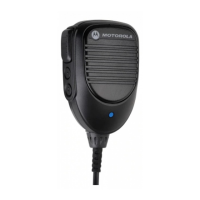
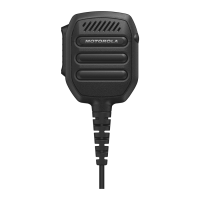
PMMN4148
RM110 Remote Speaker Microphone,
with 3.5 mm Audio Jack (IP55)
*MN009679A01*
MN009679A01-AB
MOTOROLA, MOTO, MOTOROLA SOLUTIONS
and the Stylized M logo are trademarks or
registered trademarks of Motorola Trademark
Holdings, LLC and are used under license. All
other trademarks are the property of their
respective owners.
© 2023 Motorola Solutions, Inc. All rights
reserved.
Printed In
Table 1: RSM Features
No. Description
1 Push-to-Talk Button
2
Receive-only 3.5 mm Audio Jack (Non-
threaded) covered by Dust Cover
Recommended Practice
Cover the audio jack with dust cover when it is
not plugged with earpiece.
Do not fill water into the audio jack.
If water enters the audio jack, remove water by
shaking the RSM.
Transmitting and Receiving
Recommended RSM Wearing Position
Attaching the RSM to the Radio
Attach the RSM connector to the side connector
of the radio. Then secure the connection screw in
a clockwise direction until tightened.
Note:To ensure proper operation, turn off the radio
before connecting the RSM to the radio.
Connecting the RSM to the radio disables the
speaker of the radio, but does not disable the
microphone and PTT of the radio.
Detaching the RSM from the Radio
1. Unscrew and detach the RSM connector
from the radio side connector.
2. Keep the dust cover inserted in the audio
jack of the RSM when a secondary acces-
sory is not being used.
Cable Management
To ensure optimum range and user experience, it
is recommended to avoid crossing accessory
cable with the radio antenna.
1
2
MN009679A01.fm Page 1 Monday, May 29, 2023 1:29 PM
Question and Answer IconNeed help?

Do you have a question about the Motorola PMMN4148 and is the answer not in the manual?

Overview

RM110 Remote Speaker Microphone (RSM)

The Motorola Solutions RM110 Remote Speaker Microphone (RSM) is a robust accessory designed to enhance communication for users of portable two-way radios. This device allows for convenient hands-free operation and improved audio clarity in various environments, particularly those requiring compliance with RF energy exposure regulations.

Function Description

The primary function of the RM110 RSM is to provide an external speaker and microphone for a two-way radio, allowing the user to transmit and receive audio without needing to hold the radio directly. This is especially useful when the radio is clipped to a belt or otherwise not easily accessible. The RSM features a Push-to-Talk (PTT) button for initiating transmissions and an integrated 3.5 mm audio jack for connecting an earpiece, enabling private listening.

Important Technical Specifications

  • Model Number: PMMN4148
  • Compatibility: Designed for use with Motorola Solutions portable two-way radios.
  • Audio Jack: 3.5 mm Audio Jack, suitable for connecting an earpiece for receive-only audio. The jack is covered by a dust cover when not in use.
  • Ingress Protection (IP) Rating: IP55, indicating protection against dust ingress and low-pressure water jets from any direction. This makes it suitable for use in challenging outdoor or industrial environments.
  • RF Energy Exposure: The RSM is designed to comply with FCC/ICNIRP RF energy exposure requirements. Users are advised to consult the Product Safety and RF Exposure booklet provided with their radio for detailed information on ensuring compliance.
  • Certifications: The device carries CE, UKCA, and EAC markings, indicating compliance with relevant European, UK, and Eurasian regulatory standards. It also features a crossed-out wheeled bin symbol, signifying that it should not be disposed of with general waste.

Usage Features

Attaching and Detaching the RSM: To attach the RSM to the radio, the RSM connector should be inserted into the radio's side connector. The connection screw is then secured in a clockwise direction until tightened. It's important to note that connecting the RSM disables the radio's internal speaker, microphone, and PTT button. To detach, unscrew and remove the connector from the radio's side. When not using a secondary accessory with the audio jack, the dust cover should be kept inserted.

Recommended RSM Wearing Position: For optimal performance and comfort, the RSM should be worn on the user's shoulder or lapel, allowing the microphone to be close to the mouth for clear transmission and the speaker to be audible.

Transmitting and Receiving: To transmit, the user presses and holds the Push-to-Talk (PTT) button on the RSM and speaks into the microphone. To receive, the user releases the PTT button. Audio will be heard through the RSM's speaker or through an attached earpiece.

Hearing Safety: Motorola Solutions emphasizes the importance of protecting hearing from loud noise, which can cause cumulative and sometimes undetectable damage. Users are advised to:

  • Use the lowest volume necessary for the job.
  • Turn up the volume only if in noisy surroundings.
  • Turn down the volume before attaching a headset or earpiece.
  • Limit the amount of time using headsets or earpieces at high volume.
  • When using the radio without a headset or earpiece, do not place the speaker directly against the ear.
  • If experiencing hearing discomfort, ringing in the ears, or muffled speech, users should stop listening to the radio through their headset or earpiece and have their hearing checked by a doctor. Further information on volume level and hearing protection can be found in the Radio Product Safety Leaflet or CPS for Surveillance extra loud (xL) Kit Configurations.

Cable Management: To ensure optimum range and user experience, it is recommended to avoid crossing the accessory cable with the radio antenna. Proper cable routing helps prevent interference and maintains signal integrity.

Optional Accessories: An optional Rx only xL Clear Tube Earpiece (PMLN8120) with a 3.5mm jack is available for private listening.

Maintenance Features

Dust Cover Management: The 3.5 mm audio jack is protected by a dust cover.

  • Removing the Dust Cover: Lift up the dust cover until it is fully open. Insert a small flat tip tool into the recess and pry out the dust cover.
  • Inserting the Dust Cover: Slide the side tab of the dust cover into the recess slot. Push the opposite side with a small tool. Simultaneously push the dust cover into the RSM. It is recommended to cover the audio jack with the dust cover when it is not plugged with an earpiece to maintain the IP55 rating and prevent debris from entering.

Water Management: Despite its IP55 rating, it is crucial not to fill the audio jack with water. If water enters the audio jack, it should be removed by shaking the RSM.

Swivel Clip Attachment and Detachment: The RSM comes with a swivel clip for attaching it to clothing or gear.

  • Attaching the Swivel Clip: Align the bottom release latch to face downwards. Push down the top of the clip. Simultaneously slide the clip upward until it clicks into place.
  • Detaching the Swivel Clip: Push the top of the clip to raise it to the highest position. Lift up the bottom release latch. Slide the clip to remove it. Replacement parts for the swivel clip (Low Profile Swivel Clip, PMLN8121) and dust cover (Dust Cover 10pcs/pack, PMLN8253) are available.

Service and Warranty: Motorola Solutions offers a warranty for the RSM. Users should refer to their Motorola Solutions dealer or point-of-purchase for detailed warranty information. The warranty is void if customer replacement of any parts other than the listed replacement parts occurs.

Motorola PMMN4148 Specifications

General IconGeneral
BrandMotorola
ModelPMMN4148
CategoryTwo-Way Radio
LanguageEnglish

Related product manuals