EasyManua.ls Logo

Motorola SH032 - User Manual

Motorola SH032
28 pages
Print Icon
To Next Page IconTo Next Page
Loading...
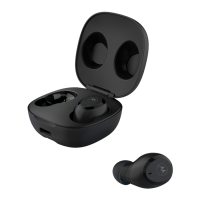
MODELS: VERVEBUDS 300
Frequency Band: 2.402 2.480 GHz
Maximum RF power: 6 dBm
Working temperature: -10
o
C 45
o
C
Product ID: SH032
FCC ID: VLJ-SH032
IC: 4522A-SH032
Quick Start Guide / Guía de inicio rápido / Snelstartgids / Guia de
Início Rápido / Guida per il primo utilizzo / Schnellstartanleitung /
Guide de démarrage rapide / Snabbstartsguide / Poradnik
użytkowania / 快速入門指南 / 快速入门指南 / Краткое
руководство пользователя / عيرسلا ليغشتلا ليلد / Hızlı Başlangıç
Kılavuzu / クイックスタートガイド / 빠른 시작 안내서 / ่ิู่
/ Коротке керівництво користувача
/
Question and Answer IconNeed help?

Do you have a question about the Motorola SH032 and is the answer not in the manual?

Summary

Charging the Vervebuds

Full Charge Before First Use

Charge the device completely before first use via micro USB from a CE compliant power source.

Pairing Your Vervebuds

Bluetooth Pairing Steps

Ensure buds are in case, remove them, wait for flashing lights, then select 'Vervebuds 300' in Bluetooth menu.

Fitting and Comfort

Proper Earbud Fit and Size Selection

Insert Vervebuds into ear and rotate. Try different earbud sizes for optimal fit and audio experience.

Base Operation and Controls

Button Functions and Additional Operations

Details on factory reset, call management, and voice commands via MFB button.

LED Indicator Status Guide

Explains the meaning of different LED light patterns for status indication.

Advanced Features

Mono Mode Usage

Procedure to pair and use one earbud at a time for mono mode.
Summary

Charging the Vervebuds

Full Charge Before First Use

Charge the device completely before first use via micro USB from a CE compliant power source.

Pairing Your Vervebuds

Bluetooth Pairing Steps

Ensure buds are in case, remove them, wait for flashing lights, then select 'Vervebuds 300' in Bluetooth menu.

Fitting and Comfort

Proper Earbud Fit and Size Selection

Insert Vervebuds into ear and rotate. Try different earbud sizes for optimal fit and audio experience.

Base Operation and Controls

Button Functions and Additional Operations

Details on factory reset, call management, and voice commands via MFB button.

LED Indicator Status Guide

Explains the meaning of different LED light patterns for status indication.

Advanced Features

Mono Mode Usage

Procedure to pair and use one earbud at a time for mono mode.

Motorola SH032 Specifications

General IconGeneral
BrandMotorola
ModelSH032
CategoryHeadphone
LanguageEnglish

Related product manuals