
 Need help?
Do you have a question about the Motorola S805 and is the answer not in the manual?
Guidelines for optimal placement, avoiding interference, and handset range.
Instructions for setting up the base unit and identifying power adapters.
Step-by-step instructions for connecting the base unit to power and phone line.
Procedure for installing the battery pack and charging the handset.
Information on battery low warnings, performance, and maintenance tips.
Diagram and explanation of handset buttons and functions.
Explanation of remaining handset buttons like keypad, intercom, speakerphone, and tone.
Explanation of icons shown on the handset LCD display.
Diagram and explanation of the base unit buttons and indicators.
Details on base unit volume, message skipping, announcement options, and display indicators.
Explanation of base display codes and how to page lost handsets.
Instructions for making calls, predialing, and dialing one-touch numbers.
How to call from the phonebook and the calls list.
Instructions for calling from the redial list.
How to answer calls, adjust volume, mute, and end calls.
Using intercom, transferring calls, and conference calls between handsets.
Steps for transferring external calls and setting up three-party conference calls.
Understanding voicemail indications and how to clear them.
How to view existing entries and add new contacts to the phonebook.
Guide to using the alphanumeric keypad for entering names.
How to edit existing entries and delete single or all entries.
Checking phonebook capacity and storing entries as speed dial numbers.
Changing phonebook entries for one-touch dialing and deleting them.
Instructions for copying phonebook entries to another registered handset.
How caller ID displays information and notes on availability.
How to view missed and received calls and notes on list capacity.
Steps to save numbers from the calls list into the phonebook.
How to delete individual calls list entries or clear the entire list.
How to view and use the redial list for last called numbers.
Instructions to save numbers from the redial list into the phonebook.
How to delete single entries or the entire redial list.
Manually setting the date and time on the handset.
Setting the ringer tone, ringer volume, and key tone on/off.
Configuring battery low tone and no coverage tone on/off.
Personalizing handset names and changing the display language.
Adjusting LCD contrast and enabling/disabling auto talk feature.
Steps to register additional handsets to the base.
Configuring the dialing mode (Tone or Pulse) and its temporary switching.
Setting the flash time for call handling.
Entering the area code for local dialing.
Procedure to reset all personalized base settings to default values.
How to play new and old messages through the base unit.
Functions for replaying, skipping, deleting messages, and adjusting volume.
How to access and play messages using the handset.
Procedure to erase all read messages from the answering machine.
How to record or play custom outgoing announcements.
Configuring message alerts, turn on/off, and setting the number of rings.
How to record a personal memo using the answering machine.
Using handset or base speaker to screen incoming calls.
Setting up and enabling remote access to the answering machine.
How to change the remote access PIN for security.
Key commands to use when accessing the answering machine remotely.
Solutions for charging problems, such as no scrolling or dirty contacts.
Steps to resolve no dial tone, including checking connections and battery.
Solutions for poor audio quality and missing ring tones.
Resolving problems with Caller ID service and storing phonebook entries.
Fixing display issues and resolving handset link loss during calls.
Solutions for noise interference and answering machine message recording problems.
Troubleshooting memory full, announce-only mode, and remote access problems.
Steps for product troubleshooting, website visits, and customer service contact.
Precautions regarding ventilation, water exposure, cleaning, and disassembly.
Safety advice on overloading outlets, extension cords, and electrical storms.
Instructions for reading, following warnings, placement, and control adjustment.
Guidelines for cleaning the phone and using the correct power supply.
Advice on backup power sources and avoiding appliance interference.
Precautions for handling, storing, and disposing of batteries.
Details on what the limited warranty covers for products and accessories.
Information on who is covered by the warranty.
What Binatone will do for warranty claims: repair, replace, or refund.
Limitations on implied warranties and disclaimer of liability for damages.
Warranty duration for repaired or replaced products and accessories.
Exclusions from warranty including normal wear and tear and battery issues.
Exclusions for damage due to abuse, misuse, or improper operation.
Exclusions for environmental exposure, unauthorized service, and altered products.
Exclusion for issues related to communication services or signals.
How to get warranty service, what to include, and contact information.
Compliance with FCC Part 15 for Class B digital devices and interference mitigation.
FCC safety criteria for RF energy absorption and Canadian ICES-003 compliance.
Compliance with FCC Part 68 and ACTA technical requirements for phone connections.
Explanation of REN and its importance for telephone line connections.
What to do if the equipment malfunctions and authorized repair procedures.
Consequences of network harm, service interruption, and hearing aid compatibility.
Guidelines for storing and testing emergency numbers.
Industry Canada compliance conditions and interference acceptance.
French explanation of FCC Article 15 restrictions and interference solutions.
FCC RF energy safety criteria and Canadian Class B digital apparatus compliance.
French explanation of FCC Article 68 and ACTA requirements for phone connections.
Details on connecting to the phone network and understanding the Ringer Equivalence Number (REN).
Advice on using shared lines and ensuring alarm system compatibility.
French advice on appliance malfunction, repair, and telephone service interruption.
Information on hearing aid compatibility and storing emergency numbers.
Conditions for Industry Canada operation regarding interference.
Meaning of 'IC' certification and REN for Canadian devices.
Technical specifications for RF frequency, channels, operating temperature, and voltages.
 General
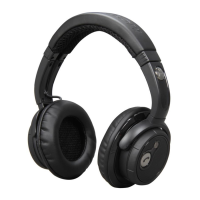
| Driver Size | 40mm |
|---|---|
| Frequency Response | 20Hz - 20kHz |
| Impedance | 32 ohms |
| Connectivity | Bluetooth |
| Operating Range | Up to 10 meters |
| Additional Features | Built-in microphone |








 To Next Page

