5
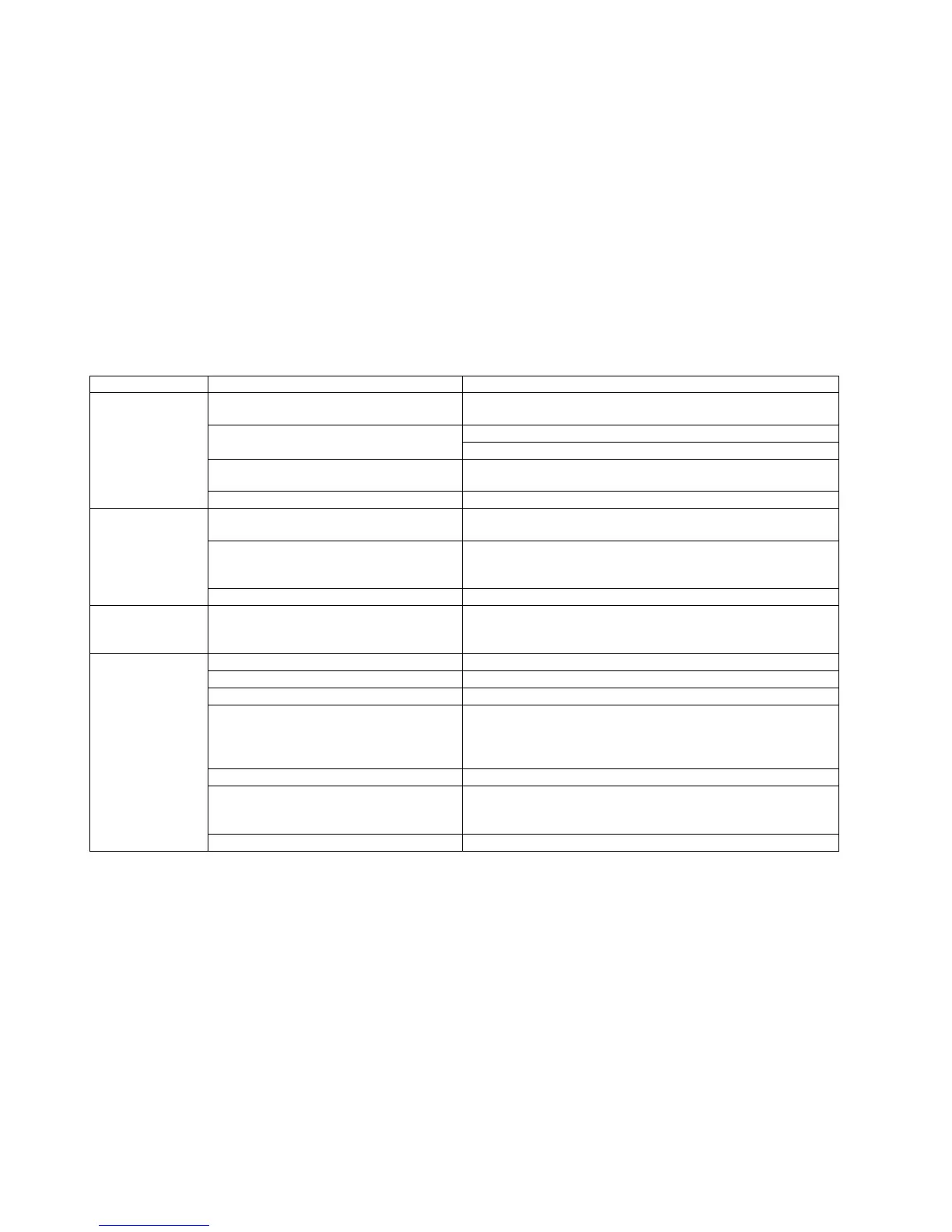
SYMPTOM PROBABLE CAUSE CORRECTIVE ACTION
Faulty Battery, Note: Battery is used only for
M770E, self-powered model.
Verify that Battery voltage is greater than 6 volts DC. Replace Battery if
the voltage is lower than 6 volts DC.
Test with substitute MPU board. Replace if necessary.
Faulty MPU board or Drive board
Test with substitute Drive board. Replace if necessary.
Cable connection or loose wire connection
Verify that main cable CN1 is plugged into both MPU board and Drive
board. Replace if necessary.
Dot-LED or Numeric
LED lights up and
then fails.
(On M770E)
Worn or damaged wire harness Inspect wire harness. Replace worn or damaged harness.
Faulty Battery
Verify that Battery voltage is greater than 6 volts DC. Replace Battery if
the voltage is lower than 6 volts DC.
Cable connection
Verify that the cable connection at MPU board and Drive board or the
connection between cables at midpoint is plugged in properly. Using a
Multi-meter, verify continuity on all cables. Replace any defective cables.
Unit does not Auto
Start
(On M770E)
Faulty Drive board If cable connection is verified as good, replace the Drive board.
Unit does not display
SPEED on Console
Cable connection
Verify that the cable connection at MPU board and Drive board or the
connection between cables at midpoint is plugged in properly. Using a
Multi-meter, verify continuity on all cables. Replace any defective cables.
Program intensity doesn’t challenge user ability. Select higher workout intensity.
Drive Belt is worn Replace Belt.
Drive Belt is excessively loose Inspect Belt tension. Adjust if necessary.
Cable connection or loose wire connection
Verify that the cable connection at MPU board and Drive board or the
connection between cables at midpoint is securely plugged in properly.
Using a Multi-meter, verify continuity on all cables. Replace any
defective cables.
Worn or damaged wire harness Inspect wire harness. Replace worn or damaged harness.
Faulty Button Switch or Operation Button board
Verify that workout intensity on Console is increased or decreased by
pressing UP/DOWN button switch. Replace Button Switch or Operation
Button board if there is no change on intensity profile.
During exercise
program, pedaling is
insufficiently easy
without providing
adequate resistance.
Defective MPU board or Defective Drive board Test with substitute MPU board or Drive board. Replace if necessary.


 To Next Page