Aansluiten Basistips Aanpassen
INSTALLATIE
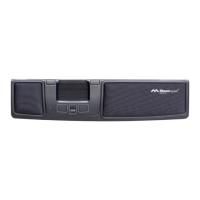
Sluit de meegeleverde kabel aan op de USB-
microconnector onder het product en sluit het
andere uiteinde aan op een USB-poort op de
computer. Eenmaal geïnstalleerd werken uw
Delta en zijn knoppen zoals weergegeven in
guur 2.
SCHAKELEN TUSSEN MAC EN PC
Het product is bij levering gecongureerd voor
pc. Om het voor Mac te congureren, drukt
u tegelijkertijd op de knop rechtsonder, de
knop linksonder (kopiëren en plakken) en de
Control Bar gedurende 3-4 seconden. De LED
zal knipperen om de conguratie te bevestigen.
Herhaal de procedure om terug te gaan naar de
pc-conguratie.
PLAATSING
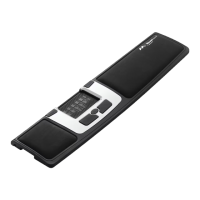
Plaats de Delta tussen uzelf en uw toetsenbord.
De B-toets op uw toetsenbord moet zich direct
voor het scoll-wiel op de Delta bevinden, zoals
weergegeven in afbeelding 1. Als u een dun
toetsenbord hebt, bevestig en gebruik dan de
toetsenbordverhogers die bij uw Delta worden
geleverd. Bevestig ze aan uw Delta door ze in
de sleuven onder het apparaat te schuiven. Het
toetsenbord moet altijd in lijn of iets lager dan
uw Delta staan.
SCROLLEN
Er zijn twee manieren om te scrollen. U kunt
het afzonderlijke scrollwiel gebruiken of
automatisch scrollen activeren op de Control
Bar. Om automatisch scrollen te activeren, klikt
u op het scrollwiel en gebruikt u de Control
Bar om te scrollen en deactiveert u vervolgens
automatisch scrollen door nogmaals op het
scrollwiel te klikken.
VERVANGEN VAN PAD
De pad kan worden vervangen wanneer deze
versleten is. U kunt nieuwe pads bestellen via
uw dealer of rechtstreeks via mousetrapper.com
MT KEYS
Om de knopfuncties aan te passen, gaat u
naar mtkeys.mousetrapper.com (met Chrome
of Edge) en volgt u de instructies. Uw Delta
moet verbonden zijn met uw computer. U kunt
bijvoorbeeld kiezen tussen functies als ’venster
sluiten’, ’computer vergrendelen’, uw eigen
snelkoppelingen aanmaken en nog veel meer.
Als u de instellingen hebt gewijzigd, worden
ze opgeslagen in de Delta en werkt deze op
dezelfde manier als u hem op een nieuwe
computer aansluit.
NEDERLANDS
DISCLAIMER AND LIMITATION OF LIABILITY
This product (the Product) has been manufactured by or on behalf of Trapper Data AB, Swedish Reg. No. 556872-7597 And its group companies (Trapper Data). As between Trapper Data and
the user, the following shall – to the fullest extent permitted by applicable law – apply: The Product is provided “as is” without warranty of any kind (either express or implied), including but not
limited to any implied warranties of merchantability and tness for a specic or general purpose and those arising by statute or by law, or from a cause of dealing or usage of trade. Trapper Data
shall have no obligations whatsoever to repair, replace or service the Product in any manner or to provide the user with any future upgrades to the Product, if any. The user is solely responsible
for the use of the Product. In no event, regardless of cause, shall Trapper Data be liable for any direct, indirect, special, incidental, punitive or consequential damages of any kind, whether arising
under breach of contract, tort (including negligence), strict liability or otherwise, and whether based on agreement or otherwise, even if advised of the possibility of such damages. Trapper Data
makes no claim or representation that the Product will prevent, cure, or mitigate any medical condition, disease, injury, pain or discomfort for all users.
Responsible party name: Mousetrapper North America Inc.
www.mousetrapper.com
info@mousetrapper.com
Hereby declares that the
Product: Mousetrapper (HID mouse/keyboard)
Model name: Advance 2.0 MTV10
Conforms to the following specications:
FCC 47 CFR 15: Radio frequency device, subpart B:
Unintentional radiators. Class B Equipment.
ICES-003 Issue 6: Information technology equipment- Limits
and methods of measurement, Class B.
This device complies with part 15 of the FCC Rules. Operation is subject to the following two conditions: (1)
This device may not cause harmful interference, and (2) this device must accept any interference received,
including interference that may cause undesired operation.
This equipment has been tested and found to comply with the limits for a Class B digital device, pursuant
to Part 15 of the FCC rules. These limits are designed to provide reasonable protection against harmful
interference in a residential installation. This equipment generates, uses, and can radiate radio frequency
energy and, if not installed and used in accordance with the instructions, may cause harmful interference to
radio communications.
This equipment referenced in this declaration is identical to the unit tested and found acceptable with the
standards. The technical records maintained by the responsible party continue to reect the equipment
being produced under this Declaration of Conformity within the variation that can be expected due to
quantity production and testing on a statistical basis.


 To Previous Page
 Loading...