28
OPERATING INSTRUCTIONS
ELECTRONIC MODULE
AIR BIKE
ADJUSTABLE INTERVAL
•
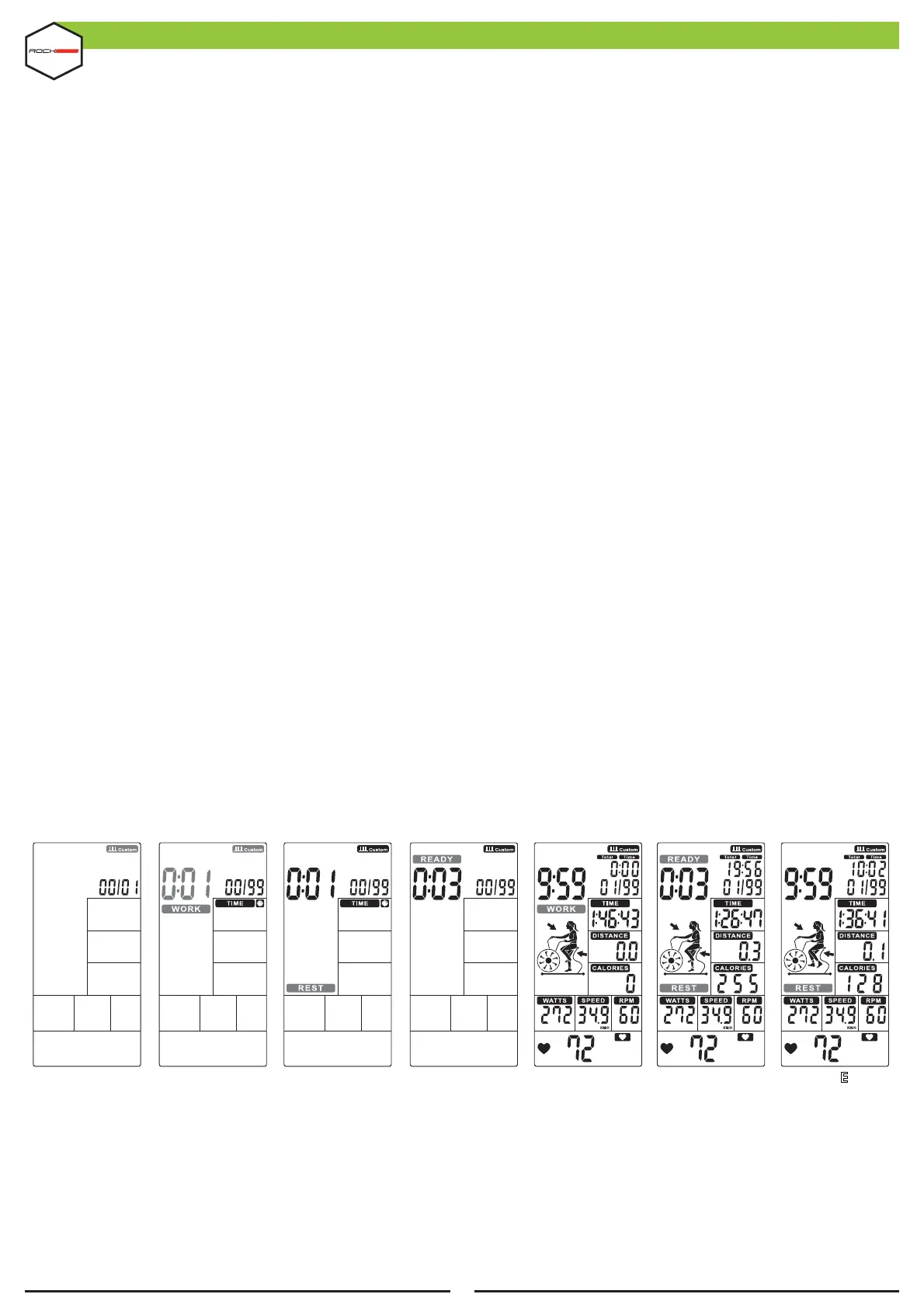
Press INTERVAL (KEY 16) to select ADJUSTABLE INTERVAL to start setup. INTERVAL 00 / XX #ashes to be
set along with 1s audible alerts. Press UP / DOWN (10 or 11 KEYS) to set 00 / XX between 1 ~ 99. Press
ENTER (KEY 19) to con!rm and go to the next setting. (Figure 32).
•
The Time display and the word WORK along with 0:01 will #ash, press UP / DOWN (KEYS 10 or 11) to set
the training time between 0:00 ~ 9:59 (Figure 33). Press ENTER (KEY
19) to con!rm and go to the next setting.
•
The Time display remains lit and the word REST will #ash, press UP / DOWN (KEYS 10 or 11) to set the rest
time from 0: 01 ~ 9: 59 (Figure 34). Press ENTER (KEY 19) to con!rm and !nish the con!guration.
•
The time counts down from 3 to 0 and then the console starts up, while an audible alert sounds per second
and READY #ashes once per second, the countdown displays ' 00/XX' (Figure 35).
•
The time is reduced from the preset total time and WORK blinks once per second. Then TIME (DISPLAY 3),
DISTANCE (DISPLAY 4), CALORIES (DISPLAY 5), WATTS (DISPLAY 6), SPEED (DISPLAY)
2) And RPM (DISPLAY 1) start counting, the count displays '01/XX '(Figure 36).
•
When a series is !nished, the time starts counting and REST #ashes once per second along with an audible
alert (Figure 37), while READY will #ash for the last 3s (Figure 38).
•
The above values continue to count and the cycle count adds 1 for each complete cycle, until the WORK
setting value ends and goes to the Final page.
•
A 1s audible alert sounds and the console enters standby mode if there is no signal input within 30s.
•
Press the START (KEY 8) once to enter the PAUSE mode, an audible alert will sound for 0.5s every 30s. All
values are shown on the display and will #ash every 4s. If training is stopped for 5 minutes, the audible alert
will sound for 2s and go into standby mode. Press START (KEY 8) to resume training.
•
Press STOP (KEY 9) to end the training, the audible alert will sound for 1s and display TIME (DISPLAY 3),
DISTANCE (DISPLAY 4), CALORIES (DISPLAY 5) for 30s and WATT (DISPLAY 6), SPEED (DISPLAY 2) and RPM
(DISPLAY 1) change to display AVG. & MAX. The HEART RATE display (DISPLAY 7) will change to display
65%, 85% MAX (Figure 21 ~ 23) every 5s.
•
Upon input of the heart rate signal, the HEART RATE display (DISPLAY 7) will show the user's rate. If there is
no signal, nothing will be displayed. (Figure 19~20).
FIGURE 32 FIGURE 33 FIGURE 34 FIGURE 35 FIGURE 36 FIGURE 37 FIGUR 38E


 To Next Page
 Loading...