OPERATING INSTRUCTIONS
31
AIR BIKE
ELECTRONIC MODULE
HEART RATE
•
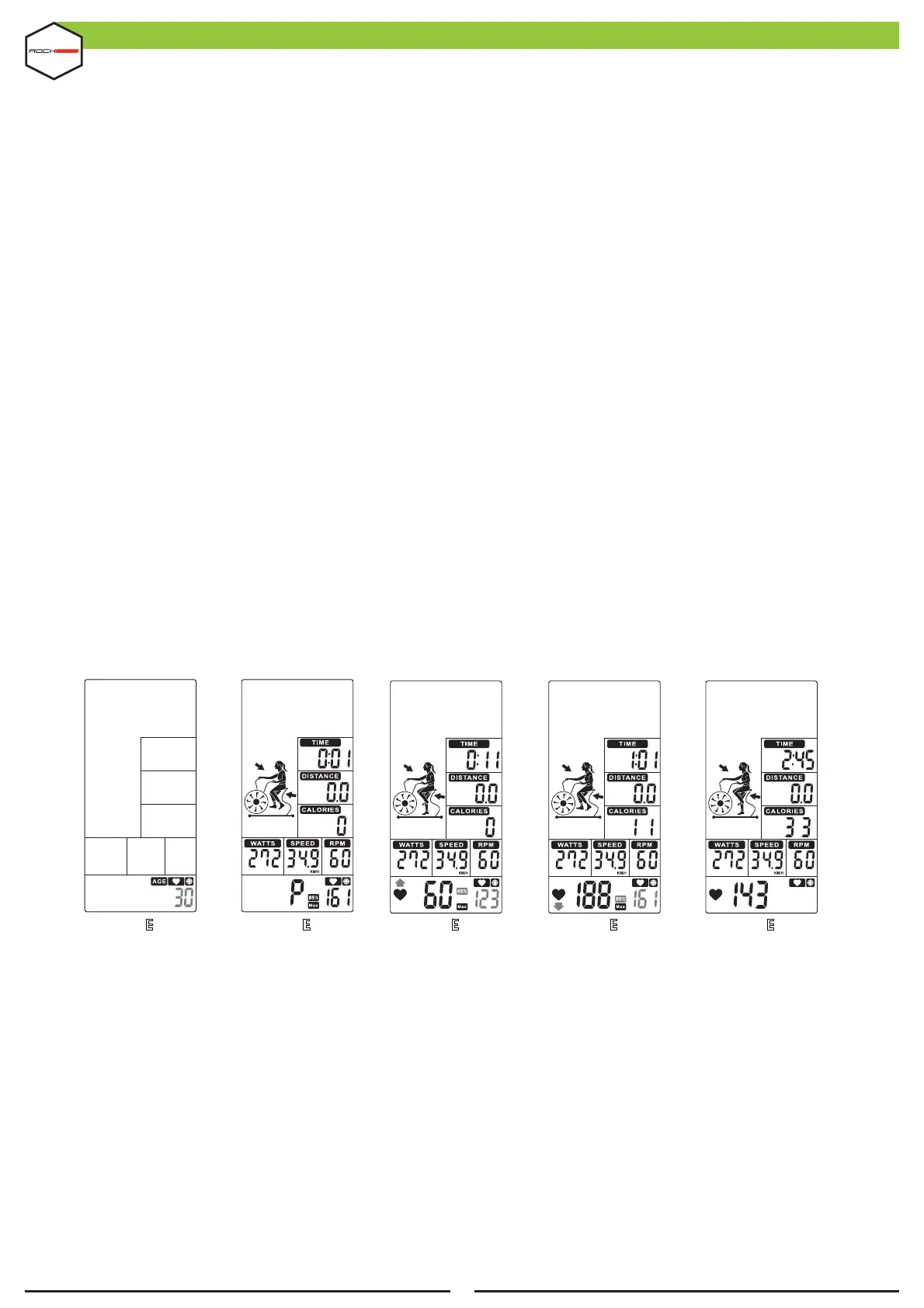
Press the TARGET HEART RATE key (KEY 14) and the HEART RATE display (DISPLAY 7) will light up, along
with a 1s audible alert.
•
Press UP / DOWN (KEY 10 or 11) to adjust the age (Figure 45). Then press ENTER (KEY 19) to con!rm
the age and start training.
•
When you start training, MAX HR (DISPLAY 7) lights up alternating between 65% and 85%. TIME (DISPLAY
3), DISTANCE (DISPLAY 4), CALORIES (DISPLAY 5), WATTS (DISPLAY 6), SPEED (DISPLAY 2) and RPM (DISPLAY
1) will be used to calculate workout value (Figure 46).
•
When the heart rate drops below 65%, the & 65% value will #ash. An audible alert will sound every 10s⇧
until the user's heart rate reaches more than 65% (Figure 47).
•
When the heart rate exceeds 85%, the & 85% value will #ash. An audible alert will sound every 10s⇩
until the user's heart rate drops below 85% (Figure 48).
•
Heart rate should be between 65%~85%.
•
No input signal for 30s, console will emit 1 short beep and enter standby mode.
•
Press the START (KEY 8) once to enter the PAUSE mode, an audible alert will sound for 0.5s every 30s.
All values are shown on the display and will #ash every 4s. If training is stopped for 5 minutes, the audible
alert will sound for 2s and go into standby mode. Press START (KEY 8) to resume training.
•
Press the STOP key (KEY 9) to end the training, the TIME display (DISPLAY 3) will show the total training
time; DISTANCE (DISPLAY 4) will display the total exercise distance; CALORIES (DISPLAY 5) will display the total
consumption during training; WATTS (DISPLAY 6), SPEED (DISPLAY 2) and RPM (DISPLAY 1) will change to
display AVG. & MAX. The HEART RATE display (DISPLAY 7) will change to display 65%, 85% MAX (Figure 21
~ 23) every 5s.
•
Upon input of the heart rate signal, the HEART RATE display (DISPLAY 7) will show the user's rate. If
there is no signal, nothing will be displayed. (Figure 19~20).
8
FIGUR 45E FIGUR 46E FIGUR 47E FIGUR 48E FIGUR 49E


 To Next Page