EasyManua.ls Logo

Mover-Technology CT 1500 - Camper Trolley Operation; Starting and Stopping; Battery Status Indicator; Battery Charging and Maintenance

Mover-Technology CT 1500
Print Icon
To Next Page IconTo Next Page
To Previous Page IconTo Previous Page
Loading...
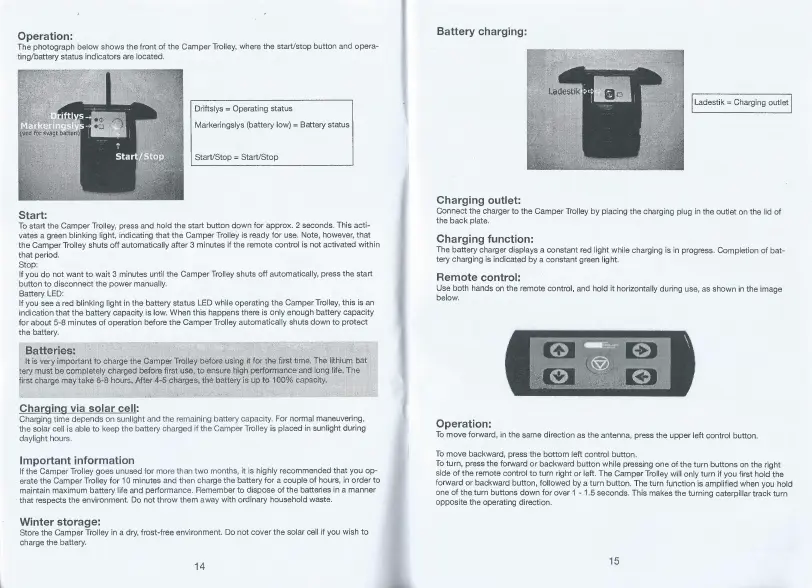
Operation:
The
photograph
below
shows
the
front
of
the
Camper
Trolley,
where
the
start/stop
button
and
opera¬
ting/battery
status
indicators
are
located.
Start:
To
start
the
Camper
Trolley,
press
and
hold
the
start
button
down
for
approx.
2
seconds.
This
acti¬
vates
a
green
blinking
light,
indicating
that
the
Camper
Trolley
is
ready
for
use.
Note,
however,
that
the
Camper
Trolley
shuts
off
automatically
after
3
minutes
if
the
remote
control
is
not
activated
within
that
period.
Stop:
If
you
do
not
want
to
wait
3
minutes
until
the
Camper
Trolley
shuts
off
automatically,
press
the
start
button
to
disconnect
the
power
manually.
Battery
LED:
If
you
see
a
red
blinking
light
in
the
battery
status
LED
while
operating
the
Camper
Trolley,
this
is
an
indication
that
the
battery
capacity
is
low.
When
this
happens
there
is
only
enough
battery
capacity
for
about
5-8
minutes
of
operation
before
the
Camper
Trolley
automatically
shuts
down
to
protect
the
battery.
Batteries:
It
is
very
important
to
charge
the
Camper
Trolley
before
using
it
for
thb
first
time.
The
lithium
bat
tery
must
be
completely
charged
before
first
use,
to
ensure
high
performance
and
long
life.
The
first
charge
may
take
6-8
hours.
After
4-5
charges,
the
battery
is
up
to
100%
capacity.
C
har
g
i
n
g
via
sojar
cell:
Charging
time
depends
on
sunlight
and
the
remaining
battery
capacity.
For
normal
maneuvering,
the
solar
cell
is
able
to
keep
the
battery
charged
if
the
Camper
Trolley
is
placed
in
sunlight
during
daylight
hours.
Important
information
If
the
Camper
Trolley
goes
unused
for
more
than
two
months,
it
is
highly
recommended
that
you
op¬
erate
the
Camper
Trolley
for
10
minutes
and
then
charge
the
battery
for
a
couple
of
hours,
in
order
to
maintain
maximum
battery
life
and
performance.
Remember
to
dispose
of
the
batteries
in
a
manner
that
respects
the
environment.
Do
not
throw
them
away
with
ordinary
household
waste.
Winter
storage:
Store
the
Camper
Trolley
in
a
dry,
frost-free
environment.
Do
not
cover
the
solar
cell
if
you
wish
to
charge
the
battery.
14
Battery
charging:
Charging
outlet:
Connect
the
charger
to
the
Camper
Trolley
by
placing
the
charging
plug
in
the
outlet
on
the
lid
of
the
back
plate.
Charging
function:
The
battery
charger
displays
a
constant
red
light
while
charging
is
in
progress.
Completion
of
bat¬
tery
charging
is
indicated
by
a
constant
green
light.
Remote
control:
Use
both
hands
on
the
remote
control,
and
hold
it
horizontally
during
use,
as
shown
in
the
image
below.
Operation:
To
move
forward,
in
the
same
direction
as
the
antenna,
press
the
upper
left
control
button.
To
move
backward,
press
the
bottom
left
control
button.
To
turn,
press
the
forward
or
backward
button
while
pressing
one
of
the
turn
buttons
on
the
right
side
of
the
remote
control
to
turn
right
or
left.
The
Camper
Trolley
will
only
turn
if
you
first
hold
the
forward
or
backward
button,
followed
by
a
turn
button.
The
turn
function
is
amplified
when
you
hold
one
of
the
turn
buttons
down
for
over
1-1.5
seconds.
This
makes
the
turning
caterpillar
track
turn
opposite
the
operating
direction.
15

Related product manuals