Need help?
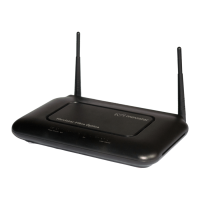
Do you have a question about the movistar RTA01N and is the answer not in the manual?
Covers device features and necessary computer/system requirements for operation.
Explains manual conventions, icons, and how to get support.
Details system requirements and lists all items included in the router's packaging.
Step-by-step guide for physically connecting the router to the network.
Explains the function and status of the router's indicator lights.
Details the purpose of each port and switch on the router's rear panel.
Guides users on setting up network configurations across different Windows OS versions.
Explains how to find and connect to available wireless networks.
Instructions for accessing and configuring the router's basic web interface and settings.
Configuration options for basic wireless network parameters like SSID and channel.
Settings for securing the wireless network using encryption and keys.
Allows configuring MAC address filtering to control network access.
Configuration for setting up virtual servers, port forwarding, and custom applications.
Instructions on how to access the router's web-based configuration interface.
Guide to verify the router and network connection status using LED indicators.
Lists and explains the default network configuration settings of the router.
Shows the current status and basic settings of the router.
Details Internet connection settings and device hardware/firmware versions.
Displays current device status and ADSL line statistics.
Shows packet statistics for transmission and reception on network interfaces.
Covers ATM PVC, Connection Types, WAN IP Settings, and Broadband credentials.
Detailed steps for configuring PPPoE connection parameters.
Detailed steps for configuring PPPoA connection parameters.
Steps to configure the Bridged DSL connection parameters.
Steps to configure 1483 MER connection via DHCP.
Steps to configure 1483 MER connection via Fixed IP.
Instructions to manually set DNS server IP addresses.
Configuration for IPv6 DNS server addresses.
Options to select preferred DSL training modes and standards.
Steps to modify the router's LAN IP address and subnet mask.
Configuration for setting up the router as a DHCP server.
Instructions to add a secondary IP address and subnet mask to the LAN interface.
Configuration for DHCP relay and disabling DHCP functions.
Configuration for assigning fixed IP/MAC addresses to hosts on the LAN.
Configuration for IPv6 LAN settings, including static DHCP configurations.
Configuration options for basic wireless network parameters like SSID and channel.
Settings for securing the wireless network using encryption and keys.
Allows setting up Virtual Access Points (VAPs) and their SSIDs.
Allows configuring MAC address filtering to control network access.
Advanced wireless settings for technically advanced users.
Explains WPS for easier network setup and lists supported features.
Details AP modes (Enrollee, Registrar, Proxy) and client operations for WPS.
Allows changing settings for WPS and connecting to Access Point as an enrollee.
Allows changing settings for WPS and connecting to Access Point as a registrar.
Explains the Push Button method for WPS setup.
Configuration for defining static routes for IPv4 and IPv6 network traffic.
Configuration for RIP protocol to share routing table information.
Steps to configure the DMZ feature to expose a local host to the Internet.
Settings for configuring virtual servers, port forwarding, and custom applications.
Configuration for NAT forwarding and excluding specific IP addresses.
Settings to configure port triggering for applications requiring dynamic port mapping.
Configuring NAT IP mapping for specified source IP addresses.
Configuration for Quality of Service (QoS) to prioritize network traffic and classify packets.
Configuration for controlling network traffic flow based on rules.
Configuration for CWMP (TR-069) to communicate with Auto-Configuration Server.
Configuration for grouping interfaces and mapping ports.
Settings to enable/disable Spanning Tree Protocol and set MAC address aging time.
Configuration to limit the number of clients accessing the Internet.
Configuration for setting up tunnels to connect IPv4 and IPv6 networks.
Settings for miscellaneous advanced configurations like Half Bridge.
Configuration for IGMP proxy to issue IGMP host messages.
Configuration for MLD proxy and snooping.
Configuration to enable or disable UPnP for network device discovery.
Instructions for installing UPnP control point software on Windows ME/XP.
Requirements for SSDP Discovery Service to use UPnP control point software.
Configuration for SNMP protocol for device management and monitoring.
Configure DNS server settings by obtaining them automatically via WAN.
Configure DNS server settings by manually entering IP addresses.
Explains Dynamic DNS and its purpose for maintaining domain name mapping.
Steps to configure Dynamic DNS service using DynDNS.org.
Steps to configure Dynamic DNS service using TZO.
Steps to configure MAC filtering to deny outgoing network access.
Feature to deny or allow specific services or applications in the forwarding path.
Feature to deny or allow specific IPv6 services or applications in the forwarding path.
Steps to configure URL blocking based on specified keywords.
Configuration to protect against Denial-of-Service (DoS) attacks.
Configuration settings for enabling and managing remote control access.
Instructions for downloading and installing firmware updates manually.
Steps to save the current router configuration to a file.
Steps to load a previously saved configuration file to the router.
Instructions to change the default username and password for web access.
Saves system settings to flash memory and reboots the router.
Resets the router to its original factory default settings.
Configuration for system time settings, including NTP/SNTP synchronization.
Configuration and viewing of system event logs.
Utilities to test network connectivity by pinging IP and IPv6 addresses.
Utilities to trace network routes and diagnose ATM interface problems.
Displays ADSL performance and runs general diagnostic tests for connectivity.
Instructions for configuring PC network settings to work with the router.
Specific steps for configuring network settings on various Windows versions.
Guide on manually assigning static IP information to PCs if needed.
Explanation of IPv4 IP address structure and notation.
Explains IP address classes, subnet masks, and their roles in network segmentation.
Provides solutions for common problems related to LEDs and Internet access.
Guide on using IP utilities like ping and nslookup for diagnosing network issues.
Defines Asymmetric Digital Subscriber Line, commonly used for home users.
Dynamic Host Configuration Protocol for automating address assignment and management.
Domain Name System that maps domain names to IP addresses.
Address of a host on the Internet, identifying network and host ID.
Local Area Network limited to a small geographic area.
Network Address Translation for translating public IP to private IP.
Point-to-Point Protocol for serial data transmission.
Point-to-Point Protocol over Ethernet interface.
Forwarding data efficiently based on destination IP and network conditions.
Basic Internet protocols for data delivery and reassembly.
 General
| Brand | Movistar |
|---|---|
| Model | RTA01N |
| Type | Wireless Router |
| Wireless Standards | IEEE 802.11b/g/n |
| Frequency Band | 2.4 GHz |
| Maximum Data Rate | 300 Mbps |
| Ethernet Ports | 4 |
| WAN Port | 1 |
| Security | WPA/WPA2 |
| Ports | 4 Ethernet, 1 WAN |

 To Next Page