EasyManua.ls Logo

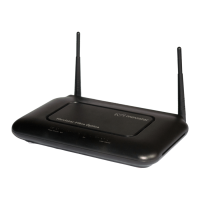
movistar VG-8050 - User Manual

movistar VG-8050
154 pages
Print Icon
To Next Page IconTo Next Page
Loading...
VG-8050
Wireless Router - Access Point
User Manual
Version 1.4, October 2014
261097-011

Table of Contents

Question and Answer IconNeed help?

Do you have a question about the movistar VG-8050 and is the answer not in the manual?

Summary

Important Safety Instructions

Chapter 1 Introduction

Chapter 2 Installation

2.1 Hardware Setup

Provides instructions for connecting and setting up the physical hardware components of the device.

Chapter 3 Web User Interface

3.2 IP Configuration

Details how to configure IP settings for the device using DHCP and Static IP modes.

3.3 Login Procedure

Guides users on accessing the device's web user interface by entering the IP address and credentials.

Chapter 4 Basic User Interface

4.1 Basic Settings

Covers configuration of WAN service, LAN service, WiFi, Ports, and VoIP settings.

4.1.1 WAN Service

Configures PPP settings or enables Bridge mode for WAN connectivity.

4.1.2 LAN Service

Allows modification of local IP, DHCP server range, and IPv6 LAN configuration.

4.1.3 WiFi

Configures basic wireless LAN features like SSID, hiding the network, and channel selection.

4.1.7 Password change

Allows changing the administrator password for device access.

Chapter 5 Advanced User Interface

Chapter 6 Advanced Setup

6.3 LAN

Configures LAN interface settings, including IP address, subnet mask, and DHCP server options.

6.4 NAT

Configures Network Address Translation (NAT) settings, including Virtual Servers and DMZ Host.

6.5 Security

Manages firewall features, IP filtering, and MAC filtering for network security.

Chapter 7 Wireless 2.4 G Band

7.1 Basic

Configures basic wireless LAN features like enabling/disabling the interface, hiding the SSID, and setting the network name.

7.2 Security

Configures wireless security using WPS or manual setup, including authentication and encryption.

Chapter 8 Voice

Chapter 9 Diagnostics

Chapter 10 Management

Summary

Important Safety Instructions

Chapter 1 Introduction

Chapter 2 Installation

2.1 Hardware Setup

Provides instructions for connecting and setting up the physical hardware components of the device.

Chapter 3 Web User Interface

3.2 IP Configuration

Details how to configure IP settings for the device using DHCP and Static IP modes.

3.3 Login Procedure

Guides users on accessing the device's web user interface by entering the IP address and credentials.

Chapter 4 Basic User Interface

4.1 Basic Settings

Covers configuration of WAN service, LAN service, WiFi, Ports, and VoIP settings.

4.1.1 WAN Service

Configures PPP settings or enables Bridge mode for WAN connectivity.

4.1.2 LAN Service

Allows modification of local IP, DHCP server range, and IPv6 LAN configuration.

4.1.3 WiFi

Configures basic wireless LAN features like SSID, hiding the network, and channel selection.

4.1.7 Password change

Allows changing the administrator password for device access.

Chapter 5 Advanced User Interface

Chapter 6 Advanced Setup

6.3 LAN

Configures LAN interface settings, including IP address, subnet mask, and DHCP server options.

6.4 NAT

Configures Network Address Translation (NAT) settings, including Virtual Servers and DMZ Host.

6.5 Security

Manages firewall features, IP filtering, and MAC filtering for network security.

Chapter 7 Wireless 2.4 G Band

7.1 Basic

Configures basic wireless LAN features like enabling/disabling the interface, hiding the SSID, and setting the network name.

7.2 Security

Configures wireless security using WPS or manual setup, including authentication and encryption.

Chapter 8 Voice

Chapter 9 Diagnostics

Chapter 10 Management

movistar VG-8050 Specifications

General IconGeneral
BrandMovistar
ModelVG-8050
TypeWireless Router
Frequency Band2.4 GHz
Max Speed300 Mbps
Antennas2 x External
Wireless Standards802.11b
SecurityWPA2
Ports4 x LAN

Related product manuals