This document is an instruction manual for the MOXEAY Portable Air Conditioner, Model: MY1111.
Function Description
The MOXEAY Portable Air Conditioner is designed for indoor use, offering cooling, heating (for models with heating function), dehumidification, and fan functions. It features continuous water drainage capabilities. The unit includes an automatic swing leaf in the air outlet for air distribution, which also covers the outlet when turned off to prevent dust ingress. The control panel is an LCD display, complemented by a high-quality LCD remote control for ease of operation. The design incorporates handles on both sides for easy portability and a rear power cord wrapping structure to keep the cord tidy and prevent damage. It also includes an air filtration system and a timing switch function. For safety and longevity, the unit has various protection functions, including an automatic compressor restart delay of three minutes after shutdown.
Important Technical Specifications
The manual does not explicitly list detailed technical specifications such as power consumption, cooling/heating capacity in BTUs, or refrigerant type. However, it mentions that the appliance uses a flammable refrigerant and warns against puncturing the refrigerant tubing. It also specifies that the timing values can be set in 1-24 hours, adjusted by one hour increments. The recommended operating temperature range for cooling is 7-35 °C (44-95 °F).
Usage Features
The air conditioner is designed for user convenience with several features:
- Control Panel and Remote Control: Both an LCD control panel on the unit and a remote control are provided for operation. The remote control requires AAA 1.5VDC batteries (not included).
- Modes: The unit supports cooling, fan, and dehumidifying modes. A sleep mode is available in cooling mode for energy-saving and quiet operation.
- Temperature and Time Setting: Users can adjust the setting temperature (not available in fan or dehumidifying mode) and set timing values for turning the unit on or off.
- Wind Speed Selection: In cooling and fan modes, users can select high or low wind speed. In dehumidifying mode, the fan automatically operates at low speed.
- Installation: The unit is portable and can be easily moved. It requires a flat and dry placement, with at least 50cm distance from surrounding objects or walls. The heat pipe assembly and window sealing plate components are designed for straightforward installation. The exhaust pipe must be properly connected, not distorted or bent, and its ventilation should not be blocked.
- Drainage: The unit offers both manual and continuous drainage options. For manual drainage, a water container is placed below the side water outlet, and a rotary knob and rubber stopper are removed to drain water. For continuous drainage, a drainage pipe can be connected to a bucket.
- Smart Life (Wi-Fi) Guide: The air conditioner can be controlled via a mobile app called "Smart Life." Users need to register an account, add the device by scanning a QR code or searching in the app market, and then connect the unit to their WiFi network. The WiFi button on the unit panel (or Fan speed button for models without a dedicated WiFi button) needs to be pressed for 3-5 seconds until the LED indicator flashes continuously to enter pairing mode. Once connected, users can control the unit's temperature, modes, fan speeds, and set customized timers remotely.
Maintenance Features
Regular maintenance is crucial for the air conditioner's performance and longevity:
- Cleaning the Surface: The surface of the machine should be cleaned with a wet soft cloth. Chemical solvents like benzene, alcohol, or gasoline should not be used as they can damage the surface or the entire machine.
- Cleaning the Filter Screen: The filter screen should be cleaned every two weeks, especially if it's clogged with dust, to maintain the air conditioning's effectiveness.
- Cleaning the Upper Filter Screen Frame: This involves unscrewing a screw, removing the EVA filter net, washing it in warm water with neutral detergent (around 40°C / 104°F), rinsing it clean, and drying it in the shade before reinstallation.
- Safety Precautions: Before any cleaning or maintenance, the machine must be turned off and unplugged.
Protection Functions
The unit incorporates several protection mechanisms:
- Frost Protection: In cooling, dehumidification, or economic power saving modes, if the exhaust pipe temperature is too low, the machine enters a protection status and reverts to normal operation when the temperature rises.
- Overflow Protection: If the water pan exceeds a warning level, the machine alarms and displays "FL." Users must drain the water for the unit to return to normal operation.
- Automatic Defrosting: Heating and cooling models have an automatic defrosting function, indicated by a flashing heating symbol on the display.
- Automatic Thermal Protection: In heating mode, the machine has thermal protection to safeguard its service life. During this period, the compressor and lower motor stop and resume operation once the machine's temperature recovers.
- Compressor Protection: To extend the compressor's life, there's a 3-minute delay before restarting after it has been turned off.
Troubleshooting
The manual provides a troubleshooting guide for common issues:
- No electricity: Check power connection.
- Overflow indicator "FL": Discharge water.
- Ambient temperature too low/high: Use within recommended temperature range (7-35 °C).
- Poor cooling/heating: Adjust set temperature, close doors/windows, clear obstructions, clean filter screen.
- Big noise: Place on a flat, hard surface.
- Compressor not working: May be due to overheat protection; wait 3 minutes for temperature to lower.
- Remote control not working: Check distance, alignment, and replace batteries.
- Error codes 'E1' and 'E2': Indicate issues with the room temperature sensor or pipe temperature sensor, respectively, requiring professional inspection.
The manual emphasizes that users should not attempt to repair or disassemble the air conditioning themselves, as this will void the warranty and could be dangerous. Any failures should be addressed by the manufacturer or qualified professionals.

 Need help?
 General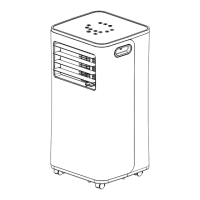

 To Next Page