III. Control Setting
1.Control panel operation instructions
1
)
operation interface
:
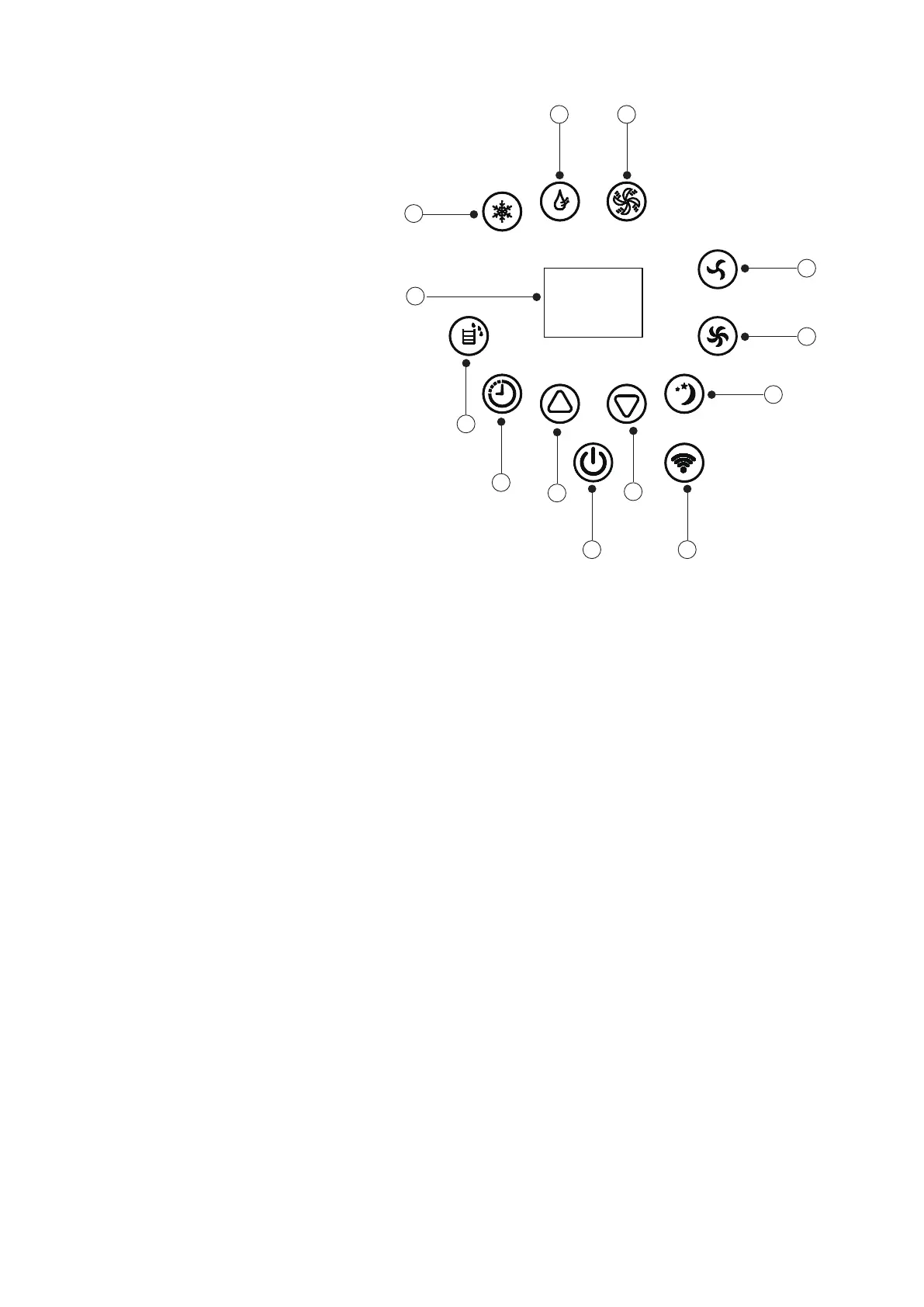
1.Power Key 2.Up Key 3.Timer Key 4. Water full light. 5.Display Window 6.Cooling Key
7. Dehumidifier Key 8.Fan Key 9.Low Fan Speed Key 10.High Fan Speed Key 11.Sleep Key
12.WIFI Key 13.Down Key
1.Power Key: press the key to turn on and turn off the machine. In the case of power on, press the
key to turn off the machine; in the case of power off, press the key to turn on the machine.
2.Mode Selection Key: In the case of power on, press the key to switch between cooling → fan →
dehumidifying mode.
3.Up Key and Down Key: press the two keys to change the setting temperature or setting time, operate as
follows:
While setting temperature, press up key or down key to select the required temperature (not available in fan
or dehumidifying mode).
While setting time, press up key or down key to select the required time.
4.Wind Speed Selection Key:
1)In cooling and fan mode, press the key to select high,low wind speed operation. But limited by
anti-cold conditions, under certain conditions, it may not run according to the set wind speed.
2)In dehumidifying mode, pressing the key is invalid, and the fan will forcibly choose low wind speed
operation.
5.Timing Key:
In the case of power on, press the key to close timing; in the case of power off, press the key to open
timing. Press the key, when the timing symbol flashes, press up and down key to select the required
timing value. Timing values can be set in 1-24 hours and the timing value is adjusted up or down by
one hour.
6.Sleep Mode:
In the cooling Mode,Press the UP and Fan Key to turn on the sleep mode,then the unit will work on
Energy-Saving and quiet type.
1 12
13
2
7 8
3
4
6
5
9
10
11


 To Next Page
 Loading...