Installation
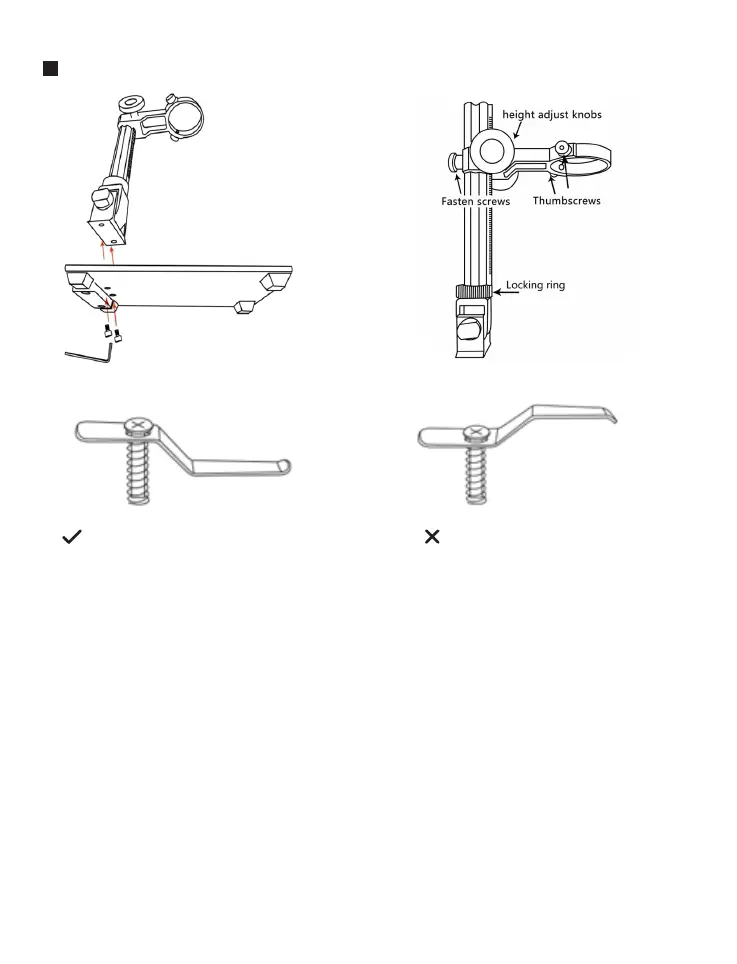
(Correct Installation) (Wrong Installation)
(Pic.3 Mount metal clips)
1. Screw the stand on the base (see the picture above, Pic.1 )
2. Put the microscope on the holder.
3. Adjust the position and orientation of the main unit and then tighten the
microscope's thumb screws to hold it in place. If the installation is done
correctly, the focus cylinder, microscope screen and the angle between
the column and the base plate can be adjusted freely.
4. The microscope comes with two metal clips, if you need to fix the object,
you can assemble it on the base. You need to pay attention to the direc-
tion of the metal clips(see Pic.3)
(Pic.2 Step 2)(Pic.1 Step 1)
3
Email: support@moysuweus.com



 To Next Page