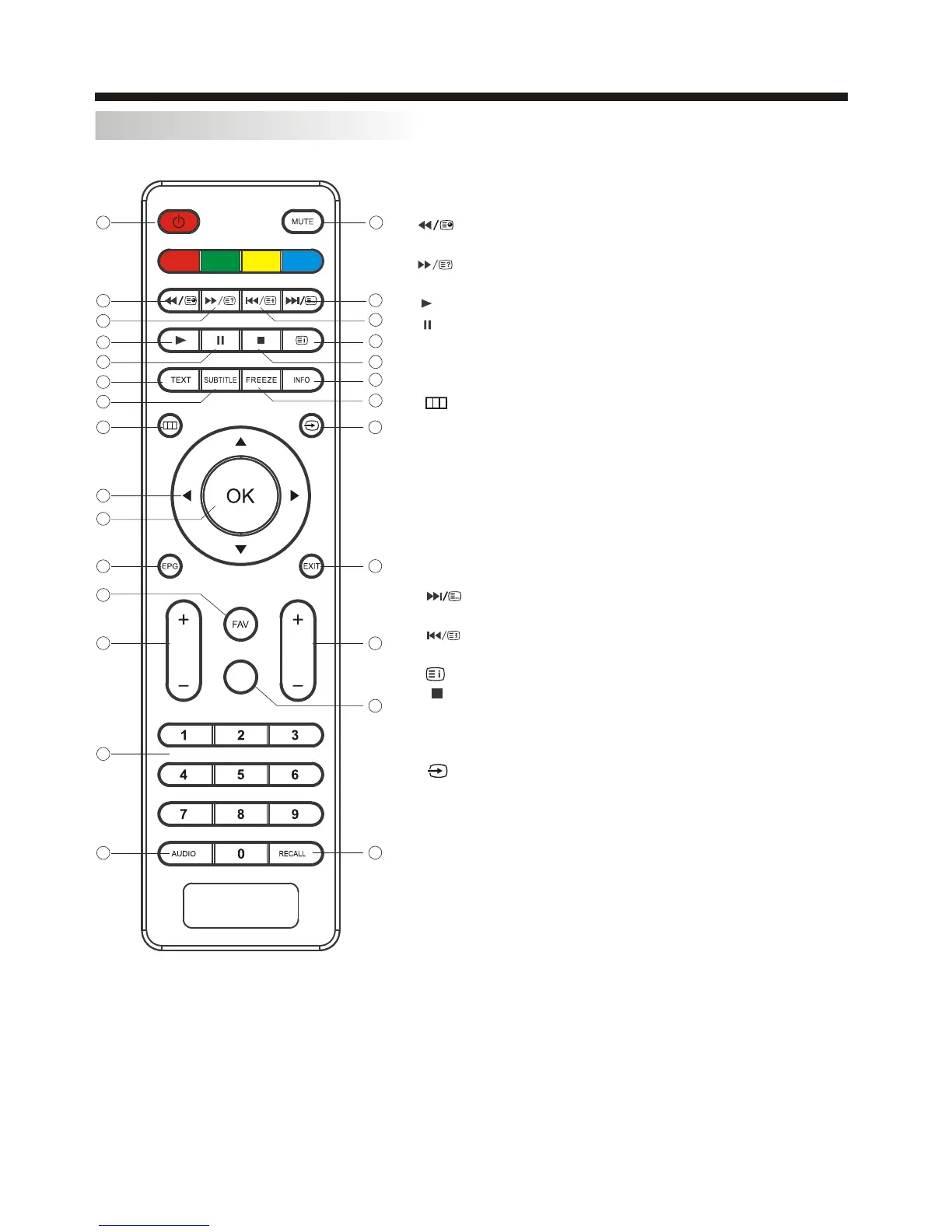
REMOTE CONTROLREMOTE CONTROL
REMOTE CONTROL
1
2
3
4
5
6
7
8
9
10
11
13
12
14
15
16
17
18
19
20
21
22
23
24
25
26
27
1:POWER:To set the TV to standby or power on.
2: :In USB mode, used as reverse key, in teletext
mode used as subpage key.
3: : In USB mode, used as forword key, in teletext
mode used as reveal key.
4: :
5: :
6:TEXT:To enter or TELETEXT.
7: SUBTITLE: To turn on subtitles press the subtitle button
in DTV mode.
: : Displays the main on-screen menu.
:
:OK
11: EPG: To display information about the program being viewed
and what's on next in DTV mode.
12:FAV: To access your favourite channels list in TV or DTV mode.
13:VOL+/- : To adjust sound level.
14:NUMERIC KEY: For direct access to channels.
15:AUDIO: To select the available audio language of TV programs .
16:MUTE: To disable or enable the sound output.
: : In USB mode, used as next key, in teletext mode used as
list key.
18: : In USB mode, used as previous key, in teletext mode used
as hold key.
19: :In teletext mode used as index.
20: : Press to stop play in USB mode.
21:INFO: To display the program information of the show you
are watching, press the info button.
22:FREEZE: Press to freeze the picture you are watching.
23: : Press to display and select the available video sources.
EXIT: To return to the previous menu or exit menu.
25:CH+/CH-: To access the next or previous channels.
26:REP:In USB mode,select Repeat mode.
27:RECALL: DTV Mode: RECALL:Jumps to last channel
viewed.
Press in USB Mode to begin or continue playback.
Press in USB Playback Mode to pause playback.
8
9
10
17
24:
CURSOR: To move within the menu.
: Confirms selection.
VOL
CH
REP
-10-



 To Next Page