Technical modifications, changes and errors excepted
www.mpfdrive.com 8
Technical modifications, changes and errors excepted
www.mpfdrive.com 7
MPF DRIVE 5.1 Motor Data
Nominal Power [ W] 250
Voltage [V] 36
Max. Torque [Nm] 50
Weight [kg] approx 4.8
Operating temperature [ -5...+°C] 40
Storage temperature -10...+[°C] 50
Degree of protection IP 55
- Max. Charging current [mA] 500
USB Connection
- Charging Voltage [V] 5
Degree of protection IP 67
TECHNICAL DATA:
CONTROL UNIT AF
(Advanced Function)
Operating temperature -5...+[°C] 40
Storage temperature -10...+[°C] 50
Weight [kg] approx 0.1
Rated voltage [V] 36
Power output [W] 7.2
LIGHTNING
(only available with light cable)
CONTROL UNIT LW
Degree of protection IP 53
Operating temperature -5...+[ °C] 40
Storage temperature -10...+[ °C] 50
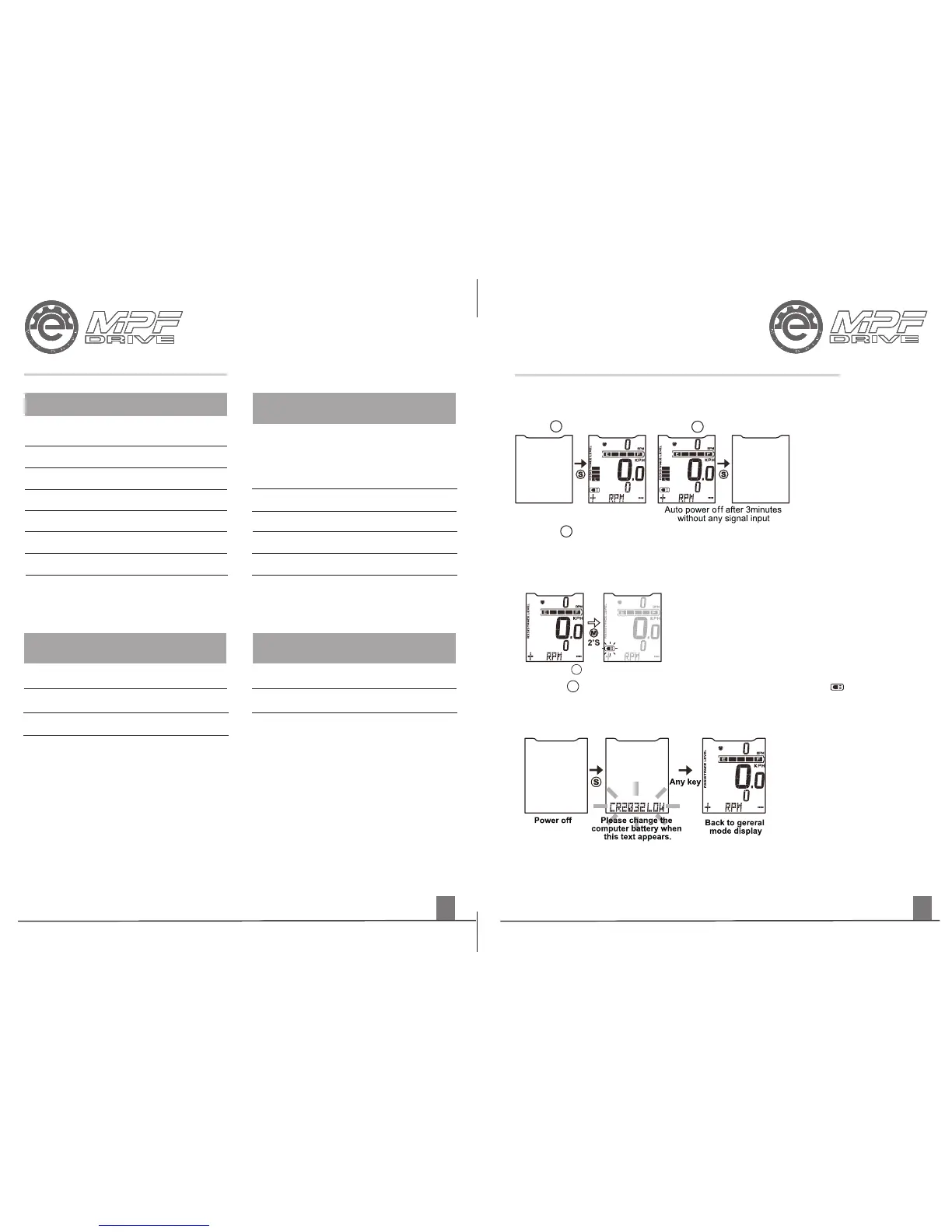
1. Press S button to set the system into Power On/Off status.
2. The system will shut down automatically after 3 minutes when not in use to
improve battery life.
POWER ON
Press S key to power on
POWER OFF
Press S key to power off
POWER ON / POWER OFF
BIKE LIGHT
Press the M button 2 seconds
Press the M button for 2 seconds to turn on / off the bike light ( symbol will
appear) together with the back light of the display
COMPUTER LOW BATTERY DISPLAY
1. When the display shows the low-battery text CR2032LOW replace the
display battery.
2. Go to: Reset the computer(All clear)
CONTROL UNIT AF (ADVANCED FUNCTION)


 To Next Page