Introduction
Introduction
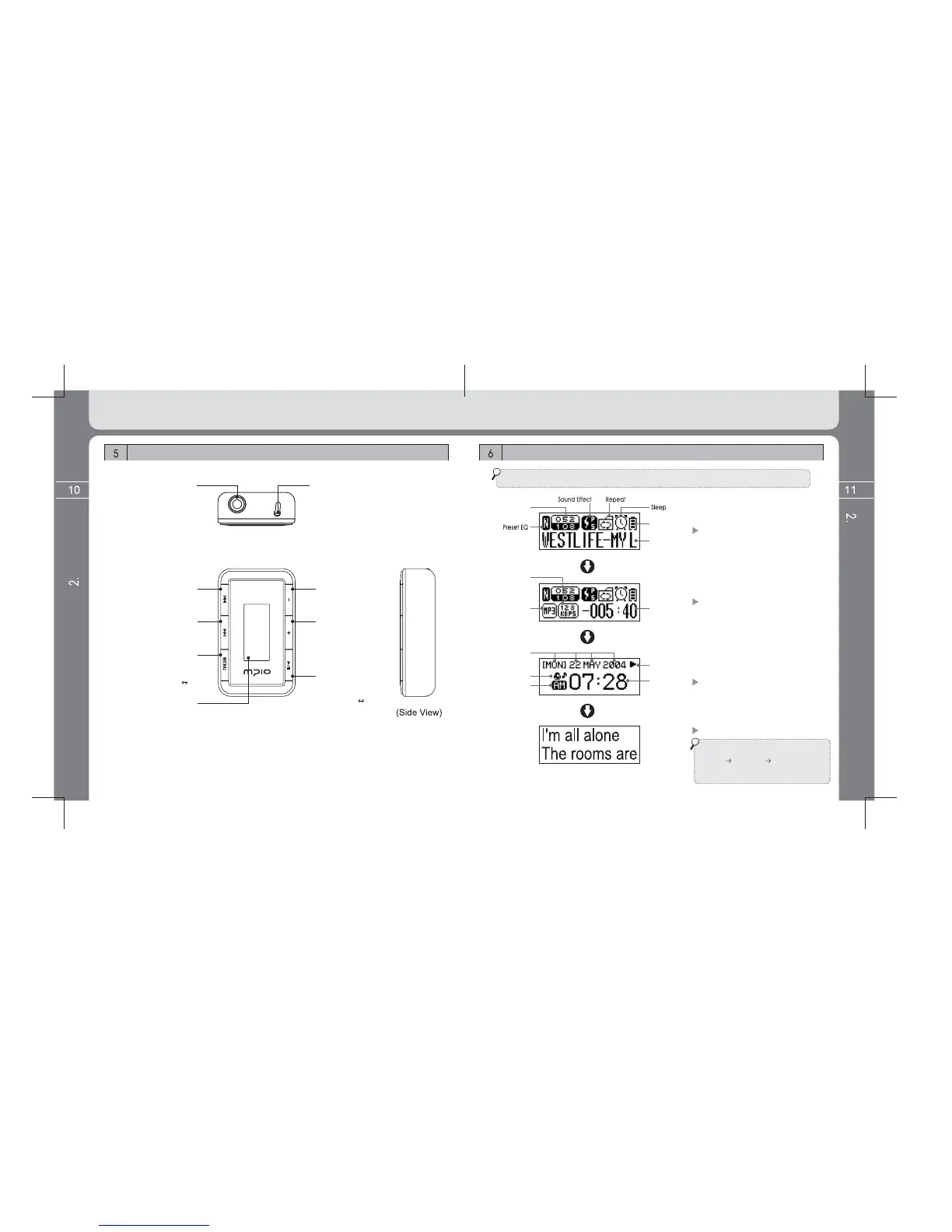
Configuration of LCD display
Part Name and how to use the buttons
(Top View)
(Front View)
* LCD information is changed as below if pressing the MENU button shortly.
VOL (–) button
Volume reduce
VOL (+) button
Volume increase/
Move to the upper menu
or folder in searching
Navigation or Menu.
PLAY/PAUSE button
Turn on/off/ Music file play,
Pause / FM SCAN
FM CHANNEL
mode change
Earphone connection terminal
& USB connection terminal
REW button
Previous music,
backward wind/menu move
FF button
Next music,
backward wind/menu move
MENU button
Menu entry (Long key)
Information change
function (Short key)
Sector repeat function
(when setting up A B
[sector repeat] in Menu)
LCD display
Displays file information,
FM listening screen and
menu setup status.
RESET
Current track/
No. of all tracks
Battery
remained
Music
information
Music information
display screen
Bit rate
File format
Playing time
Playback condition
(only in playbak)
Format type / Bit rate /
Playing time display
Weekday/day/
month/year
Alarm setup status
A.M./P.M.
Time display
Date and watch display
Lyric support display time
If files have lyrics, lyrics are displayed on
the LCD screen as left figure when
[MENU] [DISPLAY] [LYRICS] setting
values are set to ON from OFF.
(For change of Lyrics Menu, see page 34.)



 To Next Page