TC470X Instruction
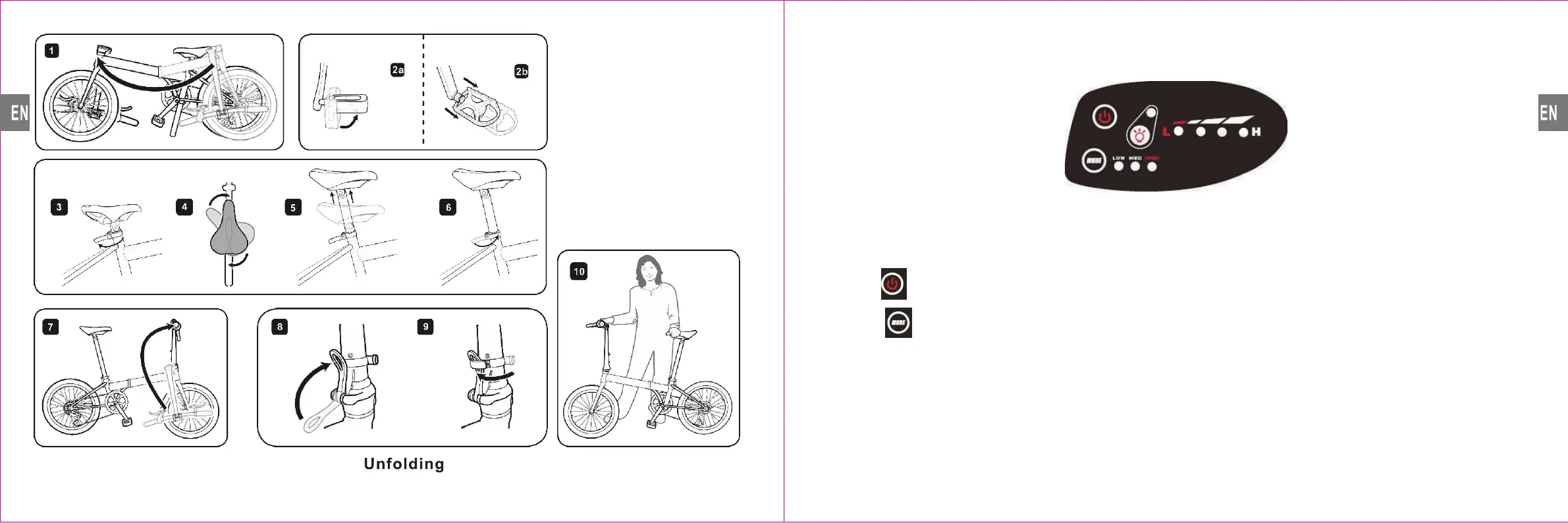
Display Panel Description: This model has 2 buttons, 8 LED lights
Location & Features:
Top left Button
Lower left Button
Top left LED
4 Middle LED
Lower left“LOW MID HIGH” LED、 、
Function:
1 Power On/Off、
On : Press “Power Button”, display works; Press the
Power Button for 3-5 seconds, Display off work.
2 On/Off the headlight、
When the display power on, press again the “Power Button” , then headlight on.
LED indicator On/Off means Headlight On/Off.
3 Mode:、
Press “Mode” Button, can adjust PAS LEVEL ,, press “Mode” Button for 3-5 seconds,
Mode change to 6KM/H. Mode change indicator On/Off & PAS LEVEL as follows:
LOW On; MED, HIGH Off
MED ON;LOW, HIGH OFF
HIGH ON;LOW, MED OFF
L M H All on 、 、
4、Battery Power indicator: No operation, automatic display, full battery power to low
battery power was showed by the LED indicator from 4 lights to 1 light.
When the battery is under voltage, only the left most LED will Flash.
PAS LEVEL 1
PAS LEVEL 2
PAS LEVEL 3
Mode change to 6KM/H
Mode Change Indicator
Battery Power Indicator
Headlight Indicator
Mode Change
Power/headlight button
Name:
13 14


 To Next Page