
 Need help?
Do you have a question about the MPS EVKT-USBI2C-02 and is the answer not in the manual?
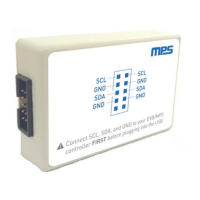
Provides details on the EVKT-USBI2C-02, its purpose, and included components for USB to I2C/PMBus communication.
Details the pin assignments for the 10-pin ribbon cable used for connecting the interface device to evaluation boards.
Illustrates the bottom view of the 10-pin ribbon cable, showing the layout for proper orientation.
Step-by-step instructions for connecting the EVKT-USBI2C-02 to an evaluation board and computer for operation.
Caution regarding the order of connection steps to prevent damage to communication pins during hot plugging.
Lists the revision history of the document, including dates, descriptions of changes, and updated pages.
The EVKT-USBI2C-02 is a communication interface device designed to bridge USB with I²C or PMBus protocols. This device is specifically engineered to facilitate interaction with Monolithic Power Systems (MPS) I²C and PMBus products, as well as MPS Virtual Bench Pro and I²C GUI tools. Its primary function is to provide a quick and straightforward method for evaluating the performance of MPS digital products.
The EVKT-USBI2C-02 kit is comprehensive, including several essential components to ensure immediate usability. The core of the kit is the USB to I²C communication device interface itself, which acts as the central hub for data translation. To connect this interface to a computer, a standard USB cable is provided. For connecting to evaluation boards or other devices, the kit includes two types of ribbon cables: one 10-pin ribbon cable and one 3-pin ribbon cable, offering flexibility for various connection requirements. Additionally, a datasheet is included to provide detailed technical specifications and operational guidelines, and necessary driver files are supplied to ensure proper communication with the host computer.
The EVKT-USBI2C-02 supports two primary types of ribbon cable connections for interfacing with evaluation boards: a 3-pin ribbon cable and a 10-pin ribbon cable. The 10-pin ribbon cable offers a more comprehensive set of connections, detailed as follows:
| Pin# | Description | Pin# | Description |
|---|---|---|---|
| 1 | SCL | 2 | SCL |
| 3 | GND | 4 | GND |
| 5 | SDA | 6 | SDA |
| 7 | GND | 8 | GND |
| 9 | NC | 10 | NC |
This pinout indicates redundant SCL (Serial Clock) and SDA (Serial Data) lines, along with multiple Ground (GND) connections, which can enhance signal integrity and provide flexibility in wiring. Pin 9 is designated as "NC" (No Connect). The device itself features clearly labeled ports for SCL, SDA, and GND, ensuring correct wiring. A crucial warning is provided: "Connect SCL, SDA, and GND to your EVB/MPS controller FIRST before plugging into the USB." This emphasizes the importance of establishing the evaluation board connection before powering the EVKT-USBI2C-02 via USB to prevent potential damage to the communication pins.
The EVKT-USBI2C-02 is designed for ease of use, particularly when integrated with MPS Virtual Bench Pro and I²C GUI tools. The quick start guide outlines a simple, step-by-step process for setting up and using the device:
While the document does not explicitly detail maintenance features, the design of the EVKT-USBI2C-02 suggests a robust and user-friendly approach. The provision of driver files and a datasheet implies that software updates and detailed technical information will be available to support the device over its lifespan. The clear warning regarding the connection order (evaluation board first, then USB) is a critical operational guideline that, if followed, helps prevent damage to the communication pins (SCL, SDA) during "hot plug" events, thereby contributing to the longevity and reliable operation of the device. This emphasis on correct connection procedures serves as a key preventative maintenance instruction. The modular design, with separate cables and the main interface device, also suggests that individual components could be replaced if necessary, though this is not explicitly stated.
In summary, the EVKT-USBI2C-02 is a dedicated and comprehensive communication interface kit that simplifies the evaluation of MPS digital products. Its straightforward setup, clear connection guidelines, and integration with MPS software tools make it an invaluable asset for developers and engineers working with I²C and PMBus protocols.
 General
| Brand | MPS |
|---|---|
| Model | EVKT-USBI2C-02 |
| Category | Conference System |
| Language | English |

 To Next Page