5-2
MS-7028 ATX Mainboard
BIOS Configuration
The Intel RAID Option ROM should be integrated with the system BIOS on all
motherboards with a supported Intel chipset. The Intel RAID Option ROM is the Intel
RAID implementation and provides BIOS and DOS disk services. Please use <Ctrl> +
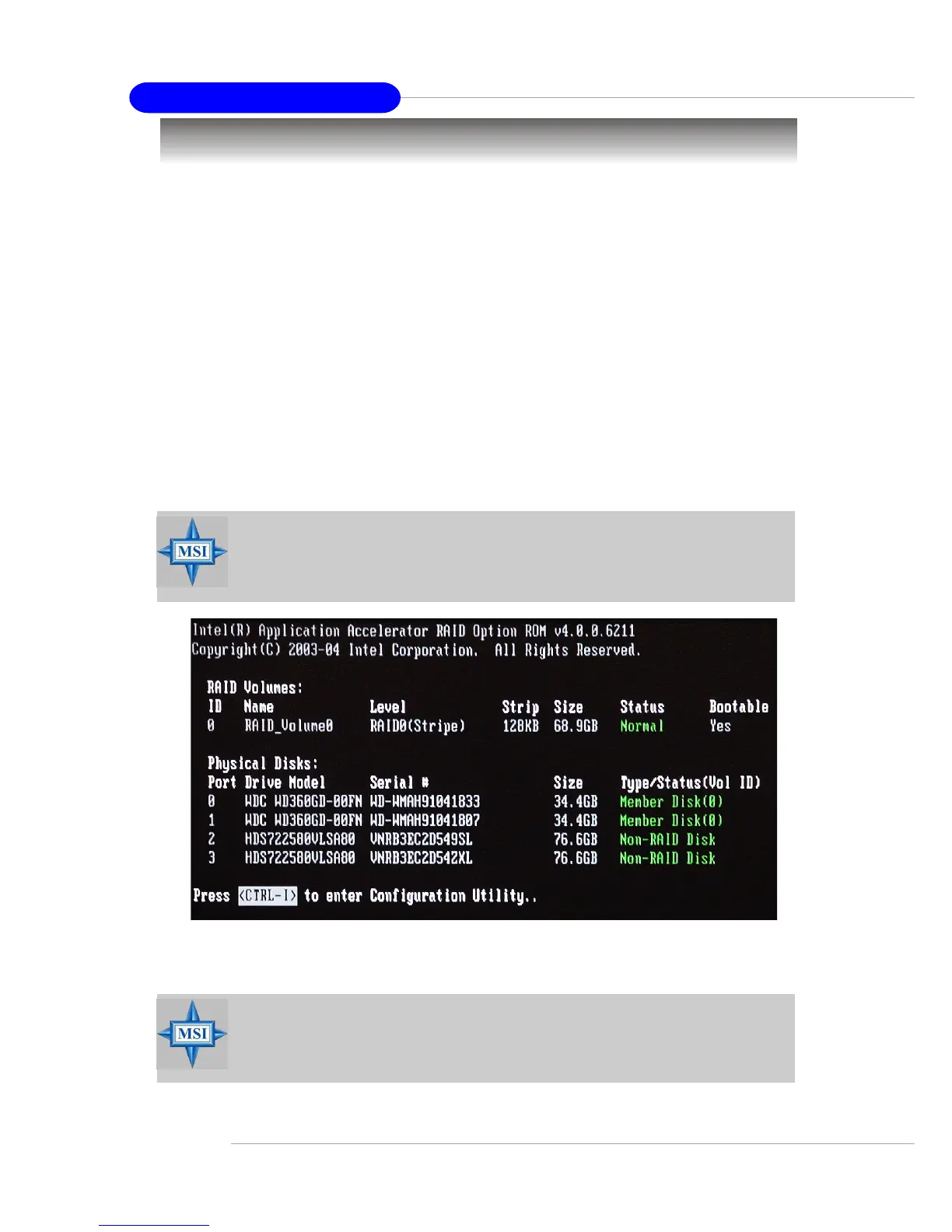
<I> keys to enter the “Intel(R) RAID for Serial ATA” status screen, which should
appear early in system boot-up, during the POST (Power-On Self Test). Also, you
need to enable the RAID function in BIOS (please to P.3-13 items ATA/IDE Configu-
ration <Enhanced> & Configure SATA as <RAID> for details) to create, delete
and reset RAID volumes.
After the above message shows, press <Ctrl> and <I> keys simultaneously
to enter the RAID Configuration Utility.
Using the Intel RAID Option ROM
1. Creating, Deleting and Resetting RAID Volumes:
The Serial ATA RAID volume may be configured using the RAID Configuration
utility stored within the Intel RAID Option ROM. During the Power-On Self Test (POST),
the following message will appear for a few seconds:
MSI Reminds You...
The “Driver Model”, “Serial #” and “Size” in the following example might
be different from your system.
MSI Reminds You...
The following procedure is only available with a newly-built system or if
you are reinstalling your OS. It should not be used to migrate an exist-
ing system to RAID 0 or RAID 1.


 To Next Page