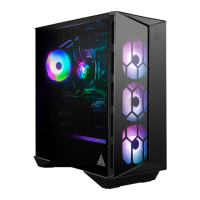
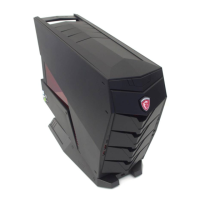
This document is the user manual for the Aegis RS 10th Gaming Desktop. It provides essential information regarding the system's overview, getting started procedures, and operational guidelines.
Function Description
The Aegis RS 10th Gaming Desktop is a high-performance personal computer designed for gaming. It offers a feature-packed platform for an exciting PC experience. The manual covers basic setup, power management, network connectivity, and system recovery, ensuring users can effectively operate and maintain their device.
Important Technical Specifications
Connectivity:
- USB 2.0 Ports: Multiple ports supporting up to 480 Mbit/s (Hi-Speed) data transfer for devices like keyboards, mice, and other USB-compatible peripherals.
- USB 3.2 Gen 1 Ports: Multiple ports (including one Type-C) supporting SuperSpeed USB with up to 5 Gbps high-speed data transfer for storage devices, hard drives, and video cameras. The Type-C connector features reversible plug orientation.
- USB 3.2 Gen 2 Ports: Multiple ports (including one Type-C) supporting SuperSpeed USB with up to 10 Gbps high-speed data transfer for various high-speed devices. The Type-C connector features reversible plug orientation.
- HDMI-out: High-Definition Multimedia Interface (HDMI) for all-digital audio/video transmission, supporting various TV formats (standard, enhanced, high-definition video) and multi-channel digital audio on a single cable.
- DisplayPort out: Digital display interface standard for connecting monitors with DisplayPort inputs.
- 2.5G LAN Port: Standard RJ-45 LAN jack for Local Area Network (LAN) connection, supporting 10 Mbit/sec, 100 Mbit/sec, and 1000 Mbit/sec data rates, indicated by LED color (Green/Orange) and state (Off, On steady, Blinking).
- PS/2 Combo Port: Provided for connecting a keyboard or mouse.
- Audio Jacks:
- Microphone Jack (Mic-In): For microphones.
- Headphone Jack (Line-Out): For headphones or speakers.
- Line In: For external audio input devices.
- SS-Out: Side surround sound line out in 7.1 channel mode.
- CS-Out: Center/Subwoofer Out in 5.1/7.1 channel mode.
- RS-Out: Rear-Surround Out in 4/5.1/7.1 channel mode.
- Power Jack: Supplies power to the system.
Power Requirements:
- The system operates within a power voltage range of 100~240V.
- It requires connection to an earthed mains socket-outlet if the power cord has a 3-pin plug.
Environmental Conditions:
- Operating Temperature: Maximum operating temperature is around 35°C.
- Storage Temperature: Do not leave the computer in an unconditioned environment with a storage temperature above 60°C or below 0°C to prevent damage.
Usage Features
System Overview (Top View):
- Power Button: To turn the system on and off.
- Reset Button: To restart the PC.
- Power LED: Indicates when the computer is on, off, or in Standby.
- USB 3.2 Gen 1 Type C: For high-speed data transfer.
- USB 3.2 Gen 1: For high-speed data transfer.
- Microphone Jack: For microphones.
- Headphone Jack: For headphones or speakers.
- MSI LED Button: Unlocks RGB lighting effects.
Getting Started:
- Placing the System: Detailed steps for unpacking, including removing the tempered glass side panel and foam packaging, inspecting components, connecting the monitor, Wi-Fi antennae, keyboard, and mouse, and finally powering on the desktop.
- Safety & Comfort Tips: Guidelines for choosing a good workspace, proper posture, hand placement, and avoiding discomfort during long periods of use. Emphasizes treating the electrical device with care.
System Operations:
- Power Management (Windows 10):
- Users can control power management features (display, hard drive, battery) via [Power Options] in Windows OS.
- Options include turning off the display and initiating sleep mode after periods of inactivity.
- The system is preset to turn off the display after 10 minutes and initiate Sleep after 30 minutes when operating on AC power, aligning with ENERGY STAR qualified monitor features.
- Waking the System Up: The computer can be woken from power-saving mode by the power button, network (Wake On LAN), mouse, or keyboard.
- Energy Saving Tips: Recommendations include turning off the monitor, tuning Power Options, installing power-saving software, and disconnecting the AC power cord when the PC is unused for a certain time.
- Network Connection (Windows 10):
- Wired Network: Steps to set up a wired LAN connection using an Ethernet cable, including configuring Broadband (PPPoE) settings with ISP information.
- Wireless Network: Steps to connect to a WLAN, including selecting an available network or manually adding a new wireless network with security details.
Maintenance Features
Upgrade and Warranty:
- Certain preinstalled components may be upgradable or replaceable. Users should refer to the User's Manual for upgrade limitations.
- Contacting the local dealer or authorized service center is recommended for upgrades or replacements to avoid voiding the warranty.
Acquisition of Replaceable Parts:
- Replaceable parts (or compatible ones) may be fulfilled by the manufacturer within 5 years of the computer's discontinuation, depending on regulations.
- Users can contact MSI support via https://us.msi.com/support/ for detailed information on spare parts acquisition.
Technical Support:
- Users can contact their place of purchase or local distributor for problem resolution.
- MSI's website (https://us.msi.com/support/) offers technical guides, BIOS updates, and driver updates.
- MSI technical support is available via phone at 1-888-447-6564, Monday to Friday from 5:00 a.m. to 4:00 p.m. Pacific Standard Time.
System Recovery (Windows 10):
- The System Recovery Function allows users to restore the system to original manufacturer's default settings, resolve operating system errors, address virus infections, or install the OS with other built-in languages.
- Important: Users should back up important data on their system drive before initiating recovery.
- Reset this PC:
- Accessed via [Settings] > [Update and security] > [Recovery].
- Keep my files: Removes apps and settings but keeps personal files. Users will be shown a list of apps to reinstall.
- Remove everything: Removes all personal files, apps, and settings. If multiple hard drives are present, users can choose to clean only the drive where Windows is installed or all drives. Users can also choose to "Just remove my files" (quicker, less secure) or "Remove files and clean the drive" (takes longer, more secure for recycling).
- If system recovery fails, users should contact the authorized local distributor or service center.
Safety Instructions:
- General Safety:
- Read instructions carefully.
- Note all cautions and warnings.
- Ensure proper power voltage (100~240V).
- Connect to an earthed mains socket-outlet if using a 3-pin plug.
- Unplug AC power cord before installing add-on cards or modules.
- Disconnect AC power cord or switch off wall socket when unused for energy saving.
- Route power cord to prevent stepping on it.
- Never pour liquid into openings.
- Keep strong magnetic or electrical objects away.
- Seek service personnel if the power cord/plug is damaged, liquid has penetrated, exposed to moisture, not working properly, dropped, or shows signs of breakage.
- Battery Safety (if applicable):
- Danger of explosion if battery is incorrectly replaced; use only manufacturer-recommended type.
- Avoid disposal into fire/hot oven, or mechanical crushing/cutting.
- Avoid extreme temperatures/air pressure.
- Do not ingest coin/button cell battery; keep away from children.
- Thermal Safety:
- Do not place on soft, unsteady surfaces or obstruct air ventilators.
- Use on a hard, flat, steady surface.
- Environmental Safety:
- Keep away from humidity and high temperature.
- Do not leave in unconditioned environments outside 0°C-60°C.
Green Product Features:
- Reduced energy consumption.
- Limited use of harmful substances.
- Easily dismantled and recycled.
- Reduced use of natural resources (encourages recycling).
- Extended product lifetime through easy upgrades.
- Reduced solid waste production via take-back policy.
Environmental Policy:
- Designed for proper reuse and recycling of parts.
- Users should contact local authorized collection points for recycling and disposing of end-of-life products.

 Need help?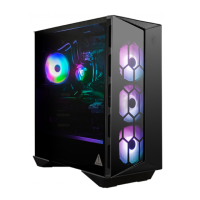

 To Next Page
 General