2-6 2-7
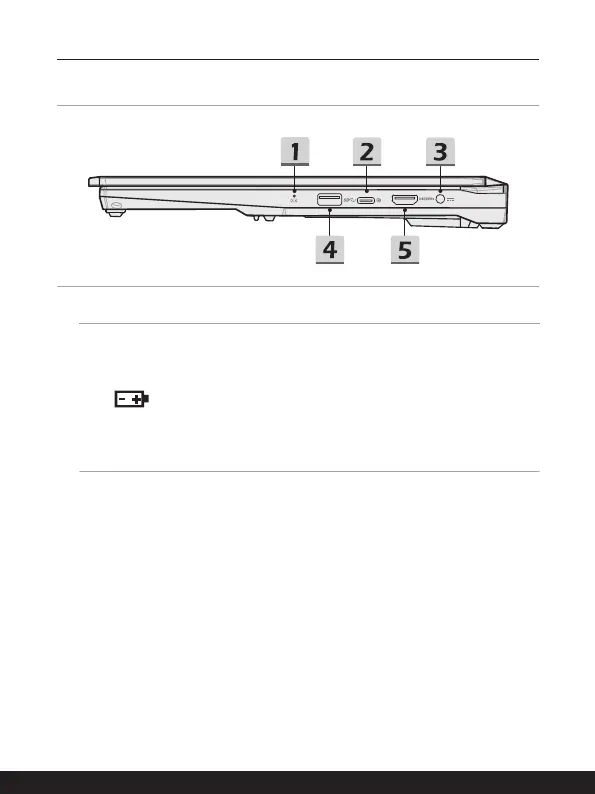
Right Side View
1. Status LED
Battery Status
• LED glows when the battery is being charged.
• LED turns amber while the battery is in low capacity status.
• Continuously blinking if the battery fails. If the problem
persists, please contact your local authorized retailer or
service center.
• Battery LED goes out when the battery is fully charged or
when the AC adapter is disconnected.
2. USB 3.2 Gen 2 Port (USB-C) (with DisplayPort function)
• USB 3.2 Gen 2, the SuperSpeed USB 10Gbps, delivers the higher interface
speeds for connecting various devices, such as storage devices, hard drives, or
video cameras, and offers more advantages over high-speed data transferring.
• The slim and sleek USB-C connector features reversible plug orientation, and
supports maximum 5V/3A or 5V/1.5A power output when AC or DC power is
connected.
• The DisplayPort function supports external display connection.
3. Power Connector
This connector is to connect the AC adapter and supply power for the notebook.
4. USB 3.2 Gen 1 Port
USB 3.2 Gen 1, the SuperSpeed USB, supports high-speed data transfer for the
connected devices, such as storage devices, hard drives, or video cameras.



 To Next Page