2-7
OSD Setup
2-6
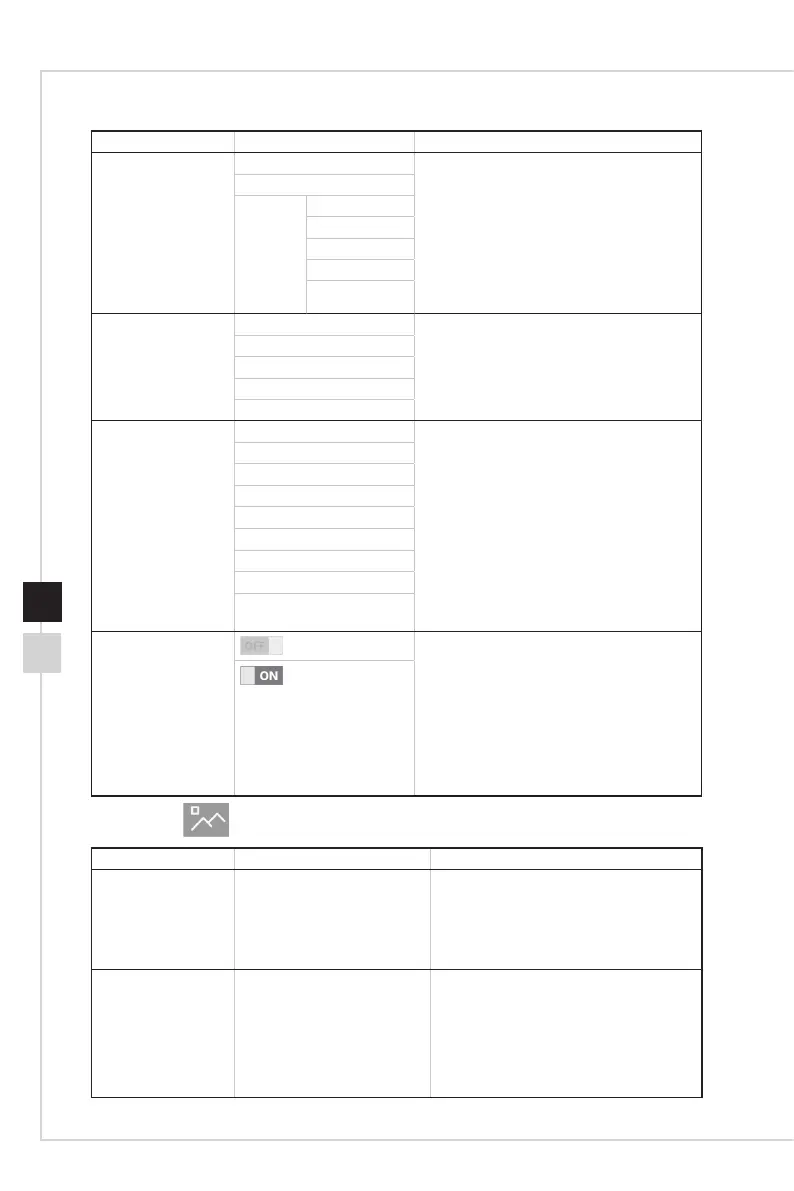
1st Level Menu 2nd/ 3rd Level Menu Description
Refresh Rate ON ■ Users can adjust Refresh Rate in any
Mode�
■ Default Refresh Rate Location is Left
Top� Location is adjustable in OSD Menu�
Press the Middle Button to conrm and
apply your Refresh Rate Location�
■ This monitor follows and works at the
Operating System’s preset Screen
Refresh Rate�
OFF
Location Left Top
Right Top
Left Bottom
Right Bottom
Customize
Alarm Clock OFF ■ Users can adjust Alarm Clock in any
Mode�
■ After setting the time, press the Middle
Button to activate the timer�
15:00
30:00
45:00
60:00
Design Assistance OFF ■ Users can adjust Design Assistance in
any Mode�
■ Default Design Assistance is OFF�
Assistance Color
Ruler: Center
Ruler: Edge
Scale
Reference Line
Grid
Rule of Thirds
3D Motion Sickness
Assistance
FreeSync Premium
Pro
■ FreeSync Premium Pro prevents screen
tearing
■ DisplayPort or HDMI default is ON and
can be adjusted ON/OFF in any mode,
any resolution, any input source and any
screen refresh rate
■ Anti Motion Blur/ PIP/PBP/Zoom in will
be disabled, if FreeSync Premium Pro is
enabled�
h Image
1st Level Menu 2nd/ 3rd Level Menu Description
Brightness 0-100 ■ Default is 75 for shipment setting�
■ Brightness will be gray out while below
items implement:
1� Local Dimming was On�
2� HDR content received�
Contrast 0-100 ■ Default is 50 for shipment setting�
■ Brightness will be gray out while below
items implement:
1� In the regular Color mode (Adobe
RGB, sRGB, Display P3 and DICOM)
that contrast was gray out�
2� HDR content received�



 To Next Page