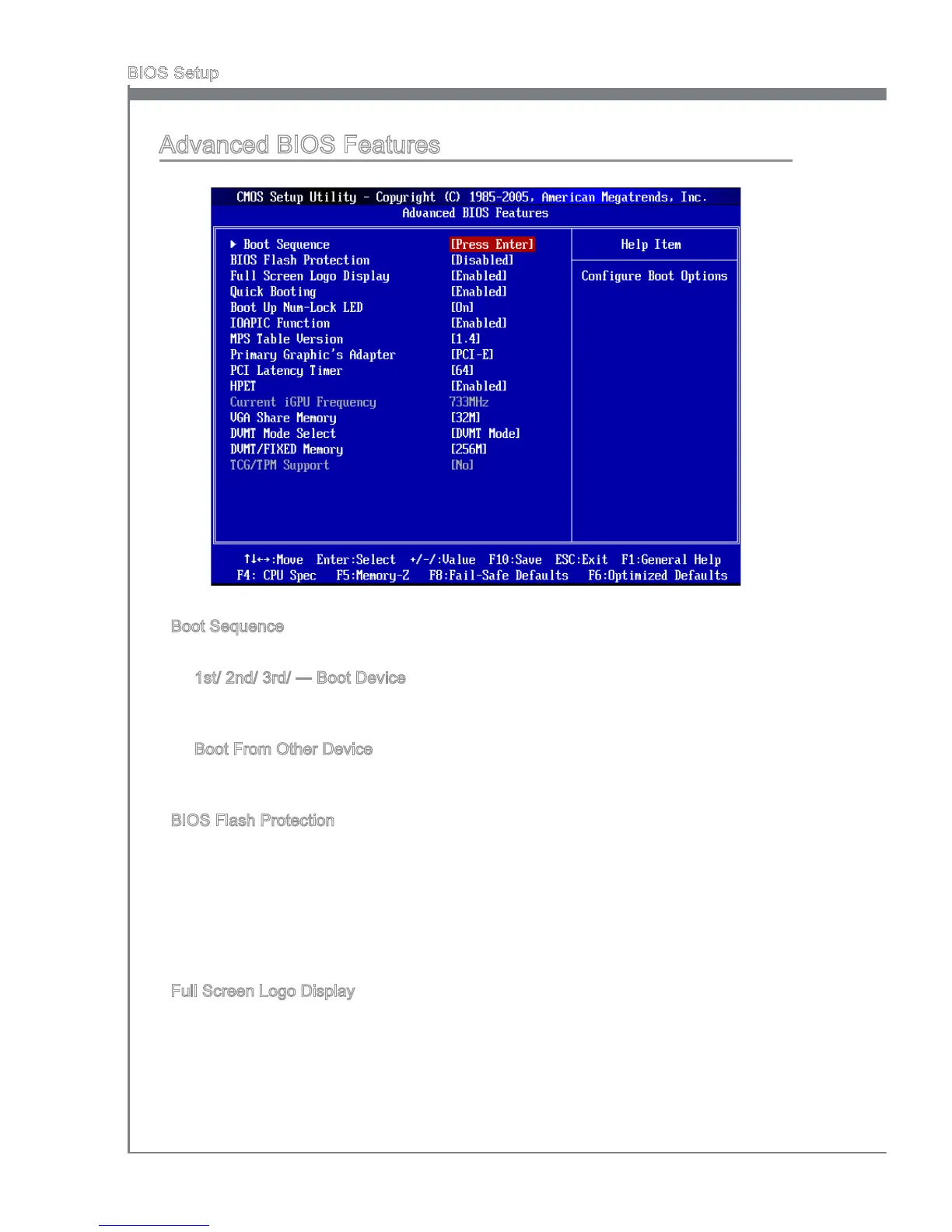
Advanced BIOS Features
Boot Sequence
Press <Enter> to enter the sub-menu.
1st/ 2nd/ 3rd/ --- Boot Devce
These tems allow you to set the rst/ second/ thrd boot devce where BIOS at
-
tempts to load the dsk operatng system.
Boot From Other Devce
Settng the opton to [Yes] allows the system to try to boot from other devce, f the
system fals to boot from 1st boot devce.
BIOS Flash Protecton
Ths functon protects the BIOS from accdental corrupton by unauthorzed users or
computer vruses. When enabled, the BIOS’ data cannot be changed when attempt
-
ng to update the BIOS wth a Flash utlty. To successfully update the BIOS, you wll
need to dsable ths Flash BIOS Protecton functon. You should enable ths functon
at all tmes. The only tme when you need to dsable t s when you want to update the
BIOS. After updatng the BIOS, you should mmedately re-enable t to protect t aganst
vruses.
Full Screen Logo Dsplay
Ths tem enables ths system to show the company logo on the boot-up screen. Set
-
tngs are:
[Enabled] Shows a stll mage (logo) on the full screen at boot.
[Dsabled] Shows the POST messages at boot.
▶
▶
▶
▶
▶


 To Next Page