14
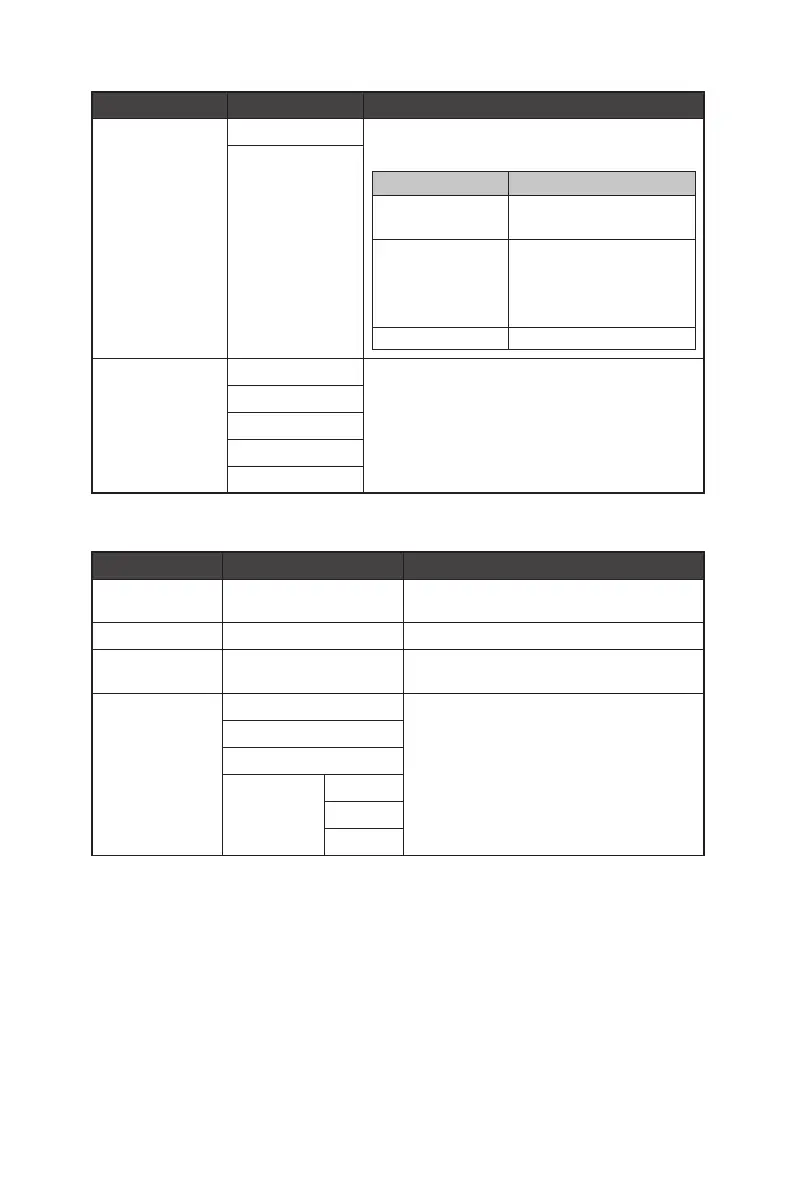
1st Level Menu 2nd Level Menu Description
MPRT OFF ∙ MPRT is available when the refresh rate is over 85Hz.
∙ Activating MPRT will affect:
Affected Function Function Status
» Response Time
» Brightness
Unable to select
» Adaptive-Sync
» HDCR
» PIP/PBP
» AI Vision
Set to OFF
» Screen Size 1:1 Set to Auto
ON
Image Enhancement OFF ∙ Image Enhancement enhances image edges to improve
their acutance.
Weak
Medium
Strong
Strongest
Image
1st Level Menu 2nd/3rd Level Menu Description
Brightness 0-100 ∙ Properly adjust Brightness according to the
surrounding lighting.
Contrast 0-100 ∙ Properly adjust Contrast to relax your eyes.
Sharpness 0-5 ∙ Sharpness improves clarity and details of
images.
Color Temperature Cool ∙ Use Up or Down Button to select and preview
mode effects.
∙ Press the OK Button to confirm and apply your
mode type.
∙ Users can adjust Color Temperature in
Customization mode.
Normal
Warm
Customization R (0-100)
G (0-100)
B (0-100)



 To Next Page