Hardware Setup
2-21
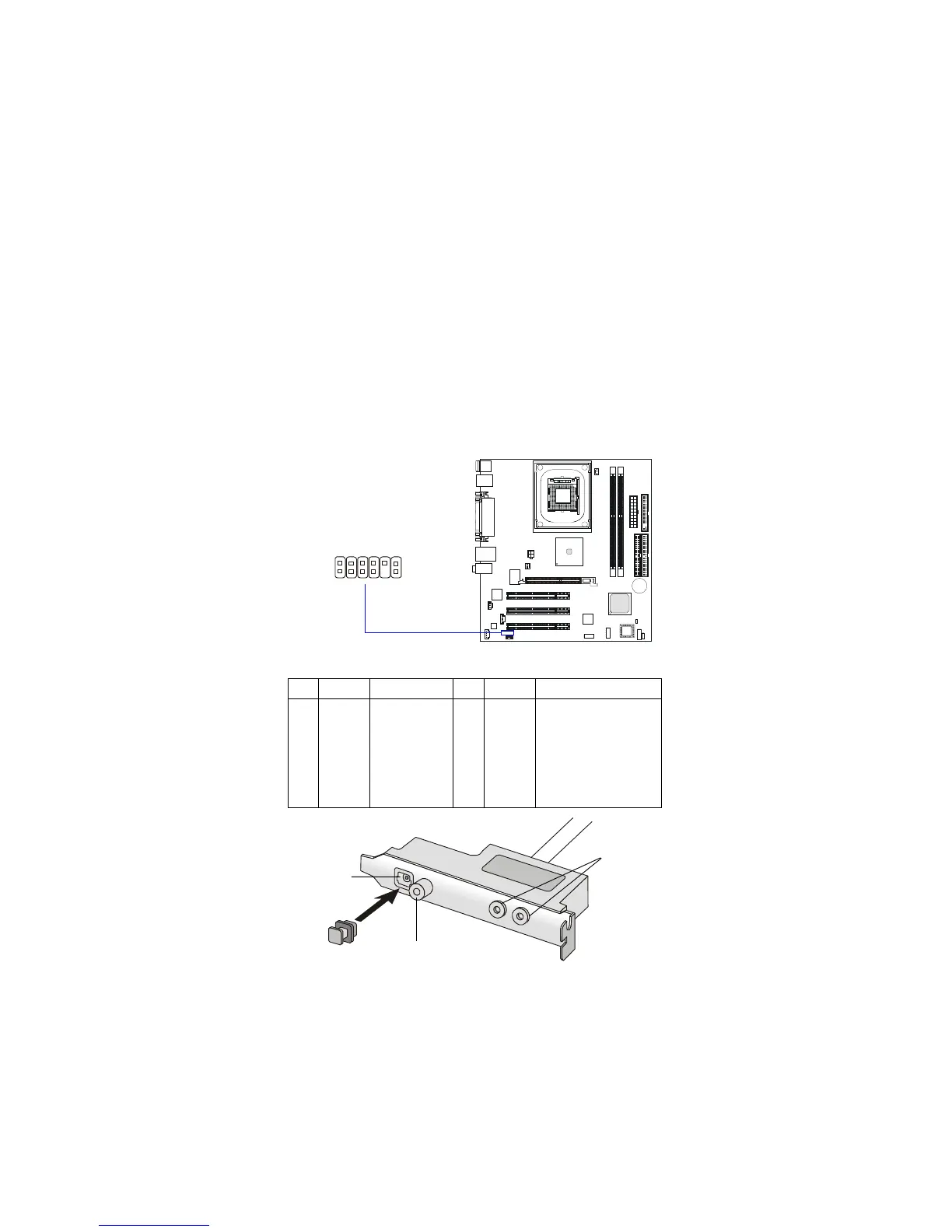
S-Bracket Connector: JSPD2
This connector allows you to connect the optional S-Bracket for Sony &
Philips Digital Interface (SPDIF). The S-Bracket offers 2 SPDIF jacks for digital
audio transmission (one for optical fiber connection and the other for coaxial),
and 2 analog Line-Out jacks for 4-channel audio output.
To attach the fiber-optic cable to optical SPDIF jack, you need to remove
the plug from the jack first. The two SPDIF jacks support SPDIF output only.
For more information on the S-Bracket, refer to Appendix. Using 4- or 6-Chan-
nel Audio Function.
S-Bracket (optional)
SPDIF jack (optical)
SPDIF jack (coaxial)
Analog Line-Out
jacks
Plug
PIN SIGNAL DESCRIPTION PIN SIGNAL DESCRIPTION
1 VCC5 VCC 5V 2 VDD3 VDD 3.3V
3 SPDFO S/PDIF output 4 (No Pin) Key
5 GND Ground 6 SPDFI S/PDIF input
7 LFE-OUT Audio bass output 8 SOUT-R Audio right surrounding output
9 CET-OUT Audio center output 10 SOUT-L Audio left surrounding output
11 GND Ground 12 GND Ground
Pin Definition
CEN/SUB
RL/RR
JSPD2
1 11
2 12



 To Next Page