2-10
Hardware Setup
▍
MS-7519
back paneL
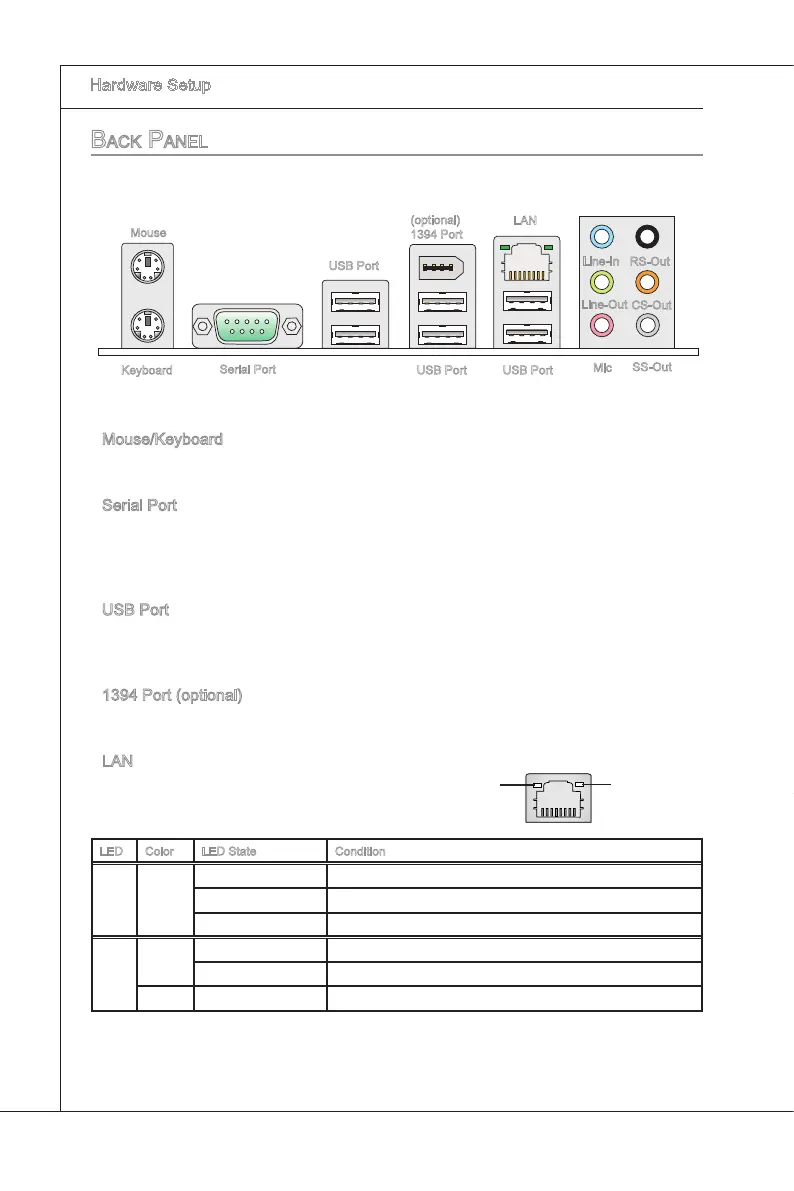
Mouse/Keyboard
The standard PS/2
®
mouse/keyboard DIN connector s for a PS/2
®
mouse/keyboard.
Seral Port
The seral port s a 16550A hgh speed communcatons port that sends/ receves 16
bytes FIFOs. You can attach a seral mouse or other seral devces drectly to the con
-
nector.
USB Port
The USB (Unversal Seral Bus) port s for attachng USB devces such as keyboard,
mouse, or other USB-compatble devces.
1394 Port (optonal)
The IEEE1394 port on the back panel provdes connecton to IEEE1394 devces.
LAN
The standard RJ-45 LAN jack s for connecton to
the Local Area Network (LAN). You can connect a
network cable to t.
LED Color LED State Condton
Left Yellow O LAN lnk s not establshed.
On(Steady state) LAN lnk s establshed.
On(brghter & pulsng) The computer s communcatng wth another computer on the LAN.
Rght
Green O 10 Mbts/sec data rate s selected.
On 100 Mbts/sec data rate s selected.
Orange On 1000 Mbts/sec data rate s selected.
▶
▶
▶
▶
▶
Mouse
(optonal)
1394 Port
USB Port
LAN
Lne-In
Lne-Out
Mc
RS-Out
CS-Out
SS-Out
USB Port
USB Port
Yellow Green/ Orange
Keyboard
Seral Port


 To Next Page
 Loading...