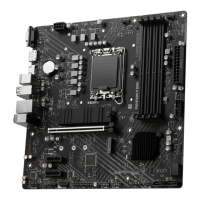
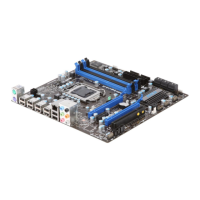
This document describes the MSI P55M-GD41 series (MS-7588 v1.x) Micro-ATX Mainboard, a high-performance and professional desktop platform solution based on Intel® P55 chipsets and designed for Intel® Lynnfield LGA1156 processors.
Function Description:
The mainboard serves as the central hub for a desktop computer system, providing connectivity and control for various components. It supports a range of processors, memory, storage, and expansion cards, enabling users to build a powerful and efficient system. Key functionalities include:
- Processor Support: Accommodates Intel® Lynnfield processors in the LGA1156 package, ensuring compatibility with advanced CPU technologies.
- Memory Support: Features four DDR3 DIMM slots, supporting up to 16GB of DDR3 DRAM at speeds up to 2133*(OC)/ 2000*(OC)/ 1600*(OC)/ 1333/ 1066 MHz. It also supports Dual-Channel mode for enhanced system performance.
- Storage: Equipped with six SATAII (SATA1~6) ports via the Intel® P55 chipset, supporting data transfers at up to 3 Gb/s. These ports support Intel® Matrix Storage Technology (AHCI/ RAID 0/ 1/ 5/ 10).
- Expansion Slots: Includes one PCI Express 2.0 x16 slot (PCI_E1), one PCI Express 2.0 x16 slot supporting up to PCI Express gen2 x4 speed (PCI_E3), one PCI Express 2.0 x1 slot, and one PCI slot (supporting 3.3V/ 5V PCI bus Interface). This allows for various expansion cards, including graphics cards, LAN cards, SCSI cards, and USB cards.
- Audio: Integrates Realtek® ALC889 (True Blu-ray Audio) / ALC888S VC2 chip, offering flexible 8-channel audio with jack sensing and compliance with Azalia 1.0 Spec.
- Networking: Supports PCIE LAN (10/100/1000) via Realtek® RTL8111DL.
- Multi-GPU Technology: Supports ATI CrossFireX™ and other Multi-GPU technologies, allowing two GPUs to run in tandem for improved graphics performance.
- BIOS Setup: Provides a comprehensive BIOS setup program for configuring system settings, including CPU, memory, power management, and overclocking features.
- RAID Functionality: Supports Intel SATA RAID (RAID 0, 1, 5, 10, Recovery, Matrix) and JMicron RAID (RAID 0, 1, 10, JBOD) for advanced storage configurations and data redundancy.
Important Technical Specifications:
- Form Factor: Micro-ATX (24.4cm X 23.5 cm) with 6 mounting holes.
- Base Clock: 133 MHz.
- Chipset: Intel® P55.
- Memory: 4 DDR3 DIMMs, up to 16GB, Dual-Channel, speeds up to 2133*(OC) MHz.
- LAN: Realtek® RTL8111DL (10/100/1000).
- Audio: Realtek® ALC889 / ALC888S VC2, 8-channel.
- SATA: 6 SATAII ports (3 Gb/s).
- Floppy: 1 floppy port (360 KB, 720 KB, 1.2 MB, 1.44 MB, 2.88 MB).
- Back Panel Connectors: 1 PS/2 keyboard, 1 PS/2 mouse, 10 USB 2.0, 1 LAN, 6 flexible audio ports.
- On-Board Connectors: 2 USB 2.0, 1 SPDIF-Out, 1 Front Panel Audio, 1 CD-In, 1 TPM Module (optional).
- Expansion Slots: 2 PCI Express 2.0 x16, 1 PCI Express 2.0 x1, 1 PCI slot.
- Power Connectors: ATX 24-pin (JPWR1), ATX 4-pin (JPWR2).
- CMOS: Onboard CMOS RAM with external battery for system configuration data.
Usage Features:
- Easy Installation: Clear instructions are provided for installing CPU, cooler, memory modules, and expansion cards.
- Front Panel Connectivity: Connectors for front panel switches and LEDs (JFP1, JFP2), front USB (JUSB1/JUSB2), and front panel audio (JAUD1).
- Digital Audio Output: S/PDIF-Out connector (JSP1) for digital audio transmission.
- Parallel Port: Optional parallel port bracket connector (JLPT1) supporting EPP and ECP modes.
- TPM Module Support: JTPM1 connector for an optional Trusted Platform Module for enhanced security.
- BIOS Configuration: User-friendly BIOS Setup Utility with various menus (Standard CMOS Features, Advanced BIOS Features, Integrated Peripherals, Power Management Setup, H/W Monitor, Green Power, BIOS Setting Password, Cell Menu, M-Flash, Overclocking Profile, Load Fail-Safe/Optimized Defaults) for system customization.
- Overclocking: Designed to support overclocking through the Cell Menu, allowing adjustments to CPU base frequency, ratio, and memory timings. Features OC Stepping for gradual overclocking.
- M-Flash: Allows flashing BIOS from a USB drive/storage drive (FAT/FAT32 format only) and booting from a BIOS file on a USB drive.
- Control Center Utility: A Windows-based utility for monitoring and configuring hardware status, including CPU clock, voltage, fan speed, and temperature. It offers Basic and Advanced modes for overclocking and Green Power settings.
- Realtek HD Audio Manager: Software utility for configuring audio settings, including sound effects, equalizer, karaoke mode, mixer, and multi-stream function.
- RAID Setup: Detailed procedures for creating, deleting, and resetting RAID volumes using Intel Matrix Storage Manager Option ROM and JMicron RAID BIOS Utility.
Maintenance Features:
- CMOS Clear Jumper (JBAT1): Allows clearing system configuration data from CMOS RAM.
- BIOS Flash Protection: A feature in BIOS to protect against accidental corruption during BIOS updates.
- Failed Overclocking Resolution: Provides mechanisms to recover from failed overclocking attempts, including rebooting the system three times or clearing CMOS.
- Hardware Monitoring (H/W Monitor): Displays current status of CPU/System Temperature, CPU/SYS FAN speeds, and various voltages (CPU Vcore, 3.3V, 5V, 12V).
- Smart Fan Control: CPU Smart FAN Target function in BIOS and Control Center utility automatically adjust CPU fan speeds based on temperature.
- Green Power: Energy-saving technology with auto phase switching for CPU and components, controllable via the Control Center utility.
- Driver Installation: Comprehensive instructions for installing Realtek HD Audio drivers, Intel SATA RAID drivers, and JMicron RAID drivers on Windows XP/Vista.
- Technical Support: Encourages users to visit the MSI website for FAQs, technical guides, BIOS updates, driver updates, and to contact technical staff for assistance.
- WEEE Statement: MSI's commitment to environmental protection, advising users to dispose of electrical and electronic equipment at local collection points for recycling.
- Battery Recycling: Waste batteries should be collected separately for special disposal.

 Need help?
 General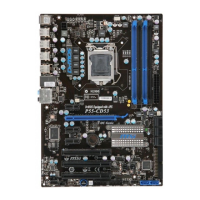


 To Next Page