En-27
Englsh
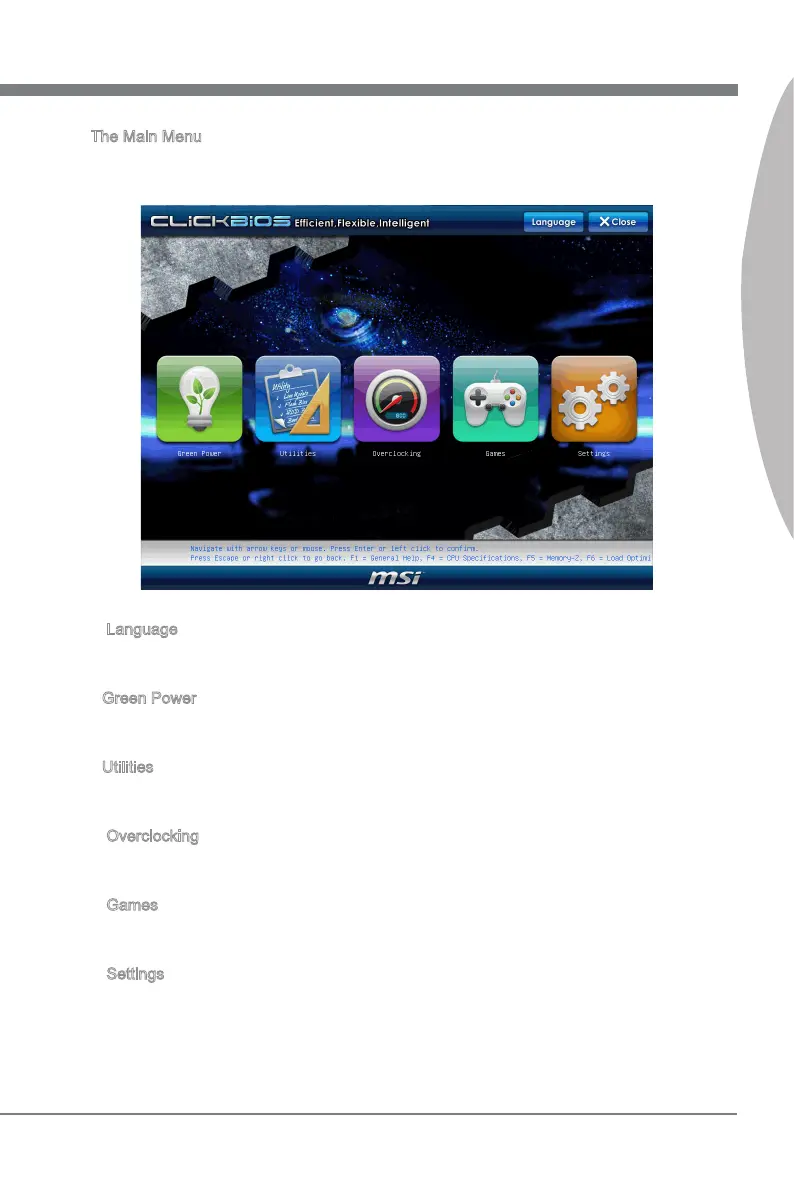
The Man Menu
Once you enter BIOS CMOS Setup Utlty, the Man Menu wll appear on the screen.
The Man Menu allows you to select from the setup functons.
Language
After enterng the Setup menu, you can see a “Language” button. Please clck t and
select the language, at your desre, for the BIOS settng rst.
Green Power
Clck “Green Power” con to enter the menu. Use ths menu to specfy the power
phase.
Utltes
Clck “Utltes” con to enter the menu. Ths menu provdes the useful utlty for you to
lve update bos and hard dsk backup.
Overclockng
Clck “Overclockng” con to enter the menu. Use ths menu to specfy your settngs for
frequency/voltage control and overclockng.
Games
Clck “Games” con to enter the menu. Ths menu provdes several games for you to
play.
Settngs
Clck “Settngs” con to enter the menu. Use ths menu to specfy your settngs for chp
-
set features, boot devce and password.
▶
▶
▶
▶
▶
▶





 To Next Page