3-4 3-5
Getting Started
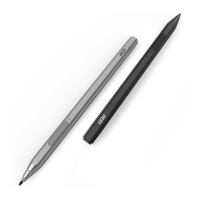
Begin to Use MSI Pen
For a new user of MSI Pen, we would like to suggest you follow the illustrations below to
begin to use the MSI Pen. By using a special double-etching process, MSI Pen becomes
a slim pencil appearance. Also, it well ne tunes a weights-balance, allowing users to hold
it comfortably.
Application
▶
Remote Control
: MSI Pen is able to remotely control Microsoft Office : PowerPoint/
Excel/PDF presentation and Web browsing for business scenario.
▶
Quick APP Launch
: Microsoft Office: One Note for business scenario and Microsoft
Office : White Board for creators.
▶
Ink Level
: MSI Pen can display the most significant thickness, this can benefit to
note taking and drawing.
▶
Portable
: MSI Pen can attach to the laptop via its proper magnet to avoid getting
lost and tip getting damaged.
▶
Tilt Angle
: MSI Pen can support up to the maximum 166 ° tilt for creators to sketch.
▶
Operation Temperature:
MSI Pen operation temperature is 10ºC to 45ºC.
▶
Battery indicator
: MSI Pen battery level will be on the task bar to let users well
know the battery status.
▶
Battery Life
: MSI Pen battery can fully charge within 45 minutes and be used over
65 hours continuously.
▶
Battery LED Indicator
: MSI Pen battery lights red, means users can use within 5
minutes.


 To Next Page