10
OSD Menus
⚠
Important
The following settings will be grayed out when HDR signals are received:
∙
Low Blue Light
∙
HDCR
∙
Brightness
∙
Contrast
∙
Color Temperature
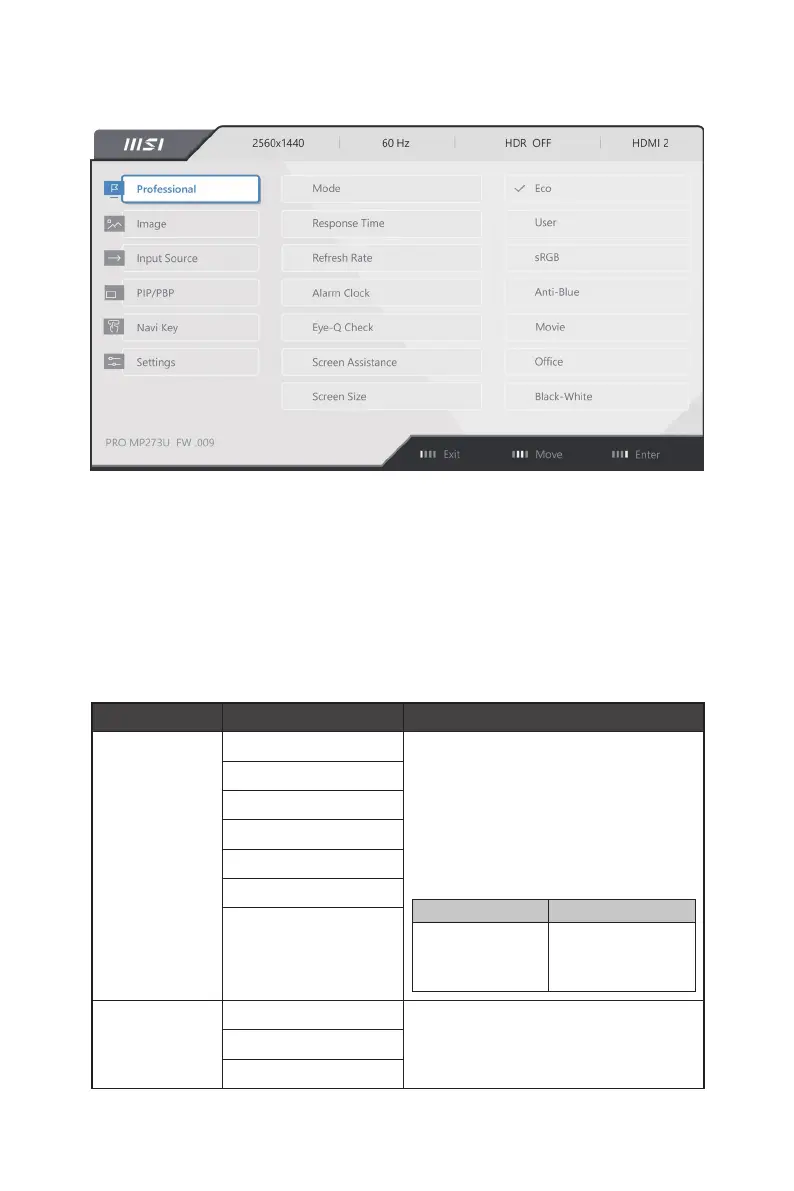
Professional
1st Level Menu 2nd/3rd Level Menu Description
Mode Eco ∙ Use Left or Right Button to select and preview
mode effects.
∙ Press the E Button to confirm and apply your
mode type.
∙ The default setting “Eco” mode meets the
requirements of TÜV Rheinland’s “Low Blue
Light” standard and Eyesafe certification.
∙ Activating sRGB will affect:
Affected Function Function Status
» Color Temperature
» Low Blue Light
» Contrast
Unable to select
User
sRGB
Anti-Blue
Movie
Office
Black-White
Response Time Normal ∙ Setting to Fastest will reach the shortest
response time and help improve blurred images
when playing very fast games.
Fast
Fastest


 To Next Page