WELCOME TO THE SMART TOUCH SYSTEM
QUESTIONS? Call us at 800-362-6224 I www.mtgsmarttouch.com
11
SMART TOUCH SYSTEM I DRIVER’S SIDE DIAGRAM
SMART TOUCH SYSTEM PASSENGER’S SIDE OVERVIEW
QUESTIONS? Call us at 800-362-6224 I www.mtgsmarttouch.com
SMART TOUCH SYSTEM PASSENGER’S SIDE OVERVIEW
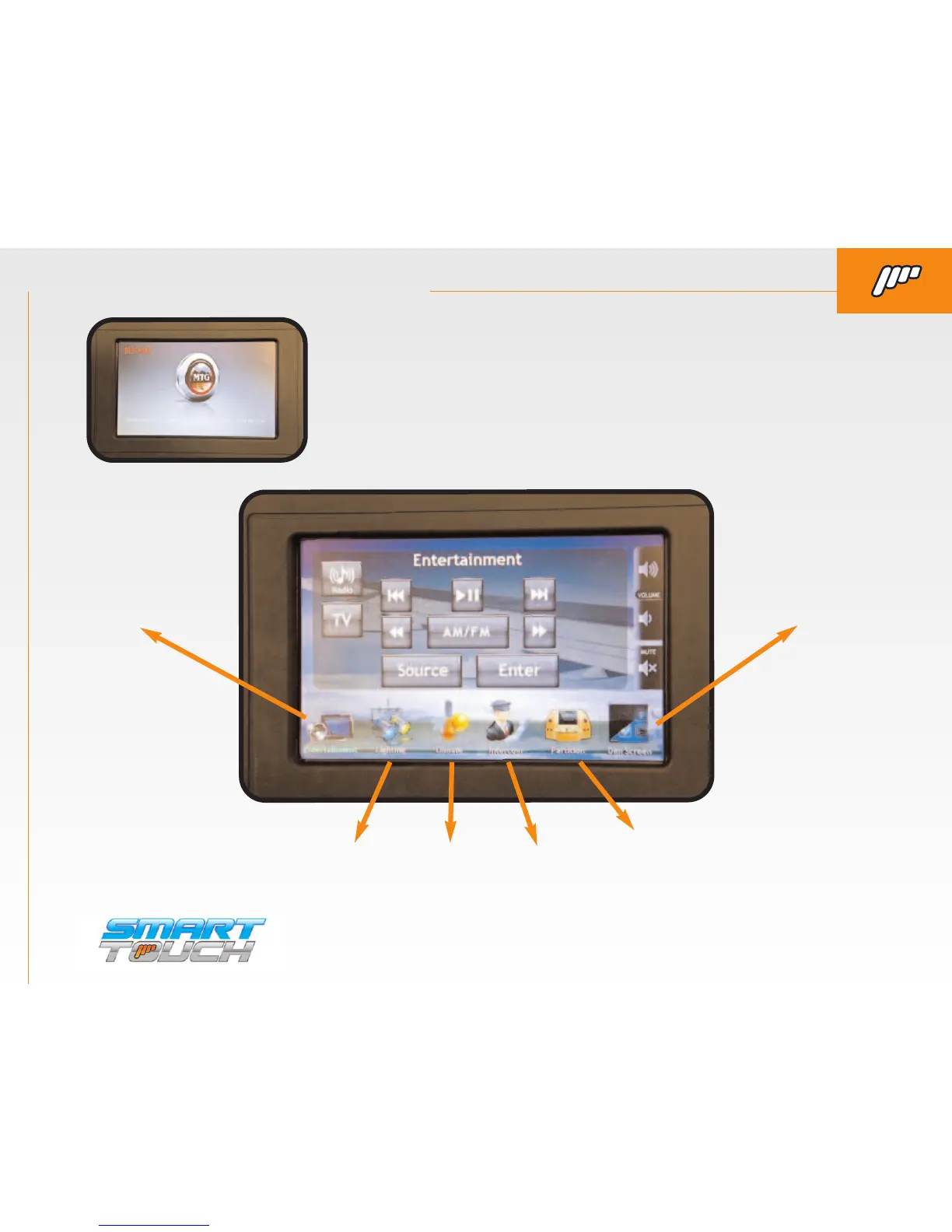
ENTERTAINMENT SCREEN IS THE DEFAULT SCREEN FROM THE “STARTUP SCREEN”.
Along the bottom of the screen there are six icons. These are used to control other functions of
the Smart Touch system such as lighting, intercom, and climate, etc..
ENTERTAINMENT DIM SCREEN
LIGHTING CLIMATE INTERCOM PARTITION
THE PASSENGER CONTROL WILL POWER ON AND DISPLAY
THE COACH BUILDER’S LOGO.
If you would like to have your com-
pany’s logo on this screen contact MTG at 1-800-362-6224 for details.



 To Next Page