WELCOME TO THE SMART TOUCH SYSTEM
QUESTIONS? Call us at 800-362-6224 I www.mtgsmarttouch.com
12
SMART TOUCH SYSTEM I DRIVER’S SIDE DIAGRAM
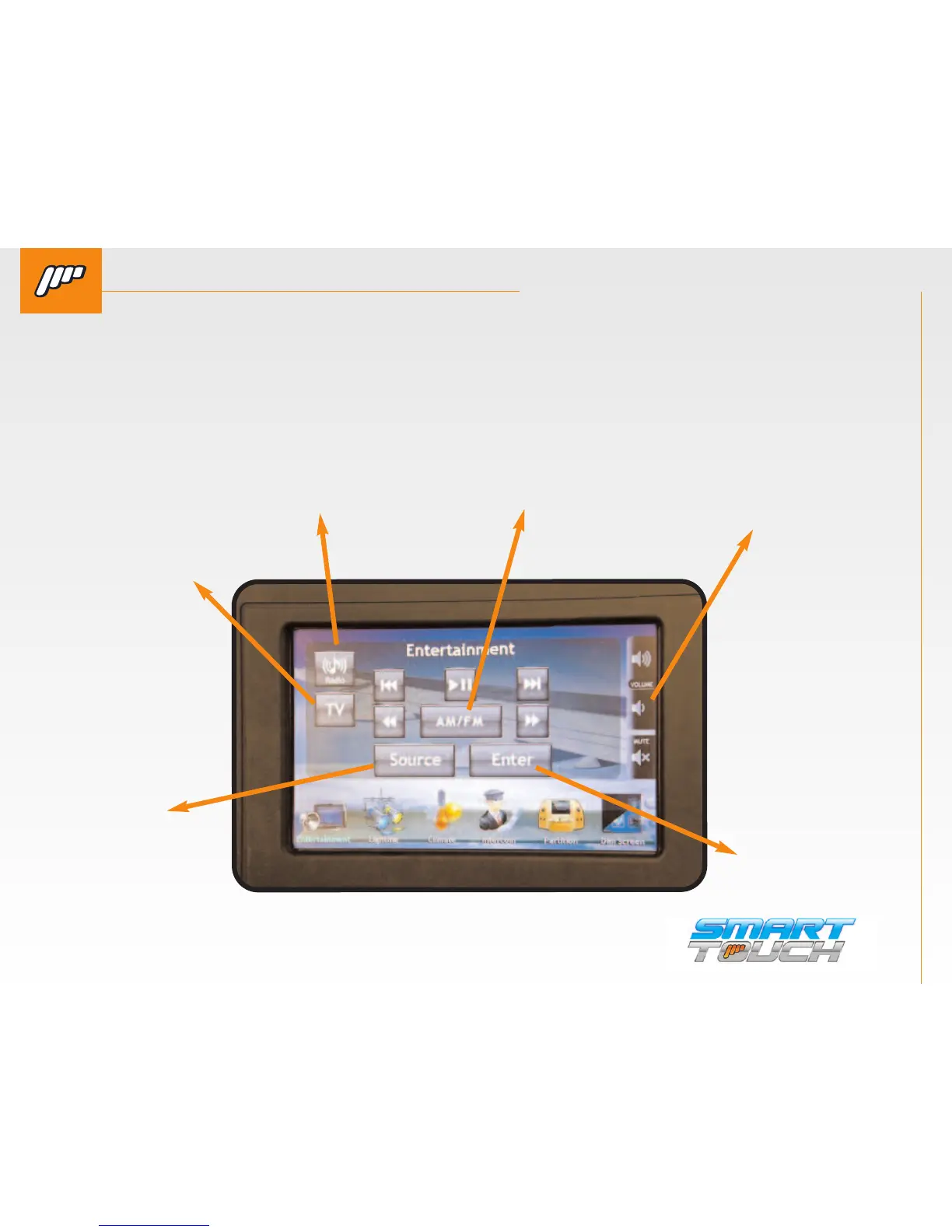
SMART TOUCH SYSTEM PASSENGER’S SIDE: ENTERTAINMENT/START UP SCREEN
QUESTIONS? Call us at 800-362-6224 I www.mtgsmarttouch.com
SMART TOUCH SYSTEM PASSENGER’S SIDE: ENTERTAINMENT / START UP SCREEN
ENTERTAINMENT SCREEN IS THE DEFAULT SCREEN FROM THE “STARTUP SCREEN”.
Along the bottom of the screen there are six icons. These are used to control other functions of
the Smart Touch system such as lighting, intercom, and climate, etc..
SOURCE
Allows you to
change the
“theme” or
background
that is dis-
played on the
passenger
controller.
TV
Allows you to change
the “theme” or
background that is
displayed on the
passenger controller.
ENTER
Displays the serial
number to the
system and the
software version.
VOLUME
Switches the dis-
play of the sys-
tem from English
to Chinese. More
languages
RADIO
Allows the driver to enter a cus-
tom message for his clients. See
next page for description
AM/FM
Switches the display of the
system from English to Chi-
nese. More languages



 To Next Page