WELCOME TO THE SMART TOUCH SYSTEM
QUESTIONS? Call us at 800-362-6224 I www.mtgsmarttouch.com
10
SMART TOUCH SYSTEM I DRIVER’S SIDE DIAGRAM
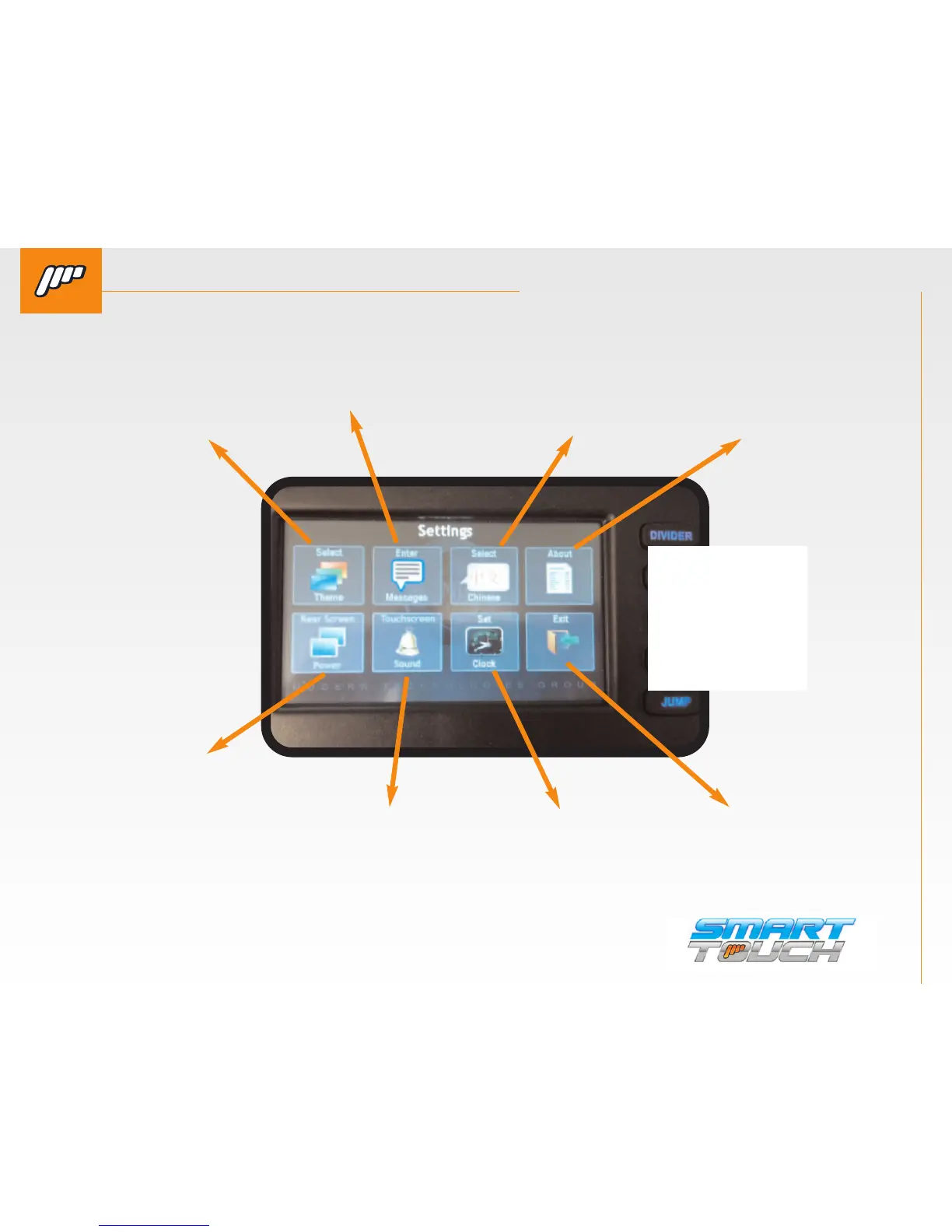
SMART TOUCH SYSTEM DRIVER’S SIDE: SETTINGS
QUESTIONS? Call us at 800-362-6224 I www.mtgsmarttouch.com
SMART TOUCH SYSTEM DRIVER’S SIDE: SETTINGS
SELECT THEME
Allows you to change
the “theme” or
background that is
displayed on the
passenger controller.
REAR SCREEN POWER
Allows the driver to turn
the passenger screen off
in case they have cus-
tomers that are improp-
erly using the controls.
SCREEN DIM
This is short description
for screen dim
ABOUT
Displays the serial
number to the
system and the
software version.
ENTER
Allows the driver to enter a cus-
tom message for his clients. See
next page for description of how
this works.
TOUCHSCREEN SOUND
This disables the beeping
sound on both the driver
and passenger control.
Older versions might not
have this option.
SELECT CHINESE
Switches the display of the
system from English to Chi-
nese. More languages will
be available in the future.
SET CLOCK
Allows you to adjust the
time and date.
NEW
SCREENSHOT
with new
diagnostics



 To Next Page