CX FLEX™ 4A PRODUCT MANUAL
8
MTI P/N 063-00318 rev A ©2019 MTI All Rights Reservedwww.mtigs.com | T:800.426.6844
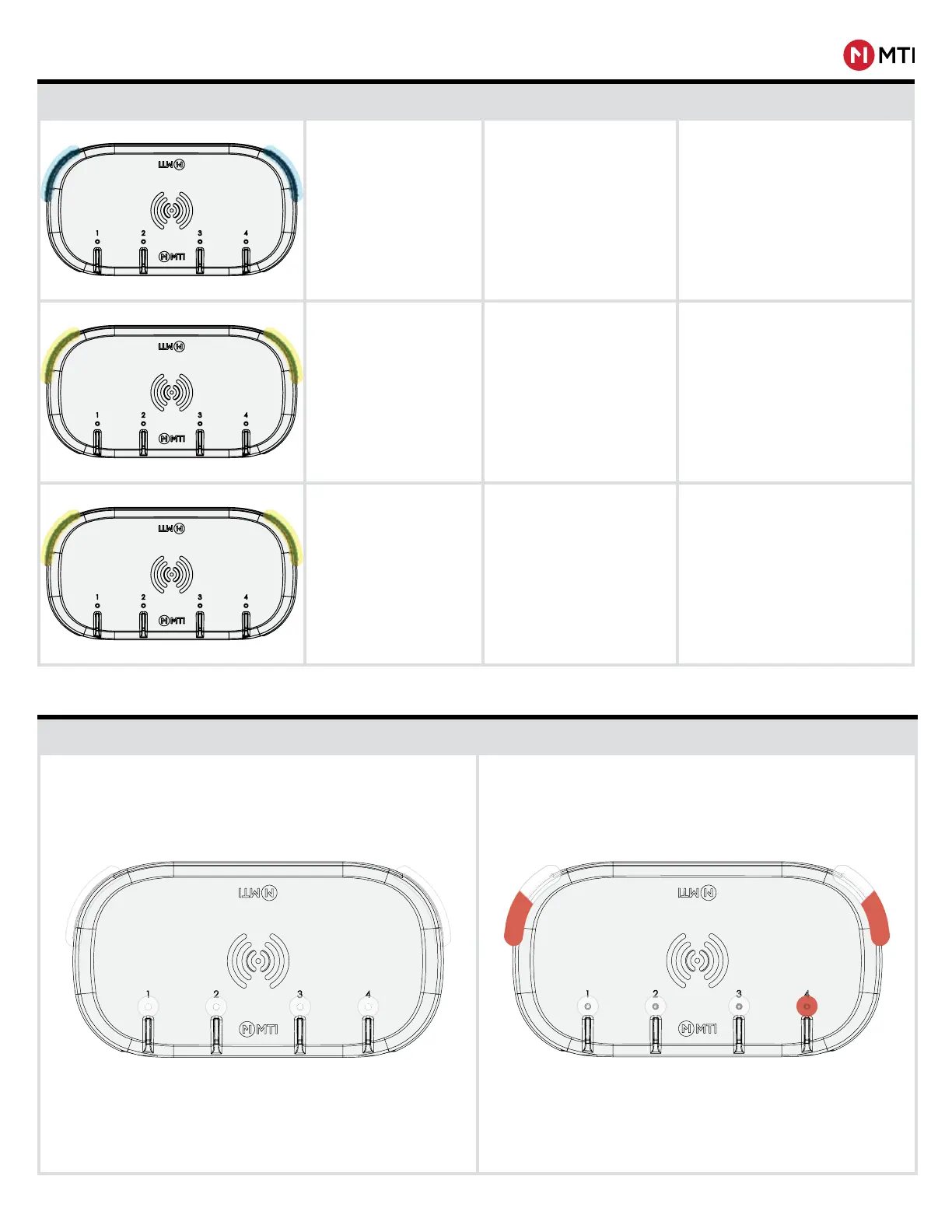
SYSTEM LED STATUS INDICATORS
Visual Reference System Status Condition Solution
System LEDs are ashing
blue.
Connect Pairing Mode
In Connect Pairing Mode; LEDs return to
previous color when Pairing is complete;
times-out after ~1.5 minutes.
System LEDs are solid yellow.
1. Armed, paired with Con-
nect,but not communicating to
Connect Network
2. Delete User Keys Mode (If
using Authorization Card)
1. Ensure Connect Network is operating
properly.
2. Hold Authorization Card again to com-
plete the key deletion process, allow
the countdown timer to expire to NOT
delete all enrolled user keys.
System LEDs are ashing
yellow.
Ready to be Armed, paired with
a Connect Network, but not
communicating with the Connect
Network.
Ensure Connect Network is operating
properly.
Armed Alarming
PORT LED STATUS INDICATORS
System and Port LEDs are solid white. System LEDs and Alarming Port(s) are ashing red and white.



 To Next Page