EasyManua.ls Logo

MTI DOOR/DRAWER LOCK - User Manual

MTI DOOR/DRAWER LOCK
4 pages
Print Icon
To Next Page IconTo Next Page
Loading...
MTI LOCKSPRODUCT MANUAL
1
MTI P/N 063-00168 rev D ©2017 MTI All Rights Reserved
MTI
1050 NE 67th Avenue Hillsboro, OR 97124 T:800.426.6844 www.mobiletechinc.com
2
2
DOOR/DRAWER INSTALLATION
Authorization Card - 401-00002
Screw Kit - 010-00011Battery - 410-00003User Key - 401-00001
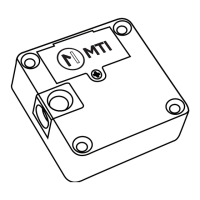
Strike Plate - 165-00383Door/Drawer Lock - 165-00444
Sold separately.
Sold separately.
DOOR/DRAWER LOCK PARTS
Required Items:
See the last page of this manual for a mounting template.
#1 Phillips Screwdriver
#2 Phillips Screwdriver
3/32” Drill Bit
9/32” Socket (Optional)
Lock
Cabinet Door
48mm
10
Latch
42mm
50mm
Sliding Doors Install
For sliding doors, the 90° bracket can be removed from the latch (using
the #2 Phillips Screwdriver and the 9/32” socket) and hard mounted to a
fixture with wood screws.
Use #1 Phillips
screwdriver
19
48mm13.8
Use only CR-123 / 3VDC batteries.
NOTES BEFORE INSTALLING: Space devices at least 4” apart. Install the lock using hand tools only. Use of power tools
could lead to damage of the fixture. Uninstalled locks should be stored without batteries. Operating temp.: 41-95° F.
Question and Answer IconNeed help?

Do you have a question about the MTI DOOR/DRAWER LOCK and is the answer not in the manual?

Summary

Door;Drawer Lock Parts

Door;Drawer Installation

Sliding Doors Install

Details how to mount the lock for sliding doors using a bracket and screws.

Using the Door;Drawer Lock

Door Open Mode

Explains the audible alerts for doors left open for extended periods.

Stuck Lock

Details the beep tone indicating a jammed lock and troubleshooting steps.

Low Battery

Describes the single long beep signal for a low battery condition.

Mounting Template

Glass Door Lock Parts

Glass Door Installation & Use

Using the Glass Door Locks

Explains how to use the User Key and Latch Bracket to open/close glass doors.

RFID Programming

Entering Registration Mode (Initial Setup)

Outlines the steps to prepare the lock for adding User Keys.

Registering User Keys to Each Lock

Details the procedure for adding multiple user keys to the lock.

Deleting User Keys Whitelist on Locks

Explains how to remove all registered user keys from the lock.

Reset Locks to Default Mode

Describes how to restore the lock to its factory default settings.

Cautions

Battery Caution

Warns about using incorrect battery types and proper disposal.

Correct Disposal of Product

Provides guidance on environmentally responsible product disposal.

FCC Statement

Details compliance with FCC rules and potential interference.

MTI DOOR/DRAWER LOCK Specifications

General IconGeneral
CategoryDoor locks
BrandMTI
MaterialMetal
InstallationSurface Mount
Key IncludedYes
TypeDrawer/Door Lock