1770 Brackett St., La Verne CA 91750 USA
•
T:
909-629-7301
•
F:
909-629-7380
•
www.mtnproducts.com
•
sales@mtnproducts.com
Reliably Serving a Thirsty World
®
POU Install
•
Provides hotter water suitable for tea, instant soups, etc.
•
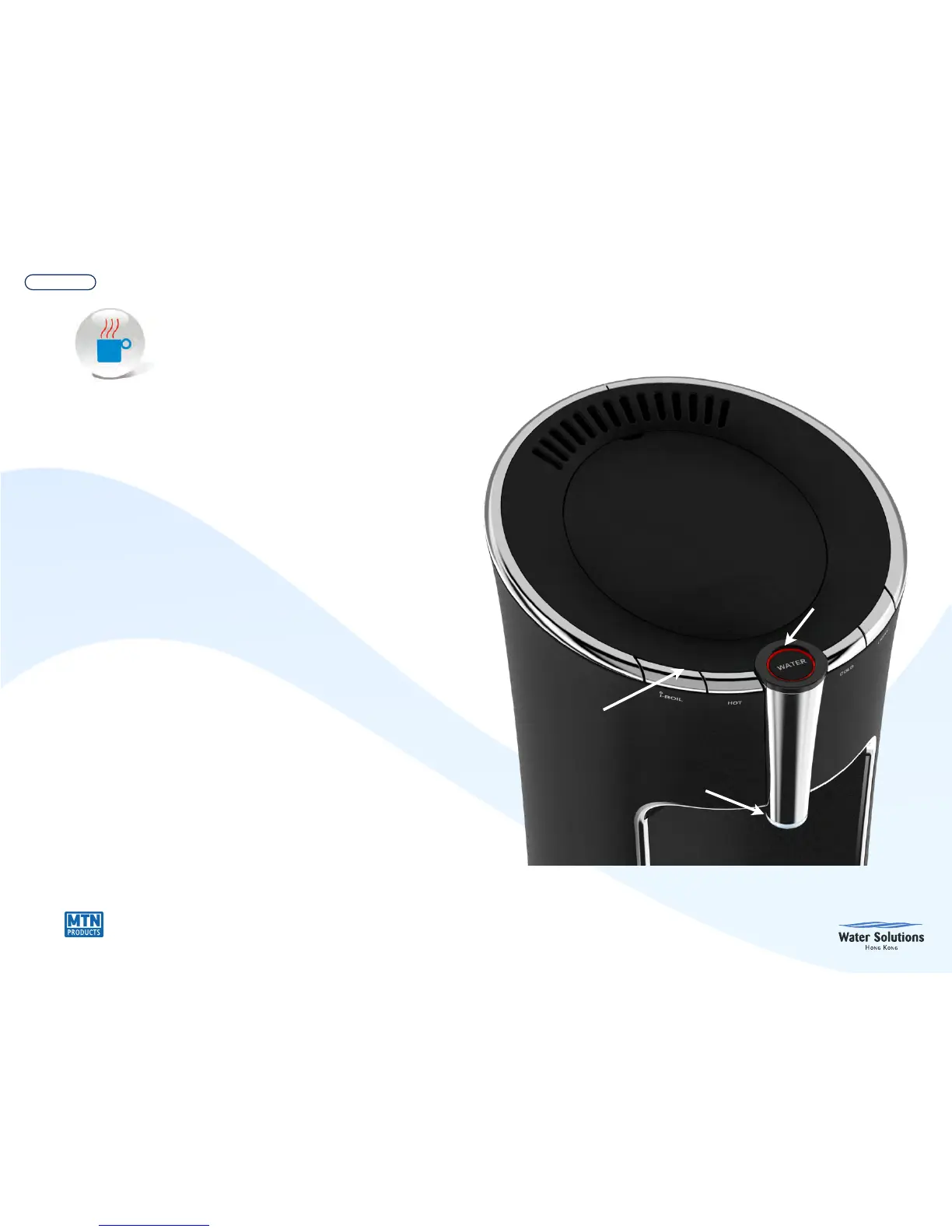
Press & hold i-Boil and wait for short beep ( about 3
seconds. )
• Illuminated ring around “Water” button will flash Red while
water is heating to i-Boil temperature. You will hear 1 long
beep and the ring around “Water” button will flash “Pink” for
an additional 2 minutes (if water is drawn and the water
temperature in the hot tank drops below 194˚F, the time will
be shorter) while the water in the hot tank is at i-Boil
dispensing temperature.
•
To dispense, press “Hot” button for 3 seconds until the light
ring turns Red (or pink if water temperature is above 194˚F)
again, then press the “Water” button to dispense i-Boil water
•
To interrupt i-Boil feature, Press & hold i-Boil button for 1
second until you hear a short beep. Unit resumes normal
operation.


 To Next Page